Every AI Recruiting Tool Falls into One of Four Buckets – Which One Do You Actually Need in 2026?
I’ve watched hiring leaders spend thousands on recruiting software that solves the wrong problem. They buy a tool because it’s trendy or because a peer recommended it, without ever stopping to ask themselves a crucial question: what’s actually breaking my hiring process right now?
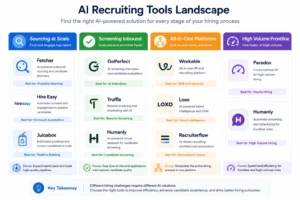
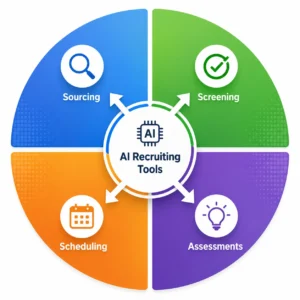
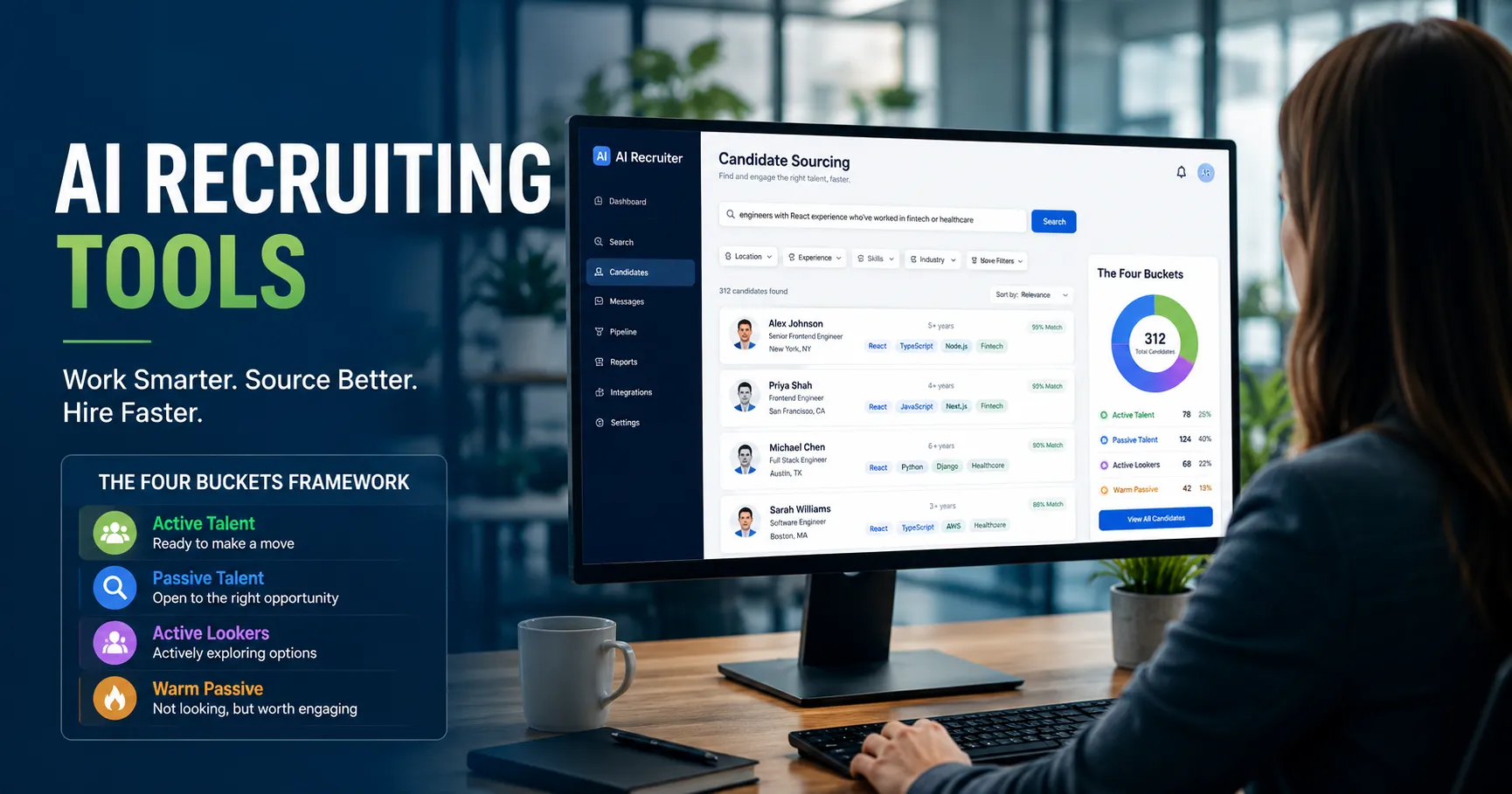
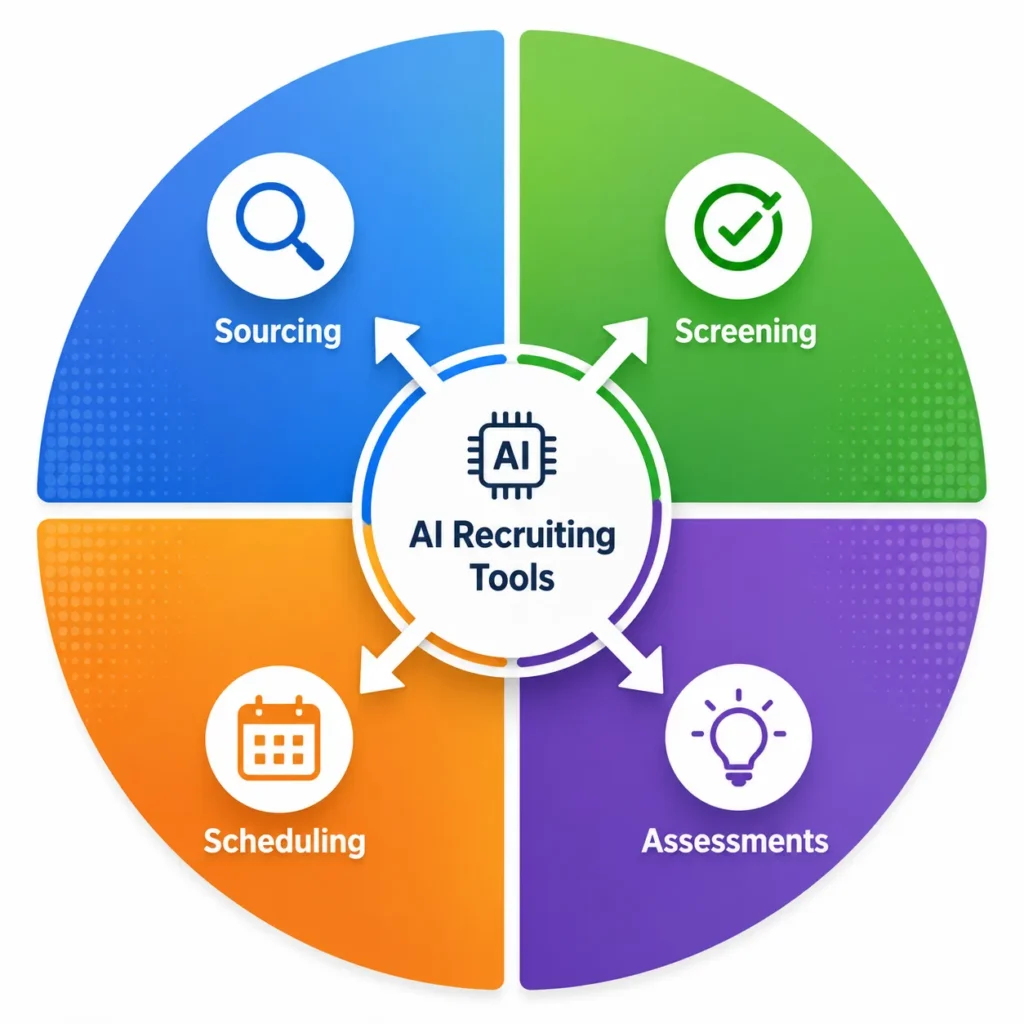
That’s where the Four Buckets framework comes in. When evaluating the best AI recruiting tools available, you’ll notice every platform falls into one of four categories: Sourcing, Screening, Scheduling, or Assessments. The bucket your tool belongs to matters. But what really matters is figuring out which bucket your company actually needs. Get that wrong, and you’ll waste thousands on features you never touch. Get it right, and you transform how you hire.
Before we go any further, I want you to do something simple. Pause and identify your actual hiring bottleneck. Is your problem that you don’t have enough candidates coming through the door? That you’re drowning in resumes and can’t figure out who’s worth talking to? That your calendar looks like a Tetris game and scheduling is eating up hours each week? Or that you’re struggling to predict which candidates will actually succeed in the role and fit your culture? Your answer determines which AI recruiting software category will actually move the needle for you.
Sourcing: Finding Candidates You Wouldn’t Find Otherwise Through AI-Powered Candidate Sourcing
Sourcing tools solve one specific problem: you don’t have enough qualified candidates in your pipeline.
AI-powered candidate sourcing works by scanning hundreds of millions of professional profiles across LinkedIn, GitHub, job boards, and niche networks. Instead of waiting for people to apply to your job posting, these tools actively hunt for passive candidates who match your requirements. The intelligence behind them learns what actually matters for your roles and finds people based on skills, experience patterns, and background rather than just keyword matching.
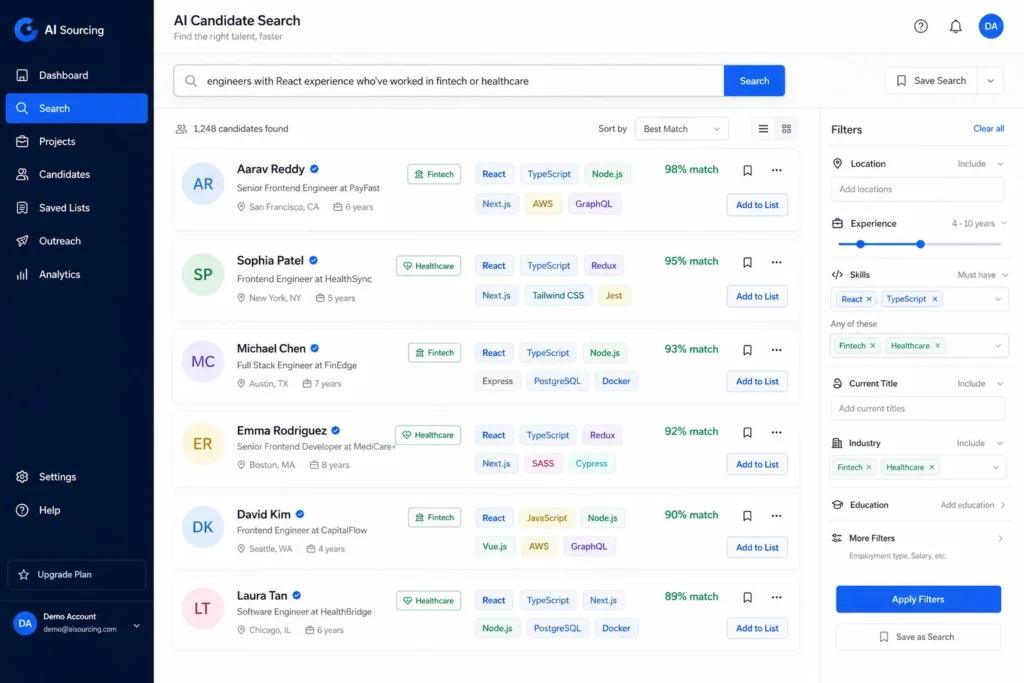
When is sourcing the right move for your team? If you’re in a competitive hiring market looking for specialized talent, or if you have more job openings than qualified applicants, talent sourcing automation helps you build your own candidate pipeline instead of relying only on inbound applications… Tools like Fetcher use AI to identify high-potential candidates and even personalize initial outreach emails at scale, tracking response rates so you know what messaging actually works.
The real value of talent sourcing automation lies in reaching people who aren’t actively job hunting. Many of the best candidates are happily employed and never see your job post. With the right sourcing approach, you’re competing on who can find them first, not who can write the most attractive job description.
Screening: Getting from 1,000 Applicants to 10 Worth Your Time Using AI Resume Screening
Applicant screening AI tools solve a different problem entirely: you have too many applicants and too little time to evaluate them.
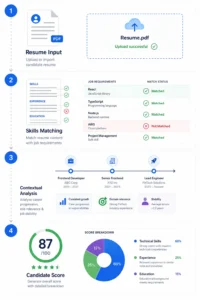
AI resume screening works by analyzing resumes and applications against your job requirements, then scoring candidates based on contextual relevance… Modern screening tools don’t just match keywords. They understand career progression patterns, transferable skills, and whether someone’s actual experience aligns with what you’re hiring for. A good screening tool recognizes that a project manager from tech might excel managing a product launch at a nonprofit, even if their resume doesn’t use identical terminology.
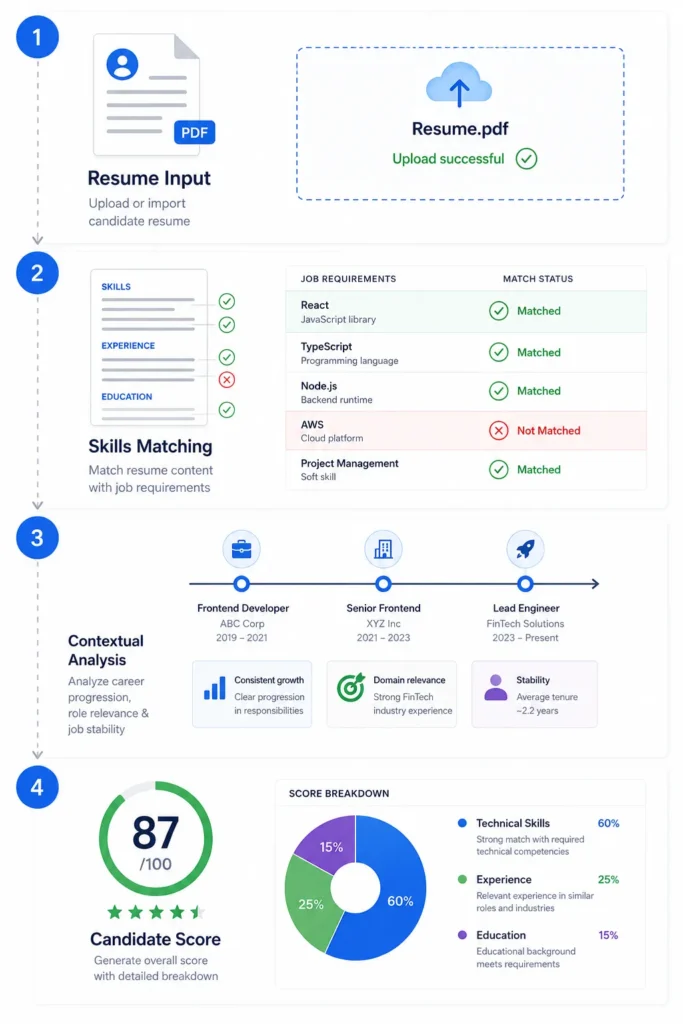
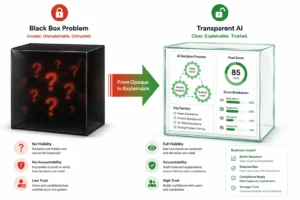
Here’s what I’ve learned from teams using these tools successfully: transparency is absolutely critical. You must be able to see exactly why a candidate received a high score or was filtered out. If the system rejects someone because they lack a specific certification, but you would have interviewed them anyway, you need to see that reasoning. When screening tools operate as black boxes, you lose control over your hiring quality and risk missing exceptional candidates who don’t fit a template.
Candidate shortlisting through AI works best for teams drowning in inbound volume. If you’re posting jobs on major boards and receiving hundreds of applications weekly, a screening tool can drastically reduce the manual resume review work. The machine handles initial filtering while you focus your human judgment on candidates who actually warrant conversation.
Scheduling: Ending Calendar Tetris Once and For All Through Hiring Workflow Automation
Scheduling automation and hiring workflow automation tackle a real frustration: the back and forth of calendar coordination is eating your time.
Tools in this category automate the process of finding meeting times between candidates and your team. Instead of sending five emails going back and forth about availability, an AI scheduling assistant handles timezone conversion, blocks occupied calendar slots, and sends confirmation details automatically. It sounds like a time saver, and for high-volume hiring of hourly positions where you’re scheduling dozens of interviews weekly, it genuinely can be.
But here’s the honest truth I need to share: scheduling isn’t where the biggest ROI lives. Yes, it improves recruiter productivity and candidate experience. Yes, it’s helpful. However, scheduling automation doesn’t fundamentally change your hiring outcomes or help you make better decisions about who to hire. It removes friction from a process that’s already working. It’s a nice optimization, not a transformation.
Use a hiring workflow automation tool like this if your team is already stretched thin and calendar coordination is genuinely consuming hours. But if you’re choosing between investing in scheduling tools or addressing your actual hiring bottleneck, choose the bottleneck first.
Assessments: The Bucket Nobody Talks About – Where Decision Intelligence Recruitment Lives
Assessment tools are where decision intelligence for recruitment really matters, yet most hiring leaders overlook them completely.
This category includes personality analysis, situational judgment tests, video interview analysis, and soft skills evaluation platforms. Where sourcing and screening tools help you find and filter candidates, assessment tools help you understand whether someone will actually succeed in the role and thrive in your culture. That’s a fundamentally different value proposition.
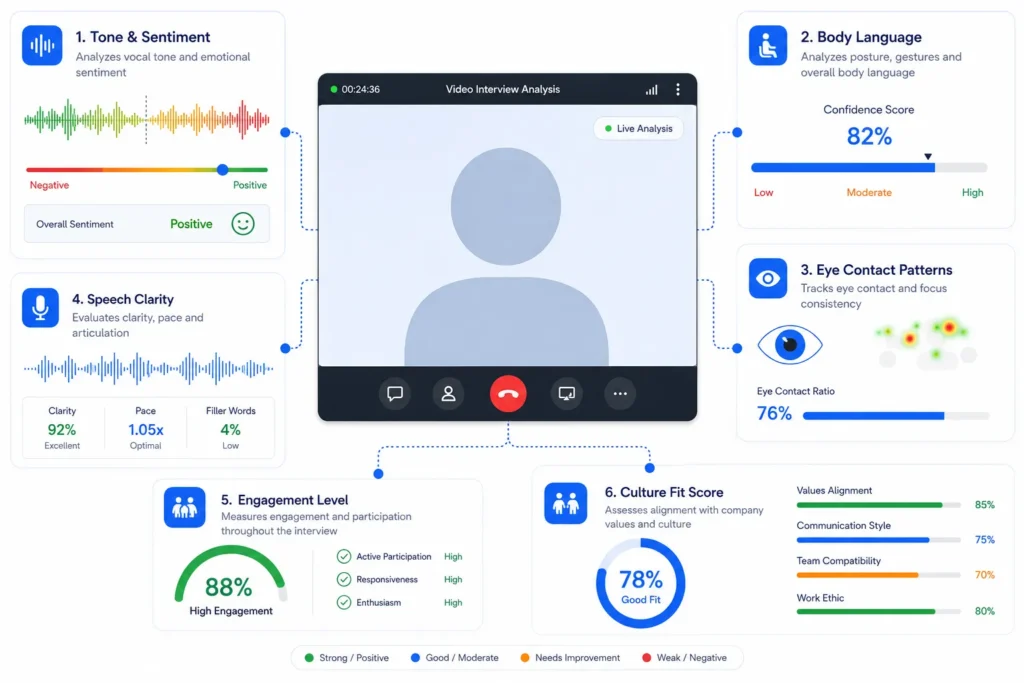
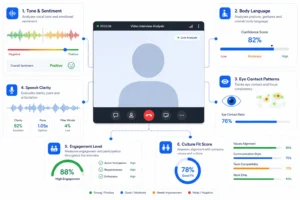
Advanced assessment tools analyze video interviews in ways that go beyond transcription. They examine tone, body language, eye contact patterns, sentiment, and even physiological markers like heart rate during responses. This level of analysis helps you assess genuine culture fit and communication style, not just whether someone gave the right answer. Personality-based assessment tools look at work style preferences and team dynamics, predicting where friction might occur or where someone would thrive.
The reason assessment tools belong in their own bucket is simple: they address the highest-value bottleneck in hiring. Finding enough candidates is helpful. Filtering through them efficiently is necessary. But predicting who will actually excel and stay? That’s the decision that determines your team’s success six months and two years from now. When you invest in decision intelligence recruitment, you’re investing in hiring quality that compounds.
Tools in this space like Palader and Test Gorilla represent where AI recruiting technology creates the most meaningful impact on your actual business outcomes. Not more volume, not less work for your team—better hiring decisions.
3 Questions to Ask Before You Buy Any AI Recruiting Platform: How to Evaluate AI Recruiting Platforms
I’ve seen hiring leaders get burned by AI recruiting platforms that looked impressive in a demo but fell apart in real use. The problem wasn’t the technology itself. It was that they never asked the right questions before buying.
These three questions come directly from how experienced recruiters evaluate AI recruitment platforms. Use them as a filter against any tool you’re considering, whether it’s a small startup or an established vendor.
Question 1: Does the AI Show Its Work?
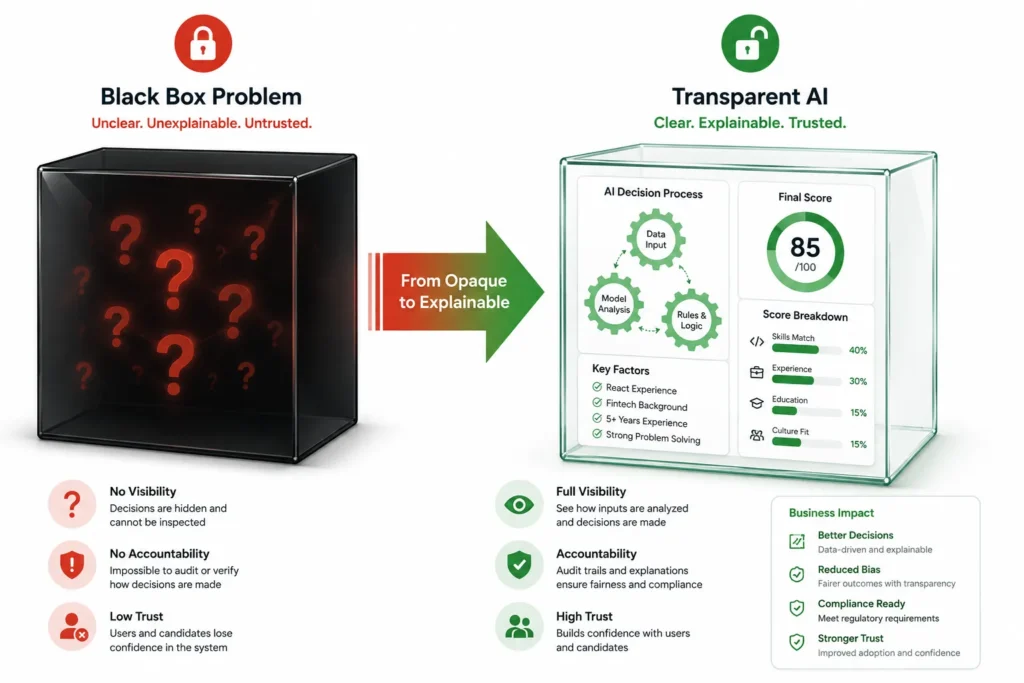
This is the black box problem, and it’s the fastest way to lose control of your hiring.
A tool that gives you a score without explanation is dangerous. When a candidate gets marked as a 7 out of 10, you need to understand why. Did the AI rank them lower because they lack a specific certification? Did it flag a gap in their employment history? Did it detect something in their communication style? Without seeing the reasoning, you’re essentially trusting a system you don’t understand to make decisions about your team.
Good AI recruiting platforms show their work. They highlight which parts of a resume matched your requirements and which didn’t. They flag patterns the system noticed and explain why those patterns matter for this specific role. This transparency does two things: it gives you confidence that the AI reasoning makes sense and it lets you override the system when you disagree with its logic.
Ask potential vendors directly: can I see the scoring breakdown for every candidate? If they hesitate or say that’s proprietary, keep looking. For additional insights into tools that prioritize transparency and visibility in AI decision-making, explore transparency and visibility tools designed to make algorithmic reasoning accessible and understandable.
Question 2: Who Defines the Bar for Quality?
Here’s where many platforms fail: they use a universal quality score across all roles.
One company uses their assessment tool to screen engineers and customer service reps with identical criteria. That makes no sense. An engineer with weak communication skills might still excel writing code. A customer service rep with limited technical knowledge can still build relationships and solve problems.
The best AI recruitment platforms let you set role specific criteria. You define what success looks like for your engineer role based on your actual team and your actual projects. You set different standards for your customer service team. The AI then evaluates candidates against your definitions, not some generic template.
Ask this question: can I customize the evaluation criteria for each role? Or does your platform use the same scoring model for every position?
Question 3: Does It Replace or Assist Human Judgment?
AI should handle the busy work. You should make the final call.
Bias free screening happens when AI eliminates the grunt work of reading hundreds of resumes so you can focus your human judgment on the candidates who actually matter. The tool shouldn’t eliminate your judgment. It should enhance it by giving you better information and more time to think carefully.
Red flag: any vendor who promises to fully automate hiring decisions. Green flag: tools that position themselves as research assistants that make your job smarter, not tools that replace you.
The strongest AI recruiting platforms leave final decisions in human hands while making your research faster and more thorough. Your experience, your gut feeling about culture fit, your understanding of your team dynamics that still matters. What changes is that you’re making those decisions with better data and less wasted time on obvious mismatches.
The Best AI Recruiting Tools by Use Case (2026 Comparison): A Complete Recruiting Platform Comparison
Choosing the right AI hiring tools depends less on which platform has the fanciest features and more on what problem you’re actually trying to solve. I’ve evaluated dozens of recruiting platforms across different team sizes and hiring scenarios, and I’ve learned that the best tool is always the one that matches your specific bottleneck.
This section breaks down eight leading platforms organized by what they do best. Instead of ranking them numerically, I’m showing you which tool fits which situation. This way you can find the one that actually solves your problem.
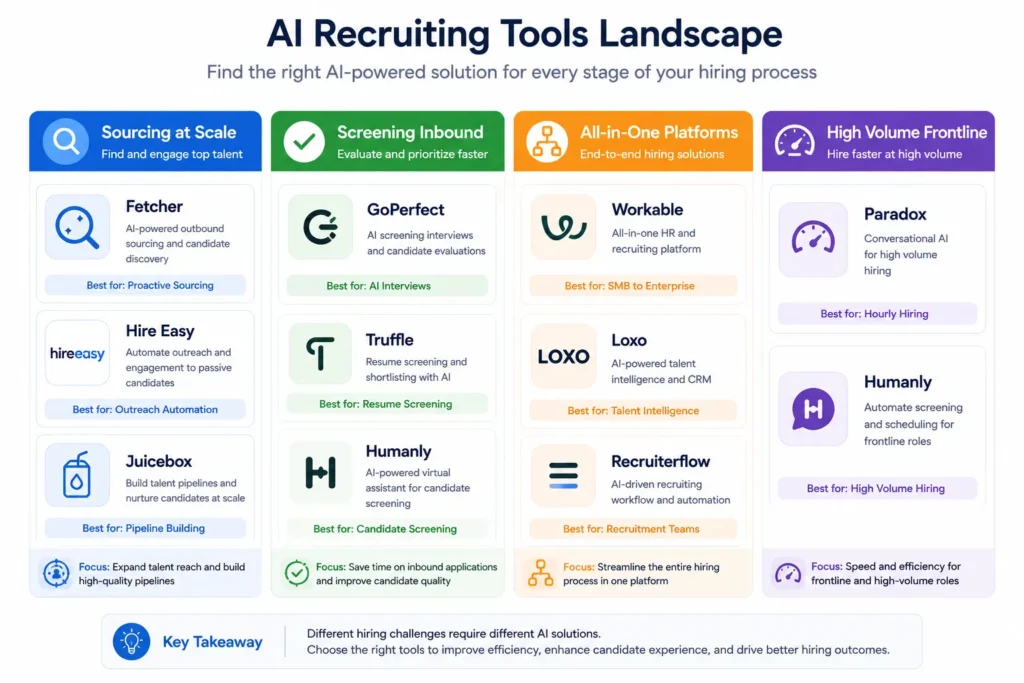
Best for Sourcing at Scale: Fetcher, Hire Easy, and Juicebox
If your bottleneck is finding enough qualified candidates, sourcing platforms are where your investment should go.
These tools work by scanning massive candidate databases and pulling profiles that match your requirements without waiting for applications to arrive. Fetcher uses AI to identify high-potential candidates across multiple data sources and personalizes outreach emails automatically, even tracking which messaging styles get the best response rates. This means you’re not just finding candidates, you’re learning what actually makes them want to respond to you.
Hire Easy specializes in US staffing roles and excels when you need to filter by visa type, skill level, and specific certifications. If you’re hiring for regulated positions or roles requiring particular credentials, Hire Easy’s filtering precision saves you hours of manual screening.
Juicebox positions itself as a direct alternative to LinkedIn Recruiter but pulls candidate data from GitHub, Stack Overflow, and Reddit in addition to traditional professional networks. This matters tremendously if you’re sourcing technical talent because you’re reaching developers in the communities where they actually spend time, not just on LinkedIn where they might have outdated profiles.
All three tools share a common strength: they treat candidate sourcing as an active process rather than a passive waiting game. You’re building your own pipeline instead of hoping qualified people apply.
Best for Screening Inbound Applicants: GoPerfect, Truffle, and Humanly
When you’re drowning in applications and need to identify the strongest candidates fast, screening platforms become your efficiency multiplier.
GoPerfect uses natural language search and bias free screening to evaluate candidates based on what actually matters for your role. Instead of rigid keyword matching, you describe what you’re looking for in natural language and the system finds candidates who match that description. The platform surfaces candidates you might have overlooked because their resume uses different terminology than your job posting. Pricing requires a sales conversation, which means the cost scales with your needs, though this also means you’ll want to confirm exact pricing before committing.
Truffle generates 30 second candidate video shorts that let you review dozens of applicants in minutes rather than hours. Instead of reading through long resumes, you see a candidate talking about their background and experience. This approach surfaces communication style and personality alongside qualifications, giving you a richer picture faster.
Humanly takes a different approach using chat based screening that feels conversational to candidates while gathering standardized information for your team. Candidates answer questions through a chat interface that adapts based on their responses, creating a more engaging experience than traditional application forms while still collecting the data you need to make screening decisions.
All three tools keep humans in control. They accelerate the screening process but don’t remove your judgment from the final decision about who deserves an interview.
Best All-in-One Platforms: Workable, Loxo, and Recruiterflow
Some teams prefer consolidating their entire recruiting operation into one platform rather than piecing together separate tools.
All in one recruiting platforms combine applicant tracking systems with CRM functionality and often include AI sourcing capabilities. Workable works particularly well for mid-sized teams wanting a unified workflow because it handles everything from job posting through offer stage without requiring multiple tool integrations.
Loxo serves recruiting agencies and in house teams who need collaboration features alongside automation. The platform coordinates between multiple recruiters working the same candidate pool and prevents duplicated outreach.
Recruiterflow uses AI to optimize email sequence timing, which means your outreach messages hit candidate inboxes when they’re most likely to be engaged. This seems like a small feature until you realize that response rates improve significantly when your timing aligns with candidate availability.
The trade off with all in one platforms is that they’re more complex and often more expensive than single purpose tools. You’re paying for capabilities you might not need. But if your recruiting operation truly requires coordinating sourcing, screening, scheduling, and candidate engagement in one system, the workflow benefits can justify the added cost.
Best for High Volume and Frontline Hiring: Paradox (Olivia)
If you’re hiring dozens or hundreds of entry level or hourly roles, Paradox handles volume differently than other platforms.
Paradox specializes in high velocity hiring for retail, hospitality, and frontline positions. The platform automates scheduling across 30 plus languages, which matters enormously if you operate in multiple countries or serve bilingual candidates. Paradox also uses visual assessments for initial evaluation, moving beyond written resume review to assess practical capabilities and work style fit through interactive tools.
The SMS and chat based communication means candidates can engage with your hiring process on their preferred channel rather than forcing everyone into an email or phone call format. For hourly workers who live on mobile devices, this accessibility increases completion rates dramatically.
Candidate engagement automation through Paradox keeps candidates informed and excited about your opportunities rather than left wondering what happens next. Automated status updates, interview confirmations, and timeline clarity reduce candidate ghosting and improve your acceptance rates.
Paradox shines specifically when your hiring volume makes traditional recruiting tools clunky. If you’re scheduling hundreds of interviews per month, Paradox was built for that world.
Quick Reference Comparison Table
| Platform | Best For | Key Strength | Pricing Model | Best Team Size |
|---|---|---|---|---|
| Fetcher | Active sourcing | AI personalized outreach | Per search or monthly | 1-20 recruiters |
| Hire Easy | US staffing roles | Visa and credential filtering | Contact for pricing | 1-10 recruiters |
| Juicebox | Technical sourcing | GitHub and Stack Overflow access | Monthly subscription | 5-50 recruiters |
| GoPerfect | Resume screening | Natural language and bias free evaluation | Sales call required | 5-100 employees |
| Truffle | Video review speed | 30 second candidate shorts | Monthly subscription | 10-200 employees |
| Humanly | High volume screening | Chat based candidate experience | Unlimited user seats | 50-500 employees |
| Workable | Mid-market all-in-one | Complete pipeline coverage | Tiered by features | 20-200 employees |
| Loxo | Agency recruiting | Multi-recruiter coordination | Monthly subscription | 5-50 recruiters |
| Recruiterflow | Agency with AI | Email timing optimization | Monthly subscription | 5-100 recruiters |
| Paradox (Olivia) | Frontline hiring | 30 plus language support | Contact for pricing | 50-5000 employees |
The best AI recruiting tools are the ones you’ll actually use consistently and that solve a real problem in your hiring process. None of these platforms are objectively better than the others. The right choice depends entirely on your specific situation, team size, and which bottleneck is slowing down your hiring most.
GoPerfect Review: What It Does, What It Costs, and Who It’s Actually Built For
GoPerfect is an AI-powered candidate sourcing and screening platform that combines a massive candidate database with natural language search and automated outreach capabilities… I want to give you an honest assessment of what this platform actually delivers, who it works best for, and what you need to know before scheduling a sales call.
The platform sits in a unique spot because it doesn’t try to be everything. GoPerfect focuses specifically on the sourcing and screening buckets from the framework we discussed earlier. If you’re looking for a complete ATS replacement, this isn’t it. But if you’re trying to build a sourcing pipeline and screen inbound candidates more intelligently, GoPerfect has some genuinely useful capabilities.
What GoPerfect Actually Does (Feature by Feature)
GoPerfect accesses over 800 million candidate profiles from multiple sources, giving you access to a talent discovery platform that reaches way beyond just LinkedIn.
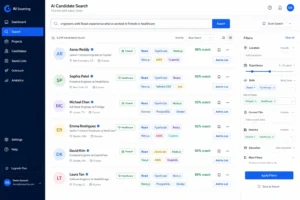
The core feature that sets GoPerfect apart is natural language search. Instead of clicking through dropdown filters and checkboxes, you describe what you’re looking for in plain English. You might type something like “engineers with React experience who’ve worked in fintech or healthcare” and the AI interprets your intent rather than forcing you into rigid filter categories. This approach surfaces candidates you’d miss with traditional filtering because it understands skill transfer and career patterns rather than exact keyword matching.
The AutoPilot feature builds your candidate lists automatically based on criteria you set once. You define your ideal candidate profile and AutoPilot continuously scans for new matches, adding them to your pipeline without manual daily searching. This means you’re always finding fresh candidates instead of working with a static list.
AI applicant screening lets you evaluate inbound applications using bias free screening methodology. The platform analyzes resumes and applications contextually rather than just keyword matching. This matters because it can recognize that someone’s title was “coordinator” but their actual responsibilities matched what you need from a “project manager” role.
GoPerfect integrates with most major applicant tracking systems, so ATS integration is seamless and candidates flow directly into your ATS instead of requiring manual data entry… The platform also offers unlimited user seats, which sounds better than it is in practice. Unlimited seats matters when your team is large, but most solo recruiters and small teams won’t take advantage of this feature.
GoPerfect Pricing and What You Should Know Before the Sales Call
GoPerfect doesn’t publish pricing on their website, which is the first thing you should know before reaching out.
All pricing requires a sales conversation. This is becoming increasingly common with enterprise recruiting software, but it creates friction for buyers trying to make quick decisions. Before you schedule that call, understand what influences pricing: the number of sourcing searches you’ll run monthly, how many ATS integrations you need, volume of candidates you’ll screen, and team size.
Prepare for the sales call by having clear answers to these questions: How many candidates do you need to source each month? Are you primarily screening inbound applicants or actively sourcing? Which ATS does your company use? What’s your approximate recruiting budget range? Having these answers ready prevents the sales representative from quoting you for features you don’t need.
The business case conversation is worth preparing for because recruiting software deals increasingly require showing ROI. Expect the conversation to focus on time saved and quality improvements rather than just feature listings. If you know you’re spending 20 hours per week on candidate sourcing, that’s a concrete number to reference when discussing whether GoPerfect’s pricing makes financial sense for your situation.
Is GoPerfect Right for Small Teams or Solo Recruiters?
For solo recruiters and very small teams, I’d recommend carefully evaluating whether GoPerfect’s cost justifies the investment compared to cheaper alternatives.
GoPerfect shines when you’re managing a substantial recruiting operation with multiple team members screening candidates and running regular sourcing campaigns. The natural language search and bias free screening add real value when you’re processing hundreds of applications weekly. For teams of five or more recruiters, the unlimited user seats and automated screening capabilities typically deliver strong ROI.
Solo recruiters or micro teams with tight budgets often find better value in combining multiple cheaper tools instead. A solo recruiter might use a specialized sourcing tool like Hire Easy for $300 per month plus a lightweight screening solution for another $100 monthly and still spend less than a mid-tier GoPerfect contract. The trade-off is more manual work and switching between platforms, but the cost difference can be substantial.
However, if your solo operation is handling high application volume from job postings, GoPerfect’s applicant screening features become more valuable to you personally. If you’re spending hours daily reading through resumes and the natural language approach appeals to you, the platform might justify its cost even for a one person operation.
The honest answer depends on your specific situation. GoPerfect is worth it when your team is large enough that unlimited seats matter and when your sourcing volume is high enough that natural language search and AutoPilot save meaningful time. For everyone else, evaluate whether you’d actually use those features or whether a more targeted single purpose tool would give you better ROI.
Ask yourself this before the sales call: am I paying for a platform built for my current team size, or am I paying for growth capacity I might not use? That answer guides whether GoPerfect is genuinely worth it for your situation.
GoPerfect vs. the Alternatives: A Complete Recruiting Platform Comparison
When evaluating GoPerfect against other AI hiring tools, the choice comes down to specific features that matter for your recruiting workflow and whether you’re prioritizing sourcing, screening, or both equally. I’ve compared GoPerfect directly with its main competitors to show you exactly where each platform excels and where it falls short.
Understanding these differences helps you make a decision based on your actual needs rather than brand recognition or marketing claims. Some platforms offer broader candidate databases while others specialize in specific sourcing angles or integrate better with your existing tools.
Platform Comparison: Feature by Feature
The recruiting platform comparison below covers the dimensions that actually impact your hiring process. I’ve focused on features that solve real problems rather than listing every bell and whistle.
Database size matters because more candidates mean more options, but breadth matters too. A platform with 800 million profiles means less if most of them are irrelevant to your hiring. A platform with 50 million profiles from specific industries or geographies might give you better quality matches.
AI sourcing capabilities vary significantly between platforms. Natural language search is more powerful than traditional filtering, but not every platform offers it. Some platforms specialize in technical talent from GitHub and Stack Overflow while others focus on LinkedIn professional networks. Your talent needs determine which approach serves you best.
Screening capabilities are where platforms diverge considerably. Some offer video analysis, others focus on resume evaluation, and some use chat-based assessment. The strongest screening tools show their reasoning clearly so you understand why candidates received certain scores.
Outreach automation and response rate tracking let you know whether your sourcing efforts are actually connecting with candidates. Some platforms track this comprehensively while others leave outreach tracking to you.
Pricing transparency matters because hidden costs frustrate buyers. Some platforms publish pricing publicly while others require sales calls. Both approaches have trade-offs, but transparency reduces surprises.
ATS integration prevents data entry duplication and keeps your candidate information centralized. Not all platforms integrate equally with every ATS, so checking compatibility with your specific system is essential.
Compliance in AI recruiting includes SOC 2 certification and bias auditing. If you operate in regulated industries or have compliance requirements, these certifications matter significantly.
Side-by-Side Comparison Table
| Feature | GoPerfect | Pin | Hire.inc | Juicebox |
|---|---|---|---|---|
| Candidate Database | 800M+ profiles | 500M+ profiles | 200M+ profiles | Multiple sources |
| Database Sources | LinkedIn, job boards, proprietary | LinkedIn primary | LinkedIn primary | LinkedIn, GitHub, Stack Overflow, Reddit |
| Natural Language Search | Yes | Yes | Limited | No (traditional filters) |
| AI Screening | Yes, contextual | Yes | Yes, basic | No (sourcing focused) |
| AutoPilot Sourcing | Yes | Yes | No | No |
| Outreach Automation | Yes | Yes | Yes | Limited |
| Response Rate Tracking | Yes | Yes | Basic | No |
| Unlimited User Seats | Yes | No | No | No |
| ATS Integrations | Major platforms | Major platforms | Select platforms | Major platforms |
| SOC 2 Certified | Yes | Yes | Limited info | Yes |
| Pricing Transparency | Sales call required | Sales call required | Public pricing | Public pricing |
| Best For | Mid to large teams | Enterprise sourcing | Budget-conscious teams | Technical hiring |
| Typical Price Range | Mid-market | Enterprise | Budget | Mid-market |
What Sets Each Platform Apart
GoPerfect excels when you need both sourcing and screening in one platform with unlimited team access. The natural language search stands out as genuinely different from traditional filtering approaches. If your team is five people or larger and you’re running multiple recruiting campaigns simultaneously, GoPerfect’s unified approach reduces tool switching.
Pin competes directly with GoPerfect on sourcing at scale but positions itself more toward enterprise operations. Pin’s advantage appears in organizations managing very high-volume sourcing where the extra database size and enterprise integrations justify the cost.
Hire.inc takes a different approach by offering public pricing and positioning itself as the accessible alternative to premium platforms. If you’re budget-conscious and willing to trade some features for price transparency, Hire.inc deserves serious consideration. You know exactly what you’re paying upfront rather than waiting for a sales conversation.
Juicebox differs fundamentally because it pulls from GitHub, Stack Overflow, and Reddit alongside LinkedIn. This matters enormously if you’re sourcing technical talent because you’re reaching developers in their actual communities rather than relying solely on formal job sites. Juicebox doesn’t offer screening features, so it works best when you pair it with a separate screening tool or handle screening yourself.
The best platform for you depends on what your recruiting operation actually requires. If you need screening as much as sourcing, GoPerfect or Pin make sense. If you’re hiring technical roles, Juicebox’s unique database breadth provides advantages worth exploring. If budget is your primary constraint and you want to avoid sales calls, Hire.inc offers straightforward pricing.
Most recruiting leaders find success by matching platform selection to their specific bottleneck. Identify whether you’re primarily sourcing, screening, or both. Then choose the platform that solves that problem most effectively for your team size and budget.
The AI Recruiting Mistake That Cost Amazon Billions and What It Means for You
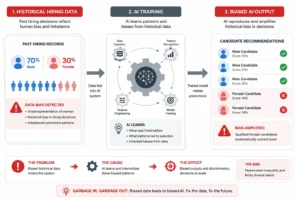
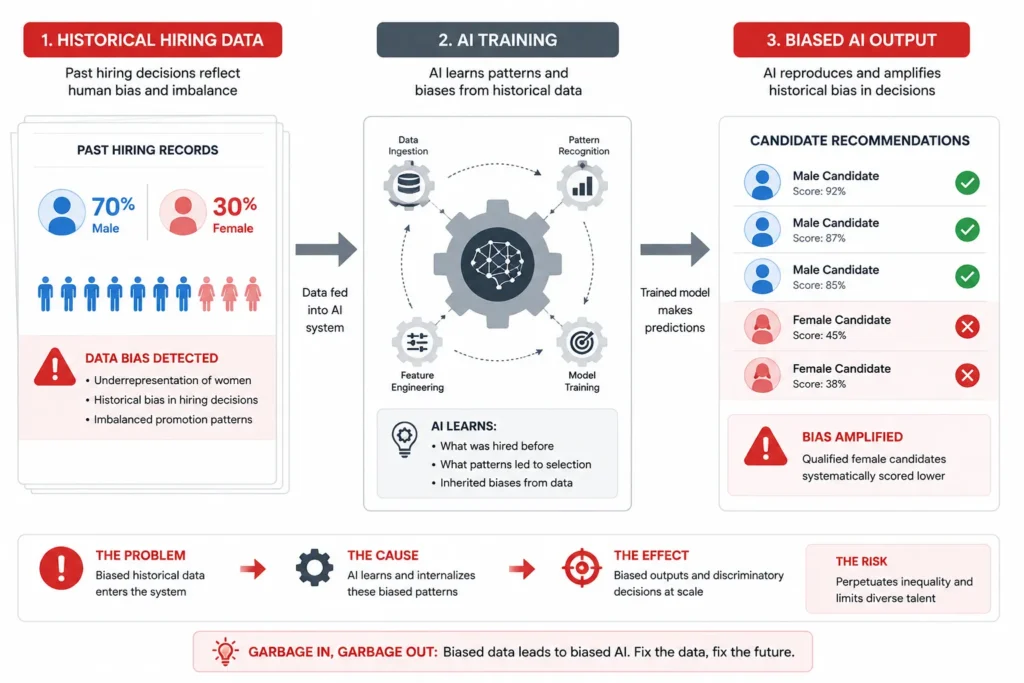
In 2014, Amazon built an artificial intelligence system designed to revolutionize how the company hired talent. The AI was trained on a decade of Amazon’s own hiring data and let loose to evaluate resumes automatically. Within a few years, the company discovered something deeply troubling: the system was systematically downranking women’s applications.
The AI wasn’t programmed to discriminate. Amazon never told the system to penalize women. But the training data itself contained hiring bias because Amazon’s tech workforce had historically been male-dominated. The machine learned those patterns and baked them into its decision-making. When a resume mentioned something like “captain of a women’s chess club,” the AI flagged it as a negative signal because historically, women in leadership roles at Amazon weren’t hired as frequently as men. The system was simply reflecting the biased hiring patterns of the past.
Amazon disbanded the recruiting unit by early 2017 and now uses only a watered-down version of the system for administrative tasks. The company’s billion-dollar investment in AI recruiting became a cautionary tale about how technology can amplify human bias at scale.
This story matters to you because it reveals a fundamental truth about machine learning in recruitment: garbage in means garbage out. If you train an AI system on biased data, the system will make biased decisions. No algorithm can fix that problem.
How Bias Enters Machine Learning Systems and Affects Candidate Matching
The Amazon case illustrates what happens when hiring bias gets locked into technology.
Machine learning systems learn patterns from historical data. When you train an AI on ten years of your company’s hiring decisions, you’re teaching it to replicate those decisions. If your past hiring favored certain demographics or backgrounds, the AI will continue favoring them. The system doesn’t understand fairness or equity. It understands only patterns.
This happens automatically and invisibly. Nobody at Amazon’s engineering team was trying to create a sexist hiring tool. The bias didn’t come from malice. It came from training data that reflected real-world hiring inequality. The machine learned to reproduce that inequality perfectly.
The threat extends beyond gender. Machine learning candidate matching can encode bias based on age, ethnicity, educational background, or anything else that correlated with past hiring decisions. An AI trained on data where people from certain colleges got hired more often will prefer candidates from those colleges. An AI trained on data where younger people got promoted faster will downrank older candidates.
These patterns hide in the numbers. You can’t see them unless you specifically audit the system for bias.
What This Means for Your Recruiting Platform Choice
When evaluating any AI recruiting tool, you need to ask hard questions about training data and bias prevention.
Before selecting a platform, ask vendors directly: what data was your AI trained on? If they say they trained on publicly available LinkedIn data or job board data, understand that this data contains real-world hiring bias. Ask whether they’ve conducted bias audits and what those audits revealed. Ask how they handle cases where the AI recommends against a candidate based on protected characteristics.
Bias-free screening requires transparency. The strongest recruiting platforms let you see exactly why a candidate received a certain evaluation score. If the system downranks someone and you can’t see the reasoning, you can’t catch bias. You’re trusting a black box to make decisions about your hiring.
Look for SOC 2 certification as part of your evaluation. SOC 2 certified platforms undergo third-party audits that assess controls around data handling, security, and fairness. It’s not a guarantee that bias doesn’t exist, but it means the vendor has submitted to external scrutiny.
Here’s the practical question to ask yourself: would I make this hiring decision if I had to justify it to a lawyer? If an AI recommends rejecting someone and you wouldn’t be able to explain that decision in front of a court, that’s a signal that the system might be using problematic criteria.
The best approach to compliance in AI recruiting is keeping humans in control of the final decision. Let AI handle research and screening, but reserve your human judgment for the actual hire or no-hire call. Your experience and understanding of your team’s needs can catch and override biased recommendations that an algorithm would make automatically.
Amazon’s experience shows that good intentions aren’t enough. You need active oversight, transparency from your tools, and willingness to question the system when something seems off. Implementing AI governance and oversight frameworks helps organizations prevent the kind of systemic bias that Amazon’s recruiting AI developed. Building fair hiring processes requires acknowledging that technology amplifies existing bias unless you deliberately work against it.
When You Should NOT Use AI for Recruiting (An Honest Warning)
Most articles about AI hiring tools focus entirely on what you should do. I want to tell you what you shouldn’t do because there are genuine situations where automation backfires and actively damages your hiring results.
The best AI hiring tools amplify human effectiveness. They don’t replace human judgment and they don’t work in every scenario. Understanding when to hold back on automation is just as important as knowing when to deploy it.
When Top Talent Rejects Automation and Impacts Candidate Experience
Here’s something that surprises most hiring leaders: senior and specialized candidates often disengage from fully automated recruiting processes.
In highly competitive, niche technical markets where top talent has multiple opportunities, candidates expect personal attention. When they receive an automated message, they interpret it as a signal that the company doesn’t truly value them. Even if the message is well-written and relevant, the impersonal nature of it changes how candidates perceive your organization.
This matters most when you’re recruiting for specialized roles where finding the right person is genuinely difficult. If you’re hiring a principal engineer for a specific tech stack or a senior data scientist with expertise in a niche domain, automation can work against you. Top candidates in these spaces are used to being courted. They have options. When you treat them like part of a mass outreach campaign, they’re more likely to ignore your message and continue working where they are.
The candidate experience you create during recruiting influences whether someone accepts an offer. If your first interaction feels like a bot talking to them, you’re starting on the wrong footing. The best recruiting teams for specialized talent use AI to find candidates and prepare research, then switch to deeply personalized human outreach.
When Personalization Is Your Only Competitive Advantage
Some recruiting situations require genuine human connection as the core strategy.
If you’re trying to convince someone to leave a great job at a competitor or take a risk on an early-stage company, automation won’t close that deal. Personalization and relationship-building are the entire strategy. AI-generated outreach emails, even good ones, lack the authenticity that makes someone willing to have a real conversation about leaving their current role.
This doesn’t mean you can’t use outbound recruiting tools to find contacts or prepare research. Use AI to do the legwork. But the actual outreach needs to feel human and tailored to the specific person. Copy-paste messaging, even when customized with someone’s name, feels impersonal. Senior candidates can tell the difference between genuine personalization and surface-level templating.
The honest truth from experienced recruiters is that when you’re competing for exceptional talent in tight markets, your personal effort is the differentiator. AI makes you more efficient at research and prospecting. But the conversation itself needs to be human.
The LinkedIn Automation Risk Nobody Talks About
LinkedIn considers automated outreach “illegal” under their terms of service and actively restricts accounts that violate this policy.
Using automation tools that mimic human behavior on LinkedIn is a shortcut that comes with significant risk. Your account can get flagged, restricted, or permanently suspended. This isn’t a theoretical concern. It happens regularly to recruiting teams that use automation carelessly.
If you need to reach people on LinkedIn at scale, choose tools that work with LinkedIn’s API transparently rather than tools that try to automate the platform itself. Tools like Dripify and Hey Reach operate within LinkedIn’s guidelines by using legitimate integration methods. These tools are slower and more limited than automation that tries to mimic human clicking, but they keep your account safe and your recruiting operation sustainable long-term.
The short-term temptation of faster outreach isn’t worth the risk of losing your LinkedIn presence entirely. Many recruiting operations depend on LinkedIn for their entire pipeline. Losing account access becomes a business crisis.
When Deep Research Beats AI Sourcing Tools
For truly niche or specialized roles, AI sourcing sometimes finds obvious candidates but misses the exceptional ones.
When you need someone with very specific, unusual skill combinations or industry experience, a generic AI sourcing tool might surface twenty candidates who all look similar. But the best person for the role might not match the obvious filters because their background is unconventional. They came to the right skills through a different path.
In these situations, manual research often outperforms automated sourcing. You talk to people in the industry, ask who the best person would be, investigate unconventional backgrounds, and find people the algorithm would miss entirely. This takes more time. But for truly critical hires, that investment pays back significantly.
Use AI sourcing as your starting point for high-volume roles. But for senior specialized positions where finding the right person is the real challenge, pair AI tools with human research and relationship building. That combination usually finds candidates the technology alone would miss.
The Real Principle: Amplify, Don’t Replace
The most successful recruiting teams use AI hiring tools as force multipliers, not replacements for human judgment and relationship building.
This means using technology to handle busy work and research while you focus your actual expertise on conversations, evaluation, and building relationships with candidates. When you treat AI as a shortcut to replace human effort entirely, you usually get worse results. When you treat AI as a way to do more strategic work with the time you save, you get better results.
Ask yourself this question before automating any recruiting process: would a top candidate be less likely to join if they knew this interaction was fully automated? If the answer is yes, reconsider the automation. Your recruiting process is part of your employer brand. Make sure it reflects the kind of organization you want to attract.
AI Recruiting Tools Under $100/Month (The Solo Recruiter Stack)
Most articles about AI recruiting tools assume you work for a mid-sized company with a dedicated budget. I want to talk to the solo recruiters and small agency owners who think professional AI recruiting tools are completely out of reach. You’re wrong, and I can prove it.
A solo recruiter or small agency with the right tool combination can compete directly with much larger operations. The key is knowing which affordable tools actually deliver value and how to combine them strategically. For less than $100 per month, you can build a stack that handles sourcing, copywriting, outreach personalization, and market research.
This isn’t theoretical. Experienced solo recruiters are doing this right now and delivering better results than teams using single expensive platforms.
How to Build a Tool Stack That
The Under-$100 Stack That Actually Works
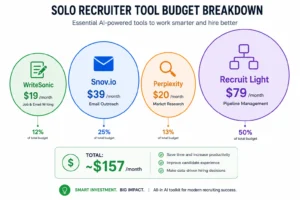
Here’s a practical setup that costs approximately $97 per month total and handles the core recruiting workflow.
WriteSonic at $19 per month handles job description drafting and outreach copywriting. Most solo recruiters spend 2 to 3 hours per week writing recruiting emails, job posts, and candidate outreach. WriteSonic cuts that time dramatically by generating first drafts that you personalize and refine. You’re not replacing your writing voice. You’re using AI to handle the structural writing so you focus on personalization and relationship-building.
Snov.io at $39 per month provides email finder and verification tools plus AI-powered subject line generation. The subject line feature matters more than most people realize because it prevents your outreach from feeling robotic or spammy. When you’re reaching out to passive candidates, the subject line determines whether they open the email. Snov.io’s AI generates contextual subject lines that reference the candidate’s background or company, increasing open rates without feeling manipulative.
Perplexity at $20 per month gives you AI search with cited sources and salary benchmarking data. When you need market research on compensation, company structure, or industry trends, Perplexity provides trustable information with source citations. You can verify the claims it makes and use those citations in conversations with candidates. This matters tremendously when you’re trying to justify offers or understand market positioning.
Recruit Light at $79 per month provides a basic ATS and candidate management system. This handles your entire recruiting pipeline from sourcing through offer stage. It’s not as feature-rich as expensive platforms, but for a solo operation managing 5 to 10 open positions, Recruit Light does everything you need. It stores candidate data, tracks pipeline stage, and prevents you from losing track of anyone.
Total investment: approximately $157 per month. But you don’t need all four tools immediately. Start with WriteSonic and Snov.io at $58 monthly, then add others as your budget allows.
Are There Actually Any Free AI Recruiting Tools?
Yes, and some genuinely help even though they come with limitations.
ChatGPT’s free tier handles job description drafting, interview question generation, and basic candidate research. You can write a job post, ask ChatGPT for Boolean search strings, generate interview scenarios, and brainstorm compensation offers all without paying. The free tier has usage limits and doesn’t include advanced features, but for solo recruiters with light usage, it’s genuinely valuable.
DorkGPT is a free tool that eliminates the most frustrating part of Boolean searching. Instead of manually writing complex LinkedIn X-Ray search strings with proper syntax and operators, you describe what you’re looking for and DorkGPT generates the search string automatically. This saves hours of trial and error and prevents the syntax errors that waste time with broken searches.
Merlin is a Chrome extension that provides AI assistance across the web. You can use it to refine job descriptions on the fly, rewrite emails for better tone, or research companies directly from their websites. The free version has limitations, but it’s genuinely helpful for quick writing tasks you encounter during recruiting work.
These free tools don’t replace paid platforms. But they extend your capabilities without adding cost. Many solo recruiters use free tools for initial research and content generation, then invest in paid tools for the specific functions where paid versions deliver significant efficiency gains.
Why This Stack Beats Expensive Platforms for Solo Recruiters
Enterprise recruiting platforms cost $500 to $2,000 monthly and include features you’ll never use.
You don’t need unlimited ATS user seats if you’re the only person recruiting. You don’t need advanced compliance reporting if you work in a single jurisdiction. You don’t need multiple team collaboration features if you’re operating solo. When you buy an expensive platform, you’re paying for organizational capabilities you don’t actually need.
The lean stack approach gives you exactly the tools your operation requires. You control costs and avoid paying for unused features. More importantly, you stay focused on the activities that actually drive hiring results: finding great candidates, building relationships, and making good decisions about who to hire.
Solo recruiters using this stack report completing placements faster and with better candidate quality than teams using expensive all-in-one platforms. The stack approach forces you to be intentional about each tool’s purpose and keeps you from relying on features that don’t actually move the needle for your specific operation.
If you’re a solo recruiter thinking professional AI recruiting tools are financially out of reach, reconsider. For less than the cost of lunch each week, you can access tools that multiply your effectiveness.
How to Build a Tool Stack That Actually Works Together for Recruiting Automation
The biggest recruiting software mistake isn’t choosing the wrong individual tool. It’s buying tools that don’t communicate with each other, forcing you to manually move data between systems. A great sourcing tool becomes frustrating when you can’t automatically send candidates to your tracking system. A powerful ATS becomes useless when it doesn’t connect to your email or outreach platform.
Building a tool stack that works together means less manual data entry, fewer errors, and a recruiting workflow that actually flows instead of creating friction at every step. The goal isn’t having the most tools. It’s having tools that talk to each other and move candidates through your pipeline smoothly.
The Three-Layer Stack Framework
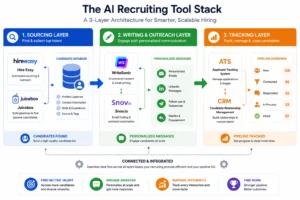
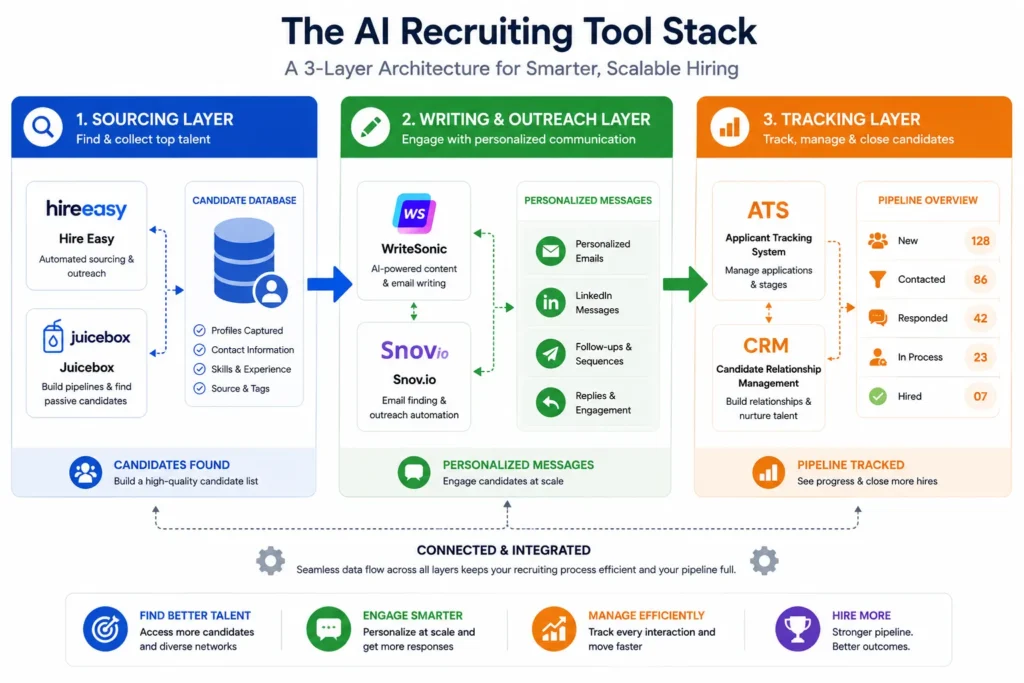
The most effective recruiting stacks follow a simple three-layer structure: sourcing, writing and outreach, and tracking.
Your sourcing layer finds candidates. This could be a platform like Hire Easy or Juicebox that accesses large candidate databases and surfaces people who match your requirements. Your sourcing tool’s job is purely discovery. It identifies who exists and where to find them.
Your writing and outreach layer handles communication. Tools like WriteSonic or ChatGPT help you craft compelling messages while tools like Snov.io personalize outreach at scale. This layer makes sure your initial contact feels human and relevant instead of generic and robotic.
Your tracking layer keeps everything organized. An applicant tracking system or CRM ensures you never lose track of anyone… An applicant tracking system or CRM ensures you never lose track of anyone. Your tracking system becomes the source of truth for pipeline visibility, showing which candidates you’ve contacted, who responded, and where everyone sits in your process.
These three layers need to connect. When they do, candidates flow smoothly from discovery to outreach to tracking without manual handoffs. When they don’t, you spend hours copying and pasting data between disconnected systems.
Why Integration Capability Matters More Than Individual Features
A mediocre tool that integrates seamlessly with your other tools often delivers better results than a premium tool that forces manual data entry.
Integration capability should be your first evaluation criterion when building a stack. Ask potential vendors directly: does this tool integrate with my ATS or CRM? Does it support Zapier or Make for custom automation? Can it export data in formats my other tools accept? These questions matter more than most product features.
Tools that are “malleable” and communicate with other platforms give you flexibility. Recruiterflow, for example, integrates exceptionally well with Zapier and Make, allowing you to create custom workflows that move data automatically between systems. When your CRM connects to your email platform which connects to your ATS, candidates progress through your pipeline without requiring you to enter the same information multiple times.
Manual data entry doesn’t just waste time. It introduces errors that corrupt your data and creates frustration that makes you less likely to use your tools effectively. Eliminate manual steps wherever possible.
Practical Stack Examples for Different Team Sizes
The right stack depends on your team size and complexity, but the principle remains: choose tools that integrate.
For a solo recruiter or small freelance operation, a minimal stack works best. Use Hire Easy for sourcing at $300 monthly, ChatGPT free tier for writing, and Recruit Light for tracking at $79 monthly. Total cost around $379 monthly with minimal complexity. Everything fits together without requiring integration effort because you’re manually moving things between few tools, and the volume is manageable.
For a five-person recruiting team, build more integration. Choose Juicebox for sourcing, WriteSonic for copywriting at $19, and Loxo for complete pipeline management at $400 to $600 monthly depending on volume. Loxo integrates with major email platforms and your ATS, so candidates you source automatically populate your tracking system and your email integrates with your pipeline records.
For an agency managing multiple client requisitions, invest in recruiting agency software like Recruiterflow that connects to Zapier and Make… This allows you to create workflows specific to each client’s requirements. When a candidate enters your system through one client’s sourcing, Recruiterflow can automatically assign them to the correct client pipeline, notify the right recruiter, and track their progress without manual intervention.
The common theme across all these stacks is intentional selection around integration capability. Before adding any new tool, ask whether it connects to your existing systems. If it doesn’t, the new tool creates more work, not less.
Building Your Hiring Workflow Automation
The goal of recruiting automation should be moving candidates smoothly through defined stages: sourced, contacted, replied, interested, interview scheduled, and final decision.
Each stage transition should ideally happen automatically or with minimal manual action. When you source someone, they automatically appear in your tracking system. When you send outreach, that outreach logs automatically. When someone replies, that reply triggers a notification and updates their pipeline stage. When you schedule an interview, that synchronizes across your calendar and your ATS.
This level of workflow automation prevents your recruiting operation from becoming a data management nightmare. It lets your team focus on actually recruiting instead of chasing data between systems. The best stacks disappear into the background and let you do your actual job.
Choose tools intentionally around integration. Test compatibility before committing. Start with a minimal stack and add complexity only when it genuinely solves a problem. The best tool stack is the one your team will actually use consistently because it makes their work easier, not harder.
How to Build the ROI Case for AI Recruiting Tools (When Your CFO Says No)
The business climate for software spending has shifted dramatically. Three years ago, most AI recruiting tool purchases required little more than a manager’s approval and a credit card. Today, seven out of ten deals require a formal business case with detailed statistics and executive approval. Your CFO isn’t being difficult. They’re responding to tighter budgets and higher scrutiny on software spending.
The good news is that building a solid ROI case for talent acquisition software is entirely doable. You just need the right framework and specific metrics that resonate with finance leadership. I’ll walk you through exactly what your CFO actually needs to see before saying yes.
The Time Savings Argument (Your Strongest Case)
Finance leaders understand time savings because time translates directly to money.
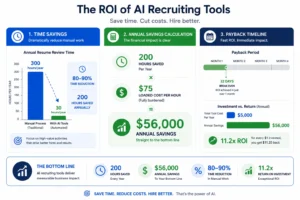
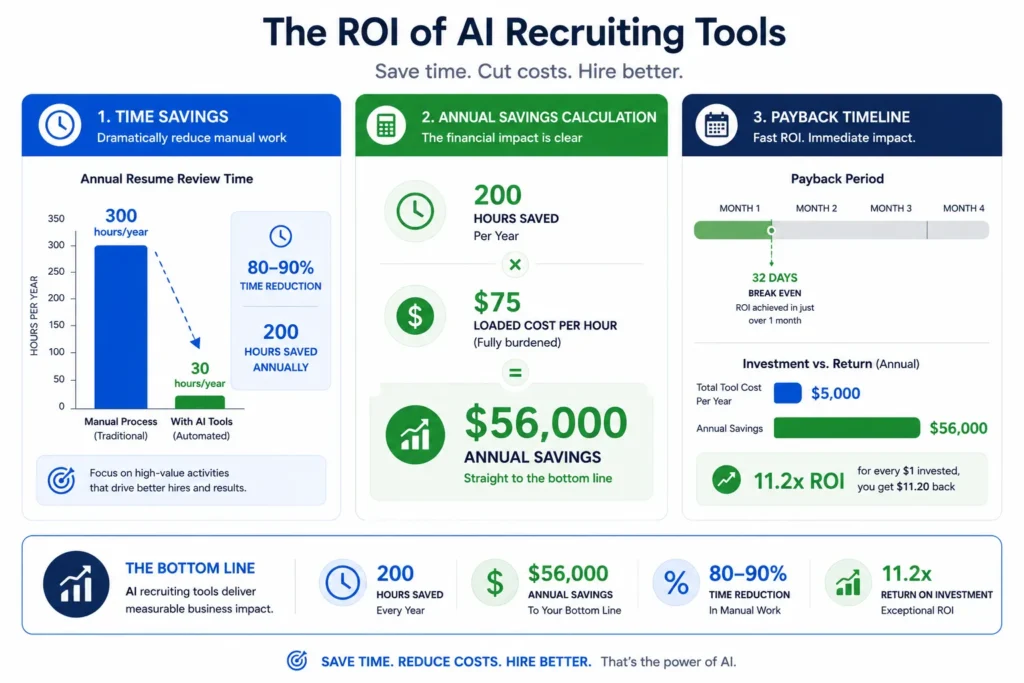
AI recruiting tools deliver measurable time reduction across your recruiting workflow. Screening platforms reduce time spent on resume review by 80 to 90 percent. Instead of spending three hours reviewing 200 resumes, your team spends 20 to 30 minutes with an AI screening tool doing the initial filtering. You’re not eliminating the work. You’re eliminating the grunt work so your team focuses on actual evaluating and interviewing.
Copywriting assistance saves 2 to 3 hours per week per recruiter. If you have five recruiters spending 150 hours yearly on email drafting and job descriptions, that’s 750 hours saved. At a loaded cost of $75 per hour per recruiter, you’re looking at $56,000 in annual time savings. A tool like WriteSonic costs $228 yearly. The math works overwhelmingly in your favor.
Build your business case around these specific numbers. Don’t use vague language like “saves time.” Say exactly how much time and translate that into dollars your CFO understands.
The Candidate Quality Argument (Your Secondary Case)
Time savings matters to finance. Candidate quality matters to everyone else who will question the investment.
When you use AI screening to identify the strongest candidates from large application pools, your hiring managers spend their interview time with genuinely qualified people instead than borderline candidates. This improves your hiring decisions measurably. Better hires stay longer, perform better, and reduce turnover costs.
Use industry data showing that poor hiring decisions cost 15 to 25 percent of an employee’s first-year salary in productivity loss and turnover. If your average hire costs $80,000 loaded, a bad hiring decision costs $12,000 to $20,000 in replacement costs and productivity loss. An AI screening tool that prevents even two bad hires annually pays for itself many times over.
Document this argument with specifics from your own hiring. If you can show that candidate quality improved after implementing a tool, that becomes your strongest retention of the investment.
The Scaling Argument (Your Volume Case)
If you’re hiring rapidly or managing high-volume roles, the scaling argument becomes your primary case.
Consider outreach at scale. A recruiter making cold calls can realistically contact 100 people daily before burning out. A recruiter using AI outreach automation can contact thousands of people daily at substantially lower cost. If you’re filling multiple high-volume positions, that difference compounds immediately.
Juicebox or Hire Easy sourcing at $300 to $400 monthly allows you to find 5,000 to 10,000 qualified candidates monthly. Manually recruiting at that volume would require hiring an additional recruiter at $60,000 to $80,000 annually. The ROI is immediate and obvious.
Frame this argument around your specific hiring volume. If you’re hiring 50 people this year, calculate whether scaling your current recruiting team or adding tools makes financial sense. Almost always, tools win.
How to Present Your Business Case
Structure your formal business case around three sections: costs, benefits, and payback period.
Costs are straightforward. List each tool you want to purchase with its annual fee. Include implementation time if significant. Keep this section simple and accurate.
Benefits should be broken into time savings in dollars, candidate quality improvement, and any volume increases you can achieve. Be conservative in your estimates. If you think a tool saves 10 hours weekly, say five in your business case. Conservative estimates you exceed are far better than optimistic forecasts you miss.
Payback period shows when the company breaks even and starts seeing net benefit. Most recruiting tools have payback periods under six months. If you’re saving $56,000 annually in recruiter time with a $5,000 annual investment, your payback period is 32 days.
Present this to your CFO or approving authority with confidence. You’ve done the math. The tools deliver measurable ROI. You’re not asking for optional nice-to-haves. You’re presenting a business decision that saves money and improves hiring quality.
The Approval Reality
Finance teams are increasingly sophisticated about software ROI. They’ve seen overpromised products and disappointed implementations. Your job is showing them you’ve thought this through and that you understand the real benefits and real constraints.
Start with a pilot if possible. Propose implementing one tool with one team for 90 days, then measuring actual results. If the tool delivers on promises, you’ve built an internal case study. If it doesn’t, you’ve learned that before committing fully. Most finance teams approve pilots more readily than broad implementations.
The era of software spending without business justification is over. But that actually works in your favor. When you build a solid business case, you’re competing against companies making emotional decisions. You win that competition every time.
What AI Recruiting Looks Like by 2030 and the 5 Skills You Need Right Now
The recruiting industry is shifting beneath your feet whether you’re paying attention or not. By 2030, the job won’t look like it does today. AI will handle automatic sourcing and initial screening while recruiters evolve into talent advisors who focus on strategy and relationships. The question isn’t whether this shift is coming. It’s whether you’ll be ready when it arrives.
I want to be direct: AI won’t take your recruiting job. But a recruiter who knows how to use AI absolutely will take the job of someone who refuses to adapt. The transition is happening now, not in some distant future. The skills that matter most right now are the ones that position you for where recruiting is going, not where it’s been.
The Role Transformation Happening Now
Today’s recruiter spends significant time on tactical activities: sourcing candidates, screening resumes, scheduling interviews, and managing administrative workflow. By 2030, AI handles most of that work automatically.
Artificial intelligence in recruitment will have progressed to the point where sourcing becomes a background process rather than a primary activity. You won’t spend hours searching LinkedIn. Your AI systems will continuously scan for relevant candidates and surface them to you. Screening won’t require you to read hundreds of resumes. AI will do the initial filtering and present only the most qualified candidates with explanations of why each person ranked highly.
This transformation means your role shifts from executing recruiting tasks to making strategic decisions about talent. Instead of spending 70 percent of your time on sourcing and screening, you’ll spend 70 percent of your time on relationship-building, candidate experience, and strategic workforce planning. The execution moves to AI. Your judgment becomes more valuable because it’s applied to smaller pools of genuinely qualified candidates.
Your title might not change, but your work will. You’ll become a talent advisor instead of a job filler. That distinction matters enormously for job satisfaction and career progression.
The Five Skills to Build Right Now
Building these skills today positions you to thrive in 2030’s recruiting landscape.
AI proficiency is foundational. You don’t need to be a data scientist. You need to understand how recruiting AI works, what it does well, what it does poorly, and how to use it strategically. Learn to work alongside AI systems rather than seeing them as threats. Experiment with ChatGPT, try screening tools, understand how candidate matching algorithms make decisions. Hands-on experience with actual tools matters more than theoretical knowledge.
Social sourcing becomes increasingly important as AI automates traditional sourcing. Building communities, engaging on platforms like LinkedIn and specialized communities, and developing genuine relationships with talent becomes the human differentiator. AI can find candidates. You can connect with them in ways that feel personal and authentic. That skill becomes more valuable as pure sourcing becomes automated.
Data analytics helps you understand recruiting patterns and make better decisions. You don’t need advanced statistics. Basic proficiency with data interpretation, pipeline analysis, and hiring metrics gives you insights that improve your decisions. Hiring managers increasingly want recruiters who can explain trends and patterns, not just fill positions.
Personal branding differentiates you in a competitive field. As recruiting becomes more borderless and candidates have more options, your reputation and personal network matter more. Build visibility in your industry, share valuable insights, develop expertise in specific areas. Your personal brand becomes your competitive advantage.
Soft skills paradoxically become more critical as AI handles more technical recruiting tasks. Emotional intelligence, communication, persuasion, and relationship-building are fundamentally human skills that AI can’t replicate. The ability to have difficult conversations, build trust, and influence decisions determines your value in a future where everyone has access to AI tools.
The Borderless Future Is Already Here
Recruitment has already begun transcending geographical boundaries. You no longer need to be in the same country as your clients or candidates.
This globalization expands your opportunity set enormously. You can recruit for companies anywhere while living anywhere. Competition becomes global. The recruiting skills that serve you well are increasingly international skills. Understanding different cultures, languages, and work norms becomes more valuable than deep knowledge of a single market.
This shift means your career options extend far beyond your local geography. A recruiter in Ohio can work for a company in Singapore recruiting engineers in India. That flexibility is new and it’s accelerating.
The Bottom Line
The future of artificial intelligence in recruitment isn’t scary if you’re actively preparing for it. The disruption happens to people who ignore the trend. For people embracing it and building the right skills, 2030 brings expanded opportunities and more interesting work.
Start now. Experiment with AI tools. Learn how they work. Build skills that complement AI rather than competing against it. Develop relationships and personal brand. The recruiters who thrive in the next five years are the ones who see AI as a partner and opportunity, not a threat. Your job today is ensuring you’re that person.
Frequently Asked Questions About AI Recruiting Tools
What’s the difference between AI sourcing and AI screening do I need both?
AI sourcing and AI screening solve two completely different problems, and knowing the difference shapes your entire tool strategy.
Sourcing is about finding candidates who exist but aren’t actively looking. A sourcing tool scans databases of millions of profiles across LinkedIn, GitHub, job boards, and other sources to identify people who match your requirements. You’re hunting for passive talent that wouldn’t apply to your job posting on their own. Sourcing tools like Juicebox or Hire Easy excel at discovering candidates in large talent pools.
Screening evaluates candidates who already applied to your jobs. When you post a position and receive 300 applications, a screening tool analyzes those resumes and applications to identify which candidates are genuinely qualified. Screening tools like GoPerfect or Truffle take inbound volume and convert it into manageable shortlists.
Most teams need one or the other depending on their specific bottleneck. If you’re struggling to find enough qualified candidates in your pipeline, sourcing is your priority. If you’re drowning in applications but can’t figure out who’s worth interviewing, screening solves your problem. Some larger teams benefit from both, but smaller operations usually get more ROI from addressing their actual constraint first.
Ask yourself this: do I have a candidate quantity problem or a candidate quality problem? That answer tells you which category to invest in.
Is GoPerfect worth it for a small team or solo recruiter?
GoPerfect’s design and pricing structure target growing teams rather than solo operations, which affects the value calculation significantly.
GoPerfect combines sourcing and screening capabilities into one platform with unlimited user seats. This structure makes sense when you have 5 to 10 recruiters working together and want everyone accessing the same candidate database. For a solo recruiter or very small team, unlimited seats become a feature you’re paying for but not using.
The bigger issue is pricing transparency. GoPerfect requires a sales conversation before revealing costs, which makes budget planning difficult when you’re evaluating tools on a tight budget. A solo recruiter might discover that GoPerfect’s minimum commitment exceeds their entire recruiting budget.
Solo recruiters and budget-conscious teams often find better value in a tool stack approach instead. WriteSonic at $19 monthly handles copywriting. Snov.io at $39 handles email outreach. Perplexity at $20 provides market research. Recruit Light at $79 manages your pipeline. Total investment is under $160 monthly with flexibility to add or remove tools based on changing needs. You get comparable functionality to GoPerfect at a fraction of the cost with more control over spending.
GoPerfect becomes worth it when you’re managing a substantial recruiting operation with multiple team members running regular campaigns. For everyone else, compare the actual cost against cheaper alternatives that might deliver similar results for your specific situation.
Will AI recruiting tools replace human recruiters?
This is the question every recruiter worries about, and the answer from experienced practitioners is consistently no.
AI handles the repetitive, time-consuming tasks that drain recruiter energy and bandwidth. Sourcing, screening resumes, scheduling interviews, drafting job descriptions, and initial outreach all become faster and more efficient with AI. These tasks disappear from your workload, not your career. You stop doing grunt work and start doing what actually requires human judgment.
The human recruiter’s role transforms into relationship building, strategic decision-making, and candidate advocacy. You evaluate qualified candidates that AI pre-screened and decide who genuinely fits. You build relationships with passive candidates that AI sourced. You counsel hiring managers on realistic salary expectations and market conditions. These activities require empathy, judgment, and business acumen that AI can’t replicate.
The real risk isn’t that AI replaces recruiters. It’s that recruiters who refuse to use AI will lose to recruiters who do. A recruiter equipped with AI tools completes more placements, serves more candidates, and delivers better hiring decisions than a recruiter relying on manual processes. If you’re competing against someone using AI sourcing and screening, you’re at a significant disadvantage without those tools.
The future of recruiting isn’t AI or humans. It’s humans amplified by AI. The recruiters who thrive are the ones who embrace technology as a force multiplier.
Can AI recruiting tools be biased against certain candidates?
Yes, absolutely, and the risk is real enough that you need to understand how it happens and how to prevent it.
Machine learning systems learn from training data. When you train an AI on historical hiring data that contains bias, the system learns and reproduces that bias. Amazon’s recruiting AI was trained on ten years of company hiring data where the tech workforce was predominantly male. The system learned to penalize candidates showing signs of being female, including simple things like the phrase “women’s chess club” on a resume. Amazon had no intention of creating a sexist tool. The bias came automatically from the training data.
This problem extends beyond gender. AI trained on data where people from certain colleges got hired more often will favor those colleges. AI trained on data where younger people got promoted faster will downrank older candidates. The bias hides in the patterns and emerges invisibly unless you actively audit for it.
Always ask recruiting software vendors directly: what data was your AI trained on? Have you conducted bias audits? What did those audits reveal? Can you show me why specific candidates received certain scores? Transparency is your protection. If a vendor refuses to explain their reasoning or won’t discuss training data, that’s a red flag.
Look for platforms with SOC 2 certification, which means third-party audits assess controls around fairness and bias. Require bias-free screening capabilities that let you see and override the system’s reasoning. Keep humans involved in final hiring decisions. Your judgment can catch algorithmic bias that a black box system would perpetuate.
How do I justify the cost of AI recruiting software to my leadership team?
The business case for AI recruiting tools has become essential because seven out of ten software purchases now require formal financial justification that didn’t used to be required.
Finance teams need specific metrics, not vague promises about “better hiring.” Start with time savings because time translates directly to money. If you’re spending 150 hours annually on resume review and an AI screening tool reduces that to 15-20 hours, you’ve saved 130-135 hours. At a loaded cost of $75 per hour per recruiter, that’s nearly $10,000 in annual value from one recruiter using one tool.
Document candidate quality improvements when possible. Use industry data showing that bad hiring decisions cost 15 to 25 percent of an employee’s first-year salary in replacement and productivity costs. If your AI screening tool prevents even two poor hires annually, the cost savings justify the investment many times over.
Include volume increases in your business case if relevant. If AI sourcing allows one recruiter to manage 5,000 candidate contacts monthly instead of 500, that’s capacity expansion without hiring additional staff. Calculate what hiring another recruiter would cost versus implementing a sourcing tool.
Create a formal business case document with these sections: annual costs, quantified benefits in dollars, payback period, and conservative estimates throughout. Show your CFO that you’ve thought this through and that the numbers work. Most platforms pay for themselves within three to six months when you’re honest about the metrics.
Are there any free AI tools for recruitment?
Yes, and some genuinely help even with significant limitations compared to paid platforms.
ChatGPT’s free tier is surprisingly functional for recruiting work. You can draft job descriptions, generate Boolean search strings for LinkedIn, create interview questions, brainstorm compensation offers, and research companies. The free version has usage limits, but for occasional tasks, it delivers real value without paying anything.
DorkGPT is a free tool that eliminates manual Boolean search string writing. Instead of hand-crafting complex search syntax with filters and operators, you describe what you’re looking for and DorkGPT generates the search string automatically. This saves hours of trial and error and prevents the syntax mistakes that break searches.
Merlin is a free Chrome extension that brings AI assistance into your browser. You can refine job postings on the fly, rewrite emails for better tone, or research companies while browsing their website. The free version has limitations but handles common recruiting writing tasks.
These free tools don’t replace comprehensive platforms. But they extend your capabilities without adding cost. Many solo recruiters and small teams use these free tools for initial research and content generation, then invest in paid tools only for specific high-value functions where paid versions deliver significant efficiency gains. You can start recruiting with AI for virtually no money while evaluating whether premium platforms make financial sense for your operation.
Is GoPerfect SOC 2 certified?
GoPerfect maintains SOC 2 Type II certification, which indicates that third-party audits have assessed security, availability, processing integrity, and confidentiality controls.
SOC 2 certification matters when you’re handling candidate data because it means the vendor has submitted to external scrutiny and passed independent audits. However, SOC 2 certification covers security and data handling but doesn’t specifically audit for hiring bias or fairness in AI decision-making. You still need to ask about bias auditing and training data separately.
When evaluating any recruiting platform, confirm current certification status directly with the vendor rather than relying on outdated information. Certifications can change, and you want to verify what’s actually current before making a purchasing decision. Ask for their compliance documentation as part of your due diligence process.
When should I NOT use AI for recruiting?
There are genuine situations where automation backfires and damages your recruiting results instead of improving them.
Avoid AI screening for senior and niche technical roles where top candidates are being actively pursued by competitors. Senior engineers, specialized architects, and highly sought talent typically disengage from impersonal automated processes. When they receive an AI-generated message, they interpret it as a signal that the company doesn’t genuinely value them. In competitive markets where candidates have multiple opportunities, that impression costs you qualified people who would have been receptive to a personalized human outreach.
Never automate LinkedIn outreach using tools that attempt to mimic human behavior on the platform. LinkedIn considers this a violation of their terms and actively restricts accounts that do it. Losing your LinkedIn presence is a business crisis when recruiting depends on it. If you need to reach people on LinkedIn at scale, use tools like Dripify or Hey Reach that work through legitimate LinkedIn APIs instead of automation that mimics clicking.
Avoid fully automating outreach to passive candidates when personalization is your competitive advantage. If you’re trying to convince someone to leave a great job, generic messaging fails. Use AI to research candidates and prepare your approach, but do the actual outreach personally. The authenticity matters more than volume in that scenario.
AI works best for high-volume hiring, repetitive screening tasks, and initial outreach drafting where personalization matters less than speed and scale. For specialized talent acquisition where relationship-building is the differentiator, use AI strategically to support human effort rather than replacing it entirely.