Before You Install Anything Here Is What Nobody Else Tells You
I learned something unexpected while testing Claude Skills. Everyone’s guide jumps straight to how to install these tools and which features matter. Nobody actually explains why Skills fundamentally operate differently from everything else Claude does. That distinction matters because it changes how you should think about the platform completely.
The Shift From Chatbot to Specialist Platform
Claude is Anthropic’s conversational AI and it’s useful for solving problems and automating workflows. But here’s the kicker: Claude without skills works like a general assistant. You ask something, you get an answer, conversation ends. Start a new chat the next day and Claude has zero memory of what you spent 20 minutes teaching it yesterday. It’s like you never had the conversation.
Claude Skills change this entirely.
A Claude AI skill is a permanent installed package. You load it once. It stays active across every single conversation you have. This one installation teaches Claude to perform a specific task at expert level every time you use it. You never repeat the same instructions. You never re-explain your preferences. Think of it this way: a general assistant needs context for every task. An AI specialist agent understands your standards and works independently. That’s the difference Claude Skills deliver.
Gary Tan, the president of Y Combinator, uses Claude Skills to manage work that would normally require a team of fifty people. That’s not hyperbole or marketing language. That’s someone at the highest levels of the startup world using these tools because they fundamentally multiply what one person can accomplish.
The Three Types of Skills (And Which Matter for You)
Three distinct skill types exist. You should understand the differences before exploring the library because each one behaves differently and serves different purposes.
Built-in skills come directly from Anthropic. They are tested, polished, already installed in your account if you have paid access. These tools handle the workflows most people encounter: fact-checking claims, refining content, building design mockups. They work immediately without configuration.
Community skills are different. Other Claude users solved specific problems and released the solutions. Someone needed to analyze Shopify stores faster so they built a skill for it. Someone else needed to parse legal documents and created a tool that does that work in minutes. These are powerful because they solve real problems actual people faced. The tradeoff is you need judgment about quality. Not every community skill is well-built.
Custom skills are the ones you build yourself. You describe a workflow you repeat weekly or monthly. You tell Claude exactly how you want it done. Claude builds the tool. That workflow drops from two hours to thirty minutes. That’s where the actual business impact happens.
The Honest Truth About Cost
Let me be direct. Claude Skills need a paid subscription. You must have Claude Pro or Claude Team. Free accounts cannot access this feature. Free accounts need an upgrade to start.
This creates a real decision. Is the paid tier worth what you actually gain? For many people yes. Absolutely. One skill that saves five hours weekly pays for itself inside a month. But understand upfront that Skills cost money.
Here is what I know from watching this work repeatedly. People go from skeptical to convinced the moment they use one skill effectively. Their first workflow shrinks from two hours to twenty minutes. Suddenly the subscription seems cheap. The time you reclaim is not theoretical. It is real work time returned to you every single week.
What You’ll Actually Accomplish By The End of This
After reading this you will know which Claude AI skills actually matter for how you work. You will understand installation steps. You will have the GPS framework—the method that forces Claude toward expert thinking instead of generic answers. And you will understand learnings.md, the single system that transforms Claude from a one-off tool into something that improves every time you use it.
From here the steps are straightforward. Read forward and I will show you exactly what to do.
What Claude AI Skills Actually Are (And Why They Beat Regular Prompting)
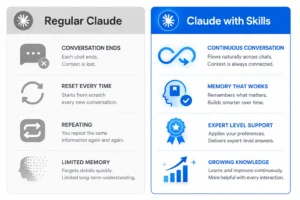
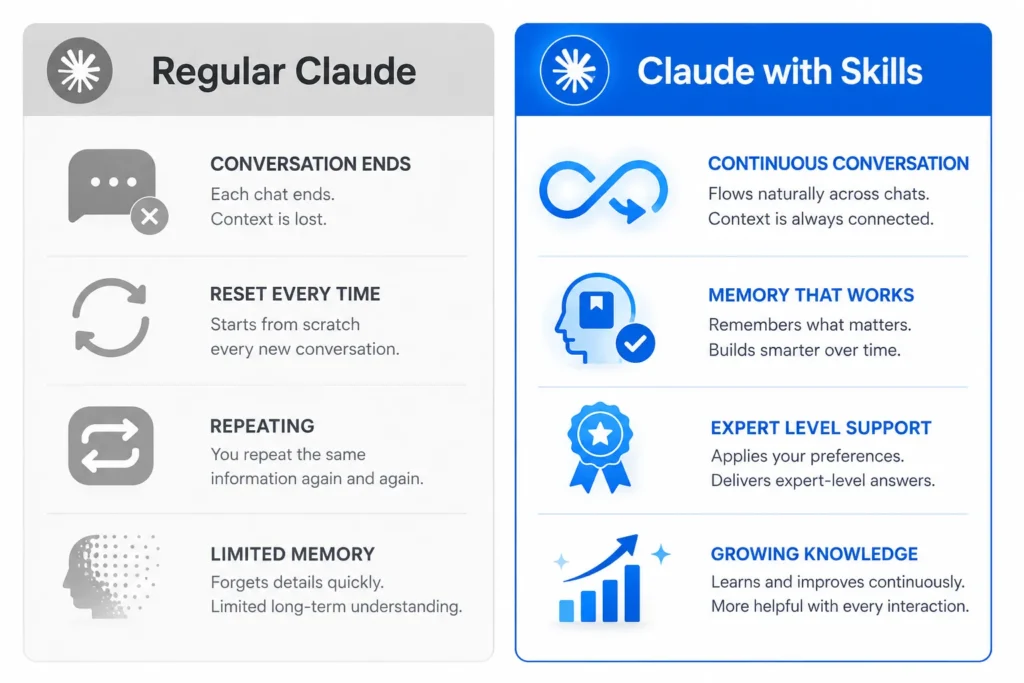
Claude AI skills are permanent packages you install one time. They teach Claude to handle specific tasks at expert level automatically, every single time you need them. They work across all your conversations without losing context. You never repeat instructions twice. Regular prompting works differently. Every conversation resets. You re-explain preferences constantly. They have zero memory between sessions.
How Claude Skills Work vs Everything Else
Think about hiring an accountant for your business. You hire someone with deep experience. They understand the rules. They know the standards. They follow the best practices. They do not need you to explain accounting principles before every task. They just work at expert level independently.
A Claude AI skill functions exactly the same way.
Regular prompting lacks this continuity. Start a fresh conversation and Claude has no memory of what you taught it before. You explain your brand voice. You list your preferences. You state your requirements. You get an answer. Start another conversation tomorrow and you are back at zero. Explaining everything again.
Claude skills carry knowledge forward automatically. Install the skill once. Claude applies that specialized knowledge in every single conversation afterward. Expert outputs stay consistent. The skill stays active without intervention. No repeated explanation. No preference degradation. No gradual quality loss as Claude forgets what matters to you.
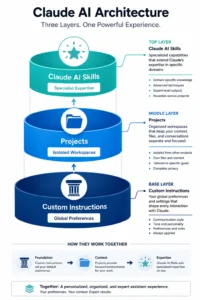
Custom instructions and Claude AI skills are different tools serving different purposes. Custom instructions set global account rules that apply everywhere. Set your tone preference once and every Claude response matches that tone across all conversations. Custom instructions are broad behavioral patterns.
Skills are narrow and deep. They focus on specific workflows. Pair a skill with the right project and Claude performs at consultant level immediately in that exact domain.
The Before and After That Changes Your Perspective
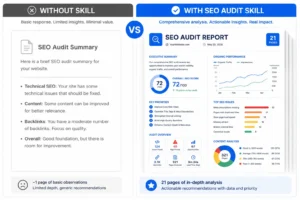
Let me show you exactly what changes when you install a skill. I tested this with a simple website audit.
Without a skill I typed: “Audit this website for SEO issues.”
Claude returned a basic review. Five or six major points. Useful but surface level. Not comprehensive.
With the SEO Audit skill installed I typed the exact same prompt: “Audit this website for SEO issues.”
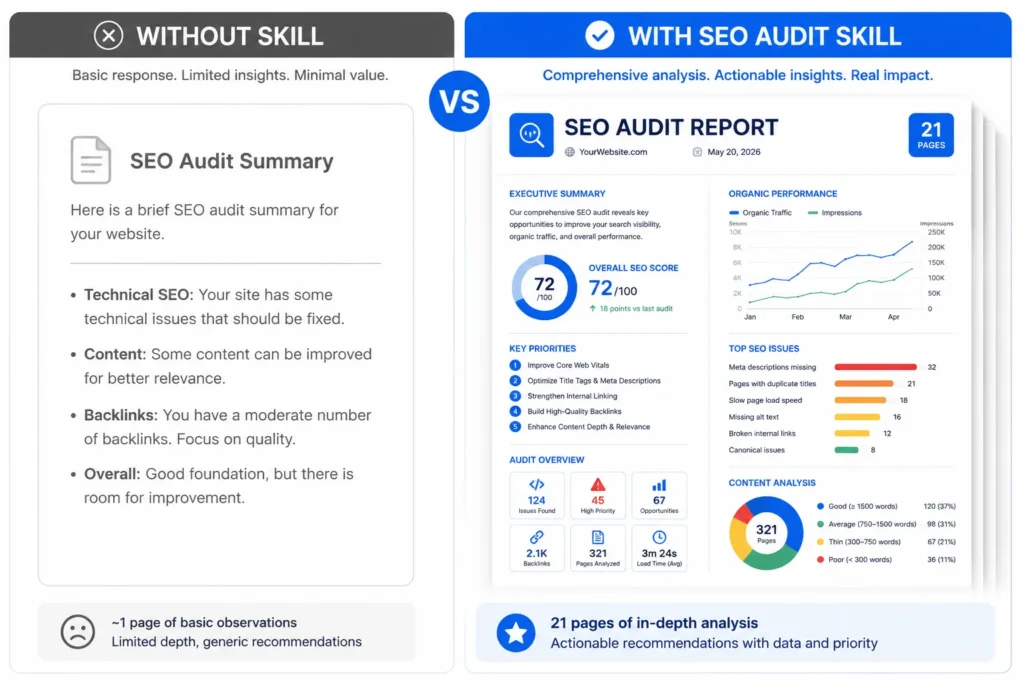
This time the output was a 21-page technical report. Broken redirects identified. Robots.txt configuration errors flagged. Sitemap problems noted. Subdomain fragmentation caught. Priority rankings specified. The findings exported as a downloadable document automatically. I used the identical prompt. The skill changed everything about what Claude delivered.
This demonstrates the fundamental difference. Claude AI skills do not just improve output quality. They change the scope of what becomes possible in a single interaction. If you’re curious about the broader landscape of AI SEO tools beyond Claude, you can explore other AI SEO tools to see how different solutions approach similar problems.
The Three Things You’re Confused About (And How They Actually Work Together)
Three features confuse beginners. I confused them too until I tested them against each other.
Claude AI skills are portable specialist packages you install once. They stay active across your entire account automatically. When you need expert analysis in a specific area the skill activates. Skills are narrow and deep by design. They excel at one thing only.
Custom instructions are different. They set global behavior rules that apply everywhere you use Claude. Set your tone preference here and every Claude response matches that tone. These are wide and shallow. They guide overall behavior without specialized depth.
Projects create isolated workspaces for specific situations. You make a project for a particular client or business initiative. Upload your brand guidelines, your previous work, your audience details into the project. Claude now has project-specific context. Here is what matters: combine projects with Claude AI skills and the output feels custom built. The project provides context. The skill provides expert depth. Together they generate output that feels created specifically for your exact situation.
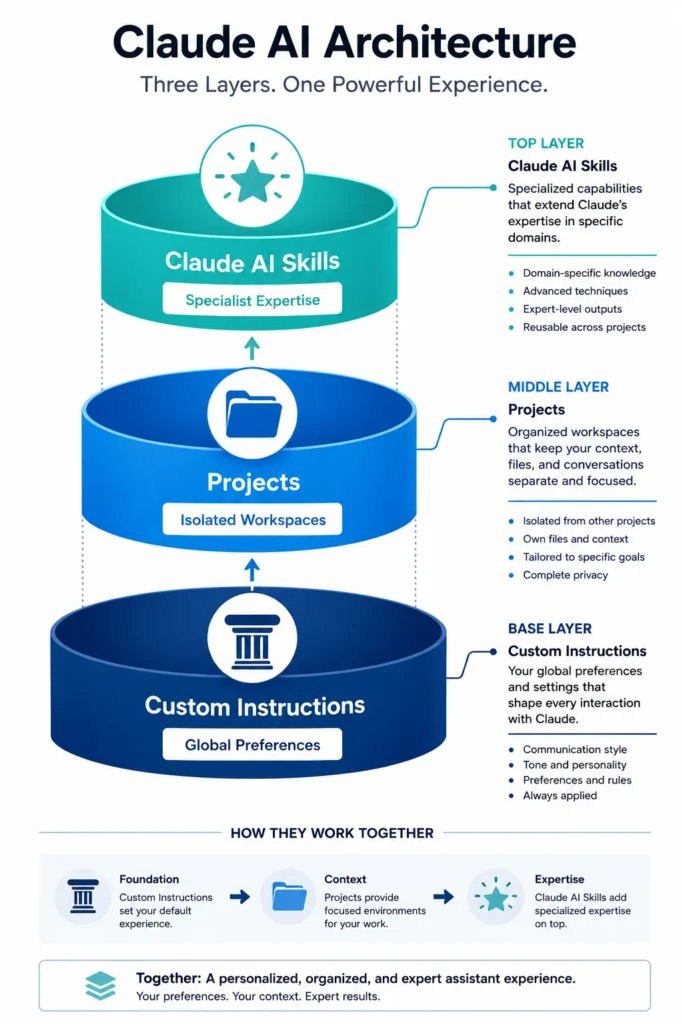
Think of it this way. Your company values and communication style are custom instructions. They apply everywhere. Individual client accounts with their specific brand materials are projects. The specialized expertise of your copywriter, your designer, your SEO specialist working within that framework are skills.
What Actually Makes Up a Claude Skill
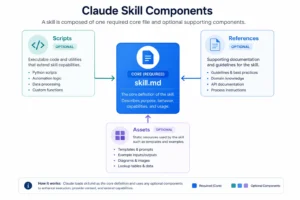
Four components make up a Claude AI skill. Knowing the structure helps you spot quality construction versus poor design.
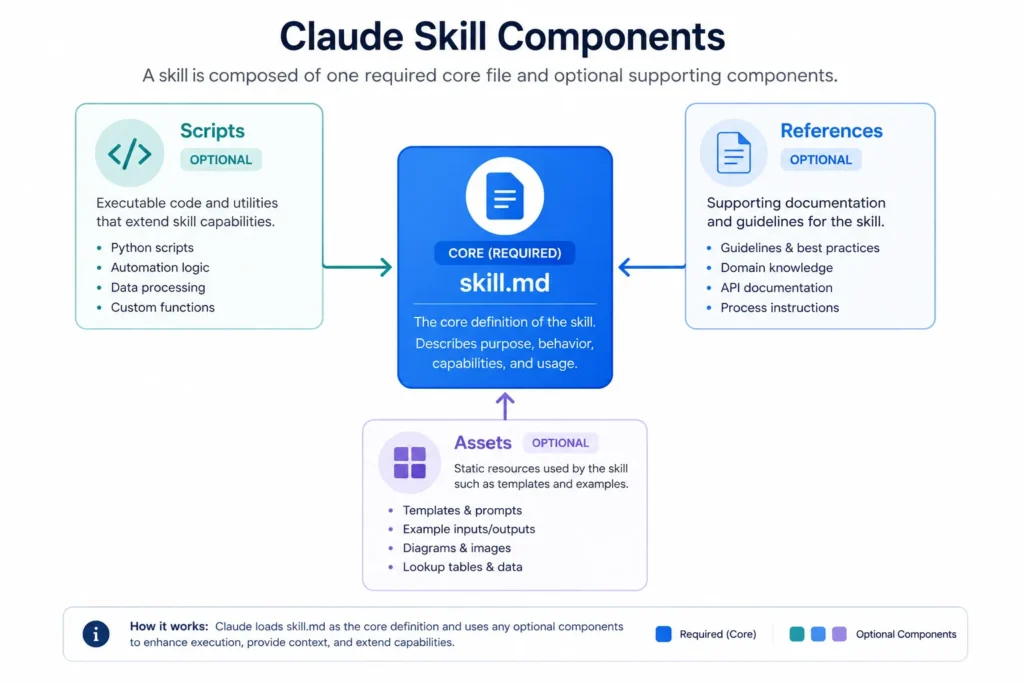
The skill.md file is mandatory. This is the instructions file. Written in Markdown. Contains the prompts, rules, and procedures that define how the skill actually behaves. No skill.md file means you do not have a skill at all. The file is the core.
Scripts are optional but crucial when you need heavy computation. These are executable code written in Python or Bash. They run in the background. While skill.md handles the conversation part, scripts handle the processing work. Need to verify facts with web searches? A script does that. Need to parse large documents and structure the data? A script handles the parsing. The skill.md file chats with you. The script does the heavy lifting.
References are optional documentation files that provide context. Upload your company’s operating procedures, your brand guidelines, technical specifications, whatever background knowledge the skill needs to work properly. When Claude runs the skill it reads these files and applies them to your specific task. This is what creates personalization.
Assets are optional supplemental materials the skill uses to generate complete outputs. Design templates. Brand-approved fonts and color codes. Code libraries. Company architecture patterns. A design skill includes your exact brand aesthetics. A coding skill includes your specific architecture standards.
Most Claude AI skills rely heavily on skill.md as the core. Some add scripts for computationally heavy work. References and assets become critical once you build custom skills for your own workflows. The combination creates depth. A well-constructed skill stops feeling like a tool you use and starts feeling like collaboration with a specialist who understands your exact situation.
How to Find, Download, and Install Claude Skills (Three Methods)
Getting Claude skills into your account is straightforward. Three distinct paths exist. Official tools from Anthropic. Community built skills from other users. Custom skills you create yourself. I will walk you through each path because installation is easier than most people assume.
Method 1: Browse and Enable Built-In Official Skills
Start with Anthropic’s official skills library. These are pre-built, tested, and available immediately with paid access.
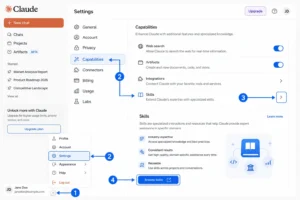
The process takes 90 seconds. Open Claude. Bottom left corner shows Settings. Click Capabilities. Select Skills. Click Browse Skills. The official library opens. That is it.
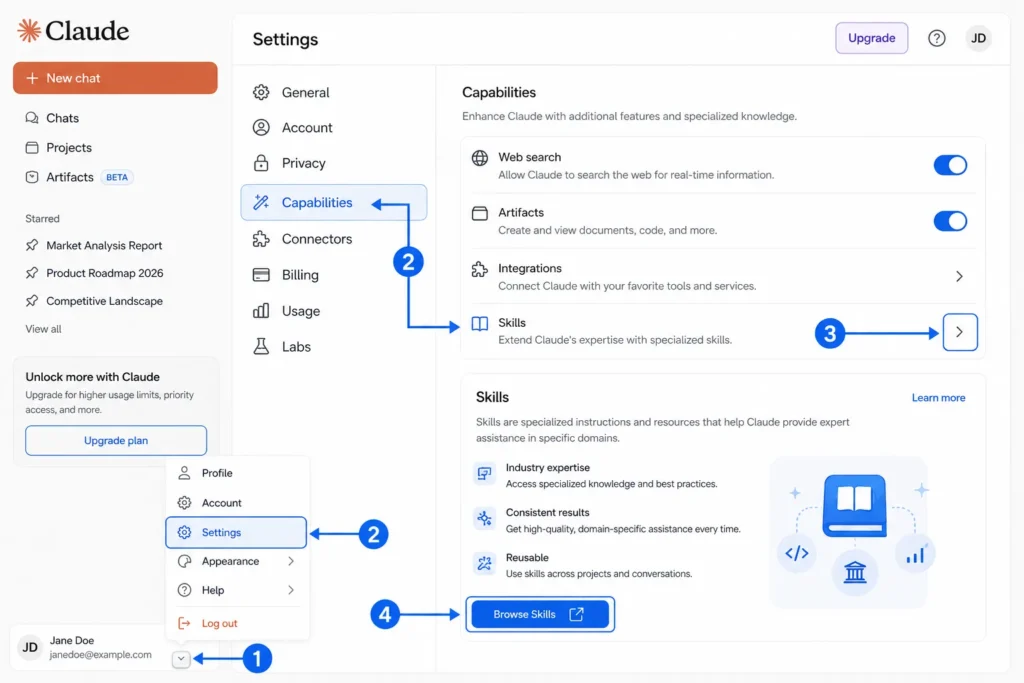
Four core skills should be your starting point as a beginner. Skill Creator lets you build custom skills through conversation without code. Theme Factory applies consistent design to your outputs automatically. Canvas Design creates interactive designs and layouts. Artifacts Builder manages complex code and structured content. These four form the foundation for everything else.
Enable them immediately. They are free. They work right away across Claude Chat, Claude Code, and Claude Cowork. Once activated they stay active and work automatically when you need them.
The official library grows regularly. Browse the full list to see what else connects with your actual work. Every skill has a clear description of what it does and when you should use it.
Method 2: Download From GitHub the Right Way
GitHub contains hundreds of community built Claude AI skills. These are specialized tools for specific industries and workflows created by other users.
The first step is finding the right skill. Search GitHub for your specific task. Look for repositories tagged as Claude skills or Claude agents. Read the description. Confirm it does what you actually need.
Now the part that frustrates most people. Do not download the entire repository. Most repositories contain multiple skills in different folders. Download the whole thing and you will upload dozens of skills when you only need one. Do this instead. Find the specific subfolder containing just the skill you want. Right-click it. Select compress. Create a zip file. Download that single compressed file to your computer.
Upload the file to Claude. Settings menu. Bottom left. Click Capabilities. Select Skills. Click the plus icon. Choose your zip file. Claude processes it. The skill appears in your list and activates automatically. You can use it immediately like any built-in skill.
One critical detail. When testing a GitHub skill mention the skill name explicitly in your prompt. Claude sometimes misses context clues about which skill to activate, particularly with community built tools. Instead of “Analyze this website for SEO issues,” write “Use the SEO Audit skill to analyze this website.” This removes ambiguity and guarantees Claude invokes the correct tool.
Method 3: Build Your Own With a Conversation
Building custom Claude AI skills through conversation is intuitive because Claude guides you through the process step by step.
Start with a new chat. Type “make a new skill.” Claude activates the Skill Creator. It starts asking what you want to build. Describe the workflow you repeat weekly or monthly. Walk Claude through the exact steps. Tell Claude the decisions you make at each point. Specify the output formats you need.
Skill Creator will interview you about details. It asks about your preferences. It asks about your standards. It asks about edge cases that matter. It asks about specific output formats you require. Answer thoroughly because these answers directly shape how well your skill performs.
Here is the single question that improves your final skill dramatically. After answering all of Claude’s questions, ask this: “What else should I clarify before we finish?” Wait for Claude to respond. These follow-up questions catch details you missed. Details that matter.
Claude then generates your skill file. Download it immediately. Upload to your account right away. Test it once. Make sure it works the way you want. If something needs adjustment, go back to your original creation chat. Ask Claude to modify the skill. It will.
The advantage of this approach is you need zero technical knowledge. You do not write code. You do not understand skill architecture. You describe what you want. Claude builds the specialist tool. That is it.
These three methods cover every skill scenario. Official Anthropic tools for proven use cases. GitHub skills for specialized community solutions. Custom skills for your exact workflows. Power users use all three methods together to build a complete Claude AI skill ecosystem that matches their specific work.
The Best Claude AI Skills to Install Right Now
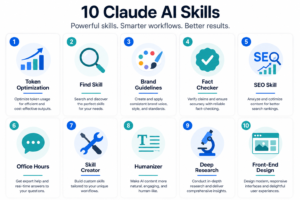
I tested dozens of Claude skills. The ones that actually matter are the ones you’ll use twice a week because they save you time in a specific bottleneck area you deal with constantly. I ranked these ten based on time saved, output quality, and how fast you see measurable improvement in your actual work. While Claude skills dominate my productivity stack, they’re part of the broader AI tools ecosystem, and understanding how they compare to other solutions helps you make informed decisions.
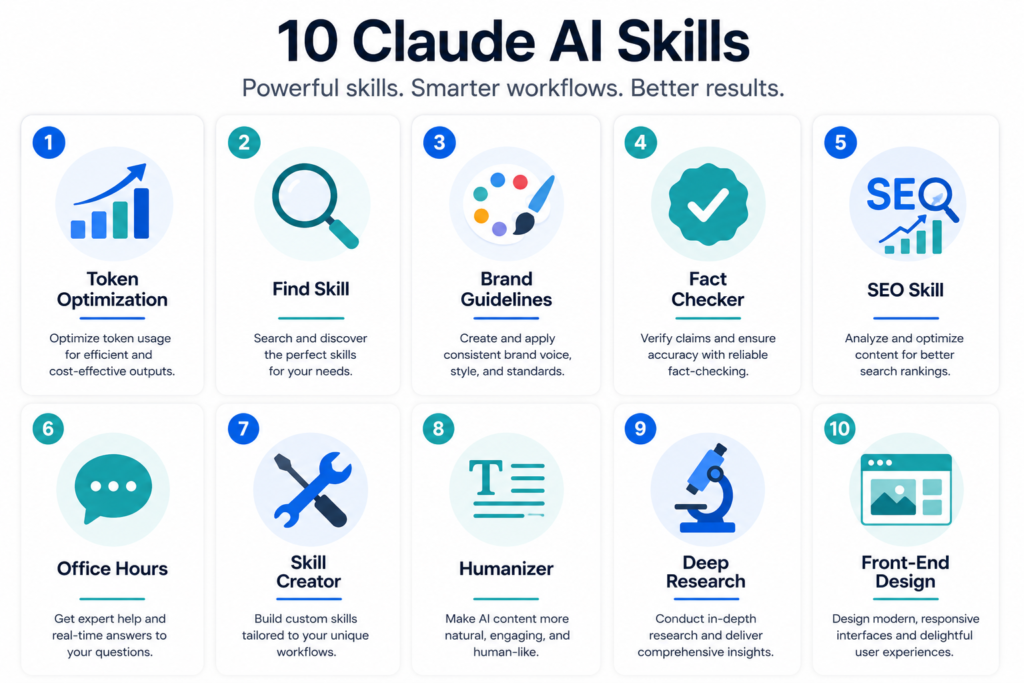
#10 Token Optimization: Process
Token Optimization solves a specific problem. Large documents burn through your monthly token allocation during processing before Claude generates useful analysis. You feed the skill six months of data and watch your tokens disappear on processing overhead instead of getting insights.
I tested this with actual YouTube growth data spanning six months. The skill compressed all that information. It returned an eight-tactic breakdown with direct reference links. Everything fit on one screen. Without the skill the same task would have consumed tokens without delivering the same depth and specificity.
When you work with large files or datasets, Token Optimization becomes essential. The skill compresses information automatically. You get expert analysis without wasting your monthly allocation on processing overhead. Pure efficiency.
#9 Find Skill: The Gateway to 1,000 Tools in Plain English
The Claude library contains over 1,000 skills. Find Skill is your navigator. Describe what you need in everyday language. Find Skill searches the entire library. It routes you to exactly the right specialized skill for your situation.
I observed this in action. Someone wanted to write a LinkedIn post matching their personal brand voice. Find Skill selected an appropriate writing style skill automatically. It asked clarifying questions about tone and audience. It delivered a finished post in 90 seconds. The post matched their actual voice perfectly because the skill understood the requirements completely.
This eliminates endless browsing through the skills library. Find Skill understands intent and executes immediately.
#8 Brand Guidelines: Program Your Brand Once, Never Repeat It Again
Brand Guidelines changes how agencies and freelancers manage multiple clients. Upload one paragraph describing your brand. The skill builds a permanent reference. It includes exact hex color codes. It includes font pairings. It includes voice examples showing what your brand should sound like and what it should not. All automated from a single description.
An agency managing ten different clients created separate brand skills for each one. Now whenever they work in a specific client project the brand skill activates automatically. Every output matches that client’s exact specifications. No manual tweaking. No consistency drift.
This is consistency at scale. One setup per client. Then perfect brand alignment across every output forever.
#7 Fact Checker: 17 Claims Verified in 40 Seconds Including a Fabricated Quote
Publishing content with false information destroys credibility instantly. The Fact Checker skill verifies claims before you hit publish. You do not risk spreading misinformation.
I tested it on a viral corporate post. The skill reviewed seventeen individual claims in 40 seconds. It identified which facts were true. It identified which were inflated. It caught a completely fabricated quote that looked plausible. The verdict card showed confidence scores for each claim with direct source links. Everything verified.
This protects your reputation directly. Run any text through Fact Checker before publishing. You catch errors that manual review would miss. The AI hallucination problem disappears when you verify claims before sharing.
#6 SEO Skill: A Full Competitor Analysis Without the Monthly Retainer
SEO audits normally cost thousands monthly. The Claude SEO skill runs a complete technical audit. Seven different analysis pillars. Competitive comparison included. Everything in one report.
I tested this on Nike versus Adidas. The skill identified broken homepage titles. Mobile zoom issues. AI search readiness scores compared side by side. A second test on a personal website generated a 21-page technical report in seven minutes. The skill caught redirect loops, robots.txt problems, sitemap configuration issues, and subdomain fragmentation that would have taken hours to identify manually.
Replace SEO agency retainers with this skill. You get immediate competitive analysis. The reports are detailed enough for actual implementation.
#5 Office Hours: The Y Combinator Partner That Will Tear Your Business Apart
Office Hours is open-sourced directly from Gary Tan’s framework. He is the president of Y Combinator. This skill adopts a brutal partner mentality. It stress-tests your business assumptions without softening the message.
When tested on a company like Zomato the skill forced uncomfortable questions. Does the user love your service or just tolerate it? It questioned infrastructure assumptions. It suggested alternate pathways that nobody had considered. The questioning style mimics what happens in actual YC partner meetings. Brutally honest. No agreement just because you want it.
Use this skill when you are making major business decisions. You need brutal honesty instead of agreement. It pushes back on weak thinking immediately.
#4 Skill Creator: Build Tools That Did Not Exist Yesterday
Building custom Claude AI skills through conversation sounds impossible until you try it. Skill Creator interviews you about your workflow. It builds a reusable tool in minutes. You describe the problem. Claude packages it as a skill.
The skill generates a side-by-side comparison showing output with and without your custom skill active before you save it. This lets you test performance before committing. Someone used this to build a monthly startup portfolio review tool that evaluates their investments automatically. That tool did not exist yesterday. It exists today.
This is the no-code AI workflow builder that puts customization power in your hands without needing technical knowledge. You think it. Claude builds it.
#3 The Humanizer: 25 to 29 Patterns That Give AI Writing Away
AI detection is getting more aggressive. Readers notice robotic writing instantly. The Humanizer skill identifies 25 to 29 specific patterns that flag content as AI-generated. Then it removes them.
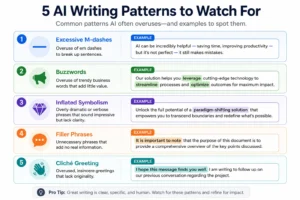
The patterns include excessive M-dashes, overuse of words like leverage and streamline, inflated symbolism, and filler phrases. One version includes a personal writing sample feature. It maps your unique sentence rhythms and word choice patterns. The output sounds like you wrote it. Not like AI tried to sound like you.
Every content creator should use this before publishing. It transforms generic AI output into writing that reads like a real person created it. Readers trust human-written content more than AI-generated content.
#2 Deep Research: $623 Million Market Map in 8 Minutes
Market research normally takes weeks. Deep Research spins up multiple agents in parallel. It conducts simultaneous research. Market size data. Competitor profiles. Funding information. Pricing strategies. All at once.
I watched it work on a meeting notes app concept. The skill mapped a $623 million market opportunity. It profiled the competition. It identified five distinct market gaps. It recommended pivoting toward engineering managers instead of sales managers. All of this happened in eight minutes. Consultants would take weeks to complete this research.
This compresses research timelines dramatically. Use this when you need market intelligence before making investment decisions. The speed is genuinely shocking.
#1 Front-End Design: From a Single Paragraph to a Production Dashboard in 10 Minutes
Front-End Design is the official Anthropic skill installed by over 277,000 users. It produces production-grade interfaces from simple text descriptions. Standard AI cannot match what this skill delivers.
I tested it with a single paragraph describing a dashboard concept. Ten minutes later the skill generated a fully interactive interface. Animated hover states. Pulsing audio waveforms. Working integrations with Slack, Gmail, and Notion. The design quality was professional. Zero generic AI aesthetic. Production ready.
This skill separates professional from amateur AI-generated design. Use it when you need production ready interfaces fast. You do not have a design budget. The skill delivers immediately.
How to Make AI Writing Sound Like a Human Wrote It
Most AI-generated writing feels stiff immediately. The phrases are rigid. Sentence patterns repeat. Words like leverage and streamline appear constantly. Readers spot it. Your credibility suffers. The Claude Humanizer skill solves this. It identifies the exact patterns that flag AI writing. Then it removes them.
I tested this on dozens of AI-generated emails and blog posts. The transformation was dramatic. Generic corporate language became direct. Inflated phrases became simple. Obviously artificial writing read like a real person created it. The difference was visible immediately.
The AI content humanizer works by detecting specific writing patterns humans almost never produce. The Humanizer skill identifies 25 to 29 distinct patterns. Different versions flag different counts. Once you know what these patterns are you notice them everywhere in AI content. They become obvious.
What These Patterns Actually Are:
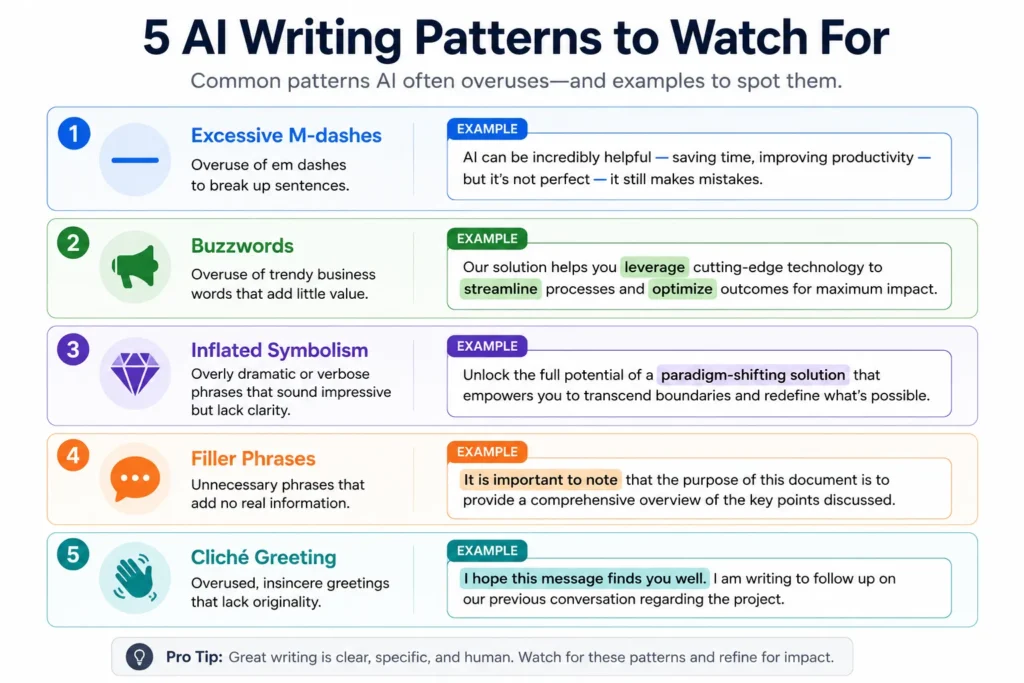
M-dashes appear constantly in AI writing. AI breaks thoughts into fragments connected by dashes instead of using periods or commas. Real writers vary their punctuation. AI defaults to dashes when structure feels uncertain.
Buzzwords like leverage and streamline appear far too frequently. AI training data contains thousands of business articles using these terms repeatedly. When generating business content AI gravitates toward them. Real writers develop distinct vocabulary. They avoid repeating the same words.
Inflated symbolism pads sentences. Phrases like “in today’s fast-paced startup landscape” or “the digital transformation era” sound corporate and hollow. Real writers get straight to the point. Theatrical language does not appear.
Filler phrases slow reading down. “It is important to note that” or “it is worth mentioning that” appear constantly. These add words without information. Real writers eliminate them to maintain pace.
The greeting “I hope this message finds you well” is so common in AI emails it became a cliché. Real people rarely write this unless drafting very formal letters. Most actual human emails skip greetings or use more casual openings instead.
How the Humanizer Analyzes Your Personal Writing
The personal writing sample analysis is the most powerful feature of the Claude Humanizer skill. Upload a few examples of your actual writing. The skill maps your unique patterns. Then it applies those patterns to AI-generated content automatically.
The skill identifies your sentence rhythm. Do you write in short bursts or longer flowing sentences? Real writers develop distinct cadences. AI cannot replicate these without analysis. The Humanizer learns your pattern and applies it directly.
The skill notes your word choice preferences. Some writers favor simple words. Others use sophisticated vocabulary. Some repeat certain words for emphasis. The Humanizer detects these choices. It ensures AI outputs match your actual style.
The skill recognizes your structural quirks. Do you start sentences with dependent clauses? Do you end paragraphs with short punchy sentences? Do you use contractions frequently while avoiding formal phrasing? These quirks make writing authentically yours. The Humanizer learns them from samples and applies them automatically.
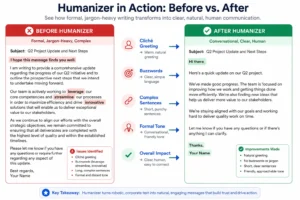
The Before and After Transformation
Here is what the Humanizer actually does in practice.
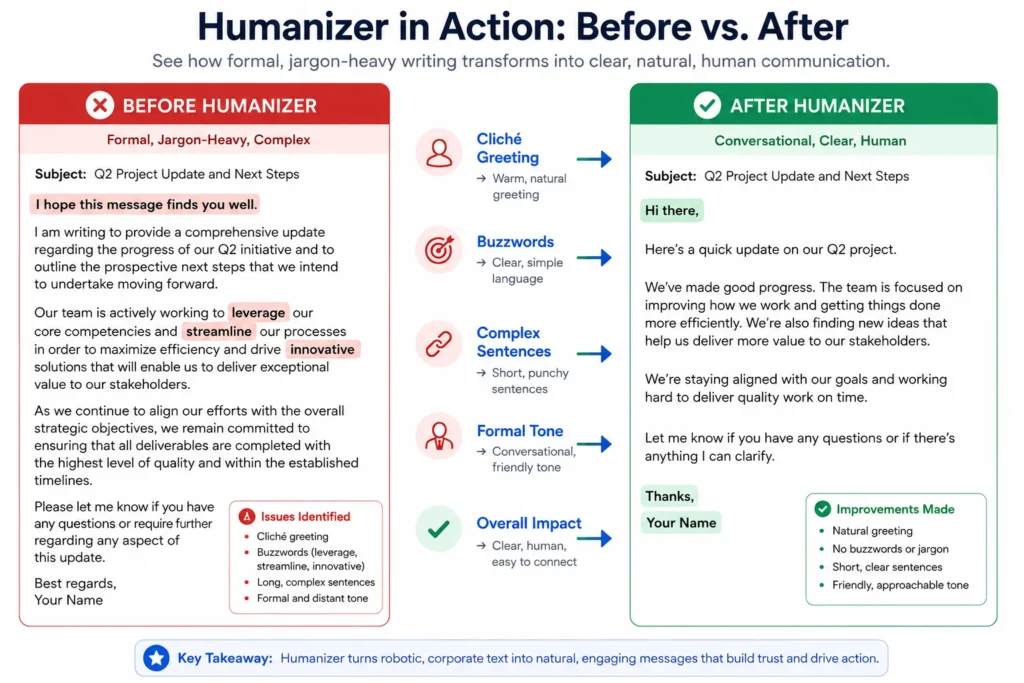
Before Humanizer:
“I hope this message finds you well. It is important to note that leveraging our innovative solutions can streamline your business processes. In today’s fast-paced digital landscape, organizations that fail to adopt AI will fall behind. We encourage you to consider the transformative potential of our platform and how it can revolutionize your operational efficiency.”
After Humanizer:
“Hi there. Our tools solve real problems in your business. Companies that ignore AI now will struggle later. Take a look at what we offer and see if it makes sense for your situation.”
The humanized version removes flowery language. It gets straight to the point. Contractions appear. Casual phrasing appears. Corporate buzzwords disappear. An actual person sounds like they wrote this version. The reader trust factor increases immediately.
Using the Humanizer in Your Content Workflow
The Claude Humanizer skill works best as a final step before publishing anything AI-generated. Write your draft with Claude. Get your structure and ideas solid. Then run the full text through the Humanizer skill.
The skill generates a report showing which patterns it detected and how it changed them. You can accept all changes or adjust specific sections if something feels off. This gives you control while removing the obviously artificial elements.
For content creators who publish frequently this becomes part of your normal editing process. Draft with Claude, humanize the output, then publish. The process takes minutes and eliminates the AI-written quality that hurts engagement.
The personal writing sample feature works best when you feed it multiple examples of your best writing. The skill learns your voice better with more examples. Three or four representative samples gives the Humanizer enough data to match your authentic style.
Why This Matters for Your Publishing
Readers trust human-written content more than AI-generated content. AI detection tools exist now and readers use them. If your content fails an AI detection check readers dismiss it immediately. The Humanizer prevents this by making AI-generated content genuinely sound human-written.
This is not about deception. You can disclose that AI helped with your writing. The humanization just ensures the final output reads naturally and maintains reader trust. AI writing quality control through humanization protects your reputation and keeps readers engaged.
Professional AI content humanizer tools like the Humanizer skill represent the bridge between AI efficiency and human authenticity. You get the speed of AI generation combined with the trust factor of human-sounding writing.
The Secret to Getting Expert Answers The GPS Framework
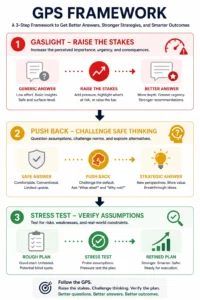
The GPS framework is a three-step methodology. GPS stands for Gaslight, Push Back, and Stress Test. It forces Claude to stop generating safe generic responses. It forces Claude to deliver genuinely strategic thinking instead. This works because it exploits how AI models actually behave when faced with pressure and real professional consequences.
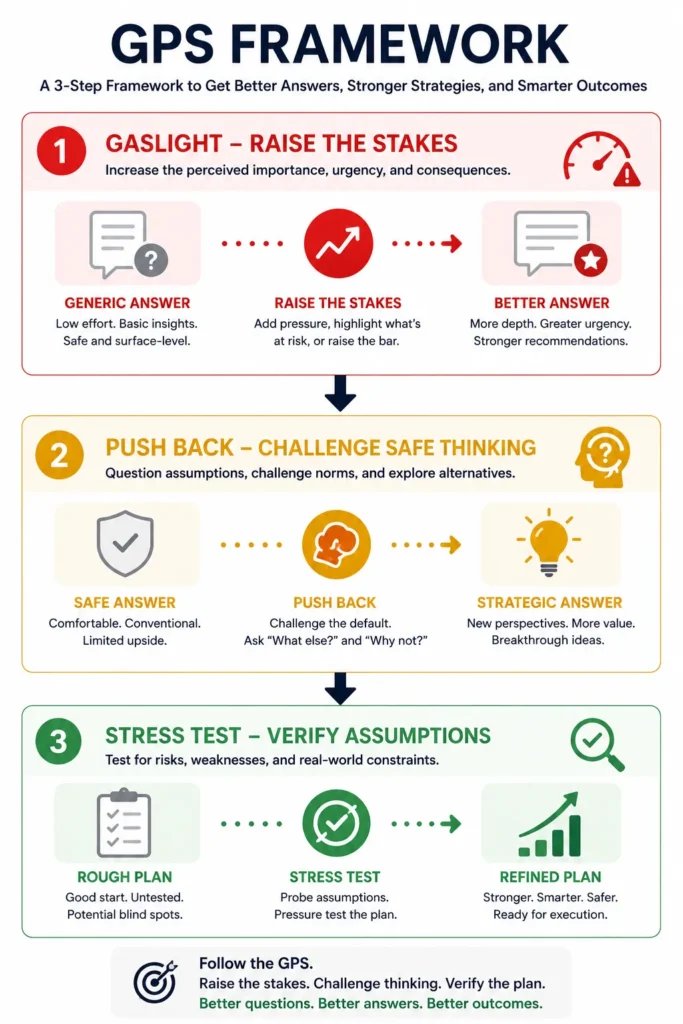
I tested this framework when evaluating Claude’s advice on major business decisions. Standard prompts gave me textbook answers that sounded safe. They were useless. I applied the GPS framework to the identical questions. Claude produced insights that changed how I think about the problems entirely.
The science behind why this works starts with observation. Sergey Brin, Google’s co-founder, noted that AI models perform better when the stakes feel real. AI models were trained on human language which carries emotional weight. When you raise professional stakes in your prompt, Claude focuses differently. It stops generating safe responses. It generates genuinely strategic thinking.
G: Gaslight Your AI (Why Raising the Stakes Changes the Answer)
Gaslighting means framing your prompt with real professional consequences. This is not about being mean to the model. This is about creating an environment where generic advice fails. The situation demands genuine expertise.
I tested this with a CFO pricing problem. My first prompt was simple: “I want to raise prices by 30 percent for top clients who generate 80 percent of revenue. What should I do?”
Claude gave a standard answer. Typical pricing advice. Surface level.
Then I reframed with real stakes: “I am advising a CFO with 20 years of experience. She has zero patience for generic answers. She will spot fluff immediately. Walk me through this pricing analysis for her.”
The response shifted dramatically. Claude identified mathematical risks immediately. It noted that losing specific large accounts would be catastrophic. Instead of flatly raising prices it suggested repricing contracts into tiers. Speed-based tiers. Access-based tiers. Seniority-based tiers. The entire analysis became concrete and actionable.
I pushed further: “If I act on this and it is wrong, I lose a client generating 40 percent of my revenue. Reread your answer with that consequence in mind.”
Claude backed down from the aggressive approach completely. It created an isolated strategy for that major account. It switched the 30 percent jump to a conditional value expansion. Price increases tied directly to faster delivery. It suggested testing on smaller clients first before rolling out broadly.
The same question. Three progressively better answers as stakes increased. This is the power of gaslighting. Frame your prompt around real consequences. Claude rises to meet the challenge. That is how Claude AI skills perform at genuinely strategic levels instead of baseline.
P: Push Back (Breaking the AI’s People-Pleasing Default)
Claude is designed to please you and agree with you. Breaking that pattern requires explicit pushback on the first response. Challenge the answer. Force Claude to think deeper.
I tested this with YouTube growth strategy. I asked how to grow a channel from zero to 10,000 subscribers. Claude gave standard advice. Thumbnail optimization. Niche selection. Hook techniques. All typical.
Then I pushed back: “That is a generic answer. Give me an insight that someone who has actually worked in this for 10 years would find non-obvious.”
Claude shifted completely. It moved past surface advice to genuine insight. Real competition is not about quality. Real competition is about cognitive processing speed. YouTube tests videos on tiny audiences first. Real retention comes from unresolved tension in your script. Not flashy editing. Unresolved tension.
I tested the same pushback strategy with LinkedIn growth. I asked for a 90-day plan to grow from 1,000 to 50,000 followers. Claude gave me basic engagement tips. I challenged it directly: “If my biggest competitor read this plan right now, what would they do to exploit its weaknesses?”
Claude identified the plan’s vulnerabilities immediately. It reframed the entire strategy to defend against competitive attacks.
Pushback forces Claude away from people-pleasing. It forces Claude toward genuinely useful competitive thinking. The second response is always better than the first because you have forced Claude to think like an actual expert instead of a helpful assistant.
S: Stress Test (The 90-Second Loop That Turns Drafts Into Real Plans)
The stress test phase runs three consecutive checks. Each one catches hidden assumptions in Claude’s responses. The entire sequence takes 90 seconds.
First: Run a Gap Check
After getting a response ask Claude what you missed. Ask: “Look at my original question and your answer together. What gaps exist? What should I have asked you so you could give me an even better answer?”
Claude identifies missing context immediately. Feed these details back into the next prompt. Your next response improves measurably. Example: asking about hiring an editor for a YouTube channel. Claude identifies you need to specify current channel metrics, exact bottlenecks, and long term business goals. Providing these details generates a completely different recommendation. Better recommendation.
Second: Run a Bias Sweep
Ask Claude to verify its answer again. Specify: “Check specifically for confirmation bias, recency bias, and survivorship bias. Are you giving me the right answer or the comfortable one?”
Claude catches its own mistakes. It admitted suffering from confirmation bias. It assumed editing was the bottleneck without reviewing title packaging. It caught survivorship bias. It had focused only on creators who successfully scaled teams. It ignored failures where quality dropped when outsourcing started.
Third: Inject Real Consequences
Ask the final pressure question: “If I follow this advice and it is wrong, I lose six months of momentum and have to onboard someone new from scratch. Given those consequences, what would you change?”
Claude completely rewrote its original hiring recommendation. It warned that editing at scale requires creative instinct. You cannot offshore this in 30 days. It dictated a strict testing structure. Outsource two videos completely. Edit two videos internally. Audit click-through rates and retention metrics. Only then make the hiring decision.
Three checks. Ninety seconds total. The rough draft becomes genuinely actionable.
Why the GPS Framework Multiplies Claude Skills Performance
Every Claude AI skill produces better outputs when prompted with the GPS framework. The framework forces Claude to stop generating baseline responses. It forces Claude to generate expert level analysis instead.
Combine the GPS framework with any Claude skill to multiply its effectiveness. Use GPS with Deep Research and you get more strategic market insights. Use GPS with the SEO skill and you catch technical issues competitors miss completely. Use GPS with the Fact Checker skill and you verify claims at a deeper level with higher confidence.
The GPS framework works with Claude, ChatGPT, Gemini, and any comparable large language model. It works because it exploits a fundamental pattern in how AI models behave. Raise the stakes. Challenge safe thinking. Run verification checks. Claude responds with measurably better analysis every single time.
Once you internalize GPS you stop asking Claude for quick answers. You start asking Claude for strategic thinking. That shift is where the real value emerges because the outputs move from helpful to genuinely strategic.
The Skill That Gets Smarter Every Time You Use It
Most people treat Claude like a calculator. Input a question. Get an answer. The interaction ends. Next week you need something similar. You start fresh. Explaining everything again. This repetition is where most Claude users miss the biggest compounding improvement opportunity.
The learnings.md pattern transforms Claude from a static tool into a personalized system. It gets smarter every single use. This is not a Claude skill you install. This is a design pattern you implement alongside any skill. It is one of the most powerful concepts in the entire Claude ecosystem. Almost nobody knows about it.
How learnings.md Creates Institutional Memory
The setup is simple. Create a text file named learnings.md. Place it in the same folder as your custom skill file. Add one directive to your skill instructions. Before running read learnings.md and apply all documented preferences. That creates a system where Claude learns from every interaction.
When you run your skill Claude reads learnings.md first. It sees all your previous corrections, preferences, and stylistic choices. Claude applies all of them to the current task automatically. You never explain your preferences twice. Ever.
At the end of each completed task Claude updates learnings.md with new entries. It logs what you corrected. What worked well. What you prefer. Any new patterns it learned about your work. These entries build over time. They create a growing knowledge base specific to your exact needs.
The compounding effect is measurable. After a week using a skill with learnings.md you have documented preferences improving every output. After a month you have a comprehensive system anticipating your needs. After three months the skill understands your work at a level that approaches real personalization.
Why This Beats Repeating Instructions Every Session
Most Claude users repeat the same instructions constantly. Explain your brand voice in one chat. Explain it again in the next chat. Explain it again the next time. Repetition wastes time. Explanations get shorter and less precise each time. You lose detail with every retelling.
The learnings.md pattern eliminates this completely. Your preferences are documented once and applied forever. Claude remembers everything you have taught it about your situation.
I tested this with a content creation skill. Without learnings.md I explained my preferred tone, my brand voice, my target audience, and my style guidelines in the first prompt of every single session. With learnings.md Claude applied all these preferences automatically the moment I started. I saved five minutes per session just from not repeating basic information.
The compounding effect grows over time. Each correction makes Claude smarter. Each preference specified gets documented. Each skill use applies all accumulated knowledge. This is genuine improvement not just time savings.
Building Your Own learnings.md From Scratch
Build your learnings.md file starting with fundamental preferences. Document your brand voice guidelines. Add your writing style preferences. Add your target audience profile. List any recurring corrections you make. Everything that defines how you work.
Format the file simply. Use dated entries so Claude knows when you learned something new. Use clear categories so information is easy to scan. Include specific examples of what you want and what you do not want.
Example entries look like this:
Prefers short punchy sentences over long flowery descriptions.
Avoids corporate buzzwords like leverage and streamline.
Requests all outputs include specific data or examples not generic statements.
Wants technical content explained simply without jargon.
After every session using the skill review what Claude generated. Log any corrections that came up. Log any preferences you specified. This builds the file into a comprehensive system of your exact needs and preferences. The file grows naturally as you work.
The Compounding Nature of Institutional Memory
This is where learnings.md becomes genuinely powerful. Each piece of information compounds with all the previous information. Your skill does not just apply your latest preference. It applies your entire history of preferences working together as an integrated system.
A skill without learnings.md generates the same quality output every time. It has no memory of your preferences. A skill with learnings.md improves measurably every week. It accumulates institutional knowledge about your exact situation. The difference is dramatic.
Maintaining a learnings.md repository shifts your environment completely. You move from a static calculator producing baseline outputs into a personalized system that understands you better each time you use it. The outputs improve. The intelligence improves. Everything improves.
This separates power users from casual Claude users. Power users build learnings.md files alongside every important skill they create. They invest five minutes documenting preferences after each session. Over months this creates a personalized system that feels custom-built for their exact work. Not static. Not generic. Custom.
The Skill That Gets Smarter Every Time You Use It
I discovered something remarkable after testing dozens of Claude skills. Most people use them the same way every time and get the same baseline results. But one design pattern transforms Claude from a static tool into a system that genuinely improves with repeated use. The learnings.md approach is not a skill you install. It is a methodology you layer underneath any skill to create institutional memory that compounds over time.
Building Institutional Memory With learnings.md
The learnings.md system works by creating a permanent record of your preferences that Claude reads before every task. Create a simple text file named learnings.md and place it in the same folder as your custom skill file. Add one directive to your skill instructions: “Before running, read learnings.md and apply all documented preferences.”
That single line creates something powerful. Claude now has access to everything you have taught it about your work style, your preferences, and your requirements. Every time you use the skill Claude reads this file first and applies all accumulated knowledge automatically.
Here is what happens in practice. You run your skill and Claude generates output. You review the output and notice something you want to improve. Instead of forgetting about it after that session, you document the correction in learnings.md with a dated entry. The next time you use the skill Claude sees that entry and applies the preference automatically.
Over time learnings.md grows into a comprehensive system of your specific needs. Claude learns your preferred tone, your writing style, your target audience, your technical requirements, and any recurring corrections you make. Each interaction feeds new information into the file making the skill smarter with every use.
Why This Beats Repeating Yourself Constantly
Most Claude users repeat the same instructions in every conversation. They explain their brand voice once. Then they explain it again in the next session. Then again the time after that. This repetition wastes time and dilutes precision with each retelling.
The learnings.md approach eliminates repetition entirely. You document your preferences once and Claude applies them forever. No more explaining the same guidelines over and over. No more watching your explanations get shorter and less detailed as you get tired of repeating yourself.
I tested this with a content creation workflow. Without learnings.md I spent the first five minutes of every session reestablishing my preferred tone, my brand guidelines, my audience profile, and my style requirements. With learnings.md Claude automatically applied all these preferences the moment I started the skill. That five minute saving adds up to hours per month.
The no-code AI workflow builder mentality shifts when you implement learnings.md. You move from managing individual tasks to building a personalized system that understands your specific situation.
How To Start Building Your Own learnings.md
Begin with a simple structure that documents your most important preferences. Use clear categories and specific examples. Include what you want and what you want to avoid.
Start your learnings.md file with dated entries like this: “User prefers short direct sentences over complex flowery language. User avoids corporate buzzwords including leverage and streamline. User requires specific data or examples not generic statements. User wants technical content explained simply without jargon. User prefers contractions and conversational tone in professional writing.”
After each session review what Claude generated and add new entries to learnings.md. If Claude made a mistake, document it. If Claude did something well, note what worked. If you had to correct something, log that correction. This builds your institutional memory.
The file grows naturally as you use the skill. After a week you have documented ten important preferences. After a month you have fifty documented patterns. After three months Claude understands your work at a level that feels genuinely personalized.
The Compounding Power of Accumulated Knowledge
This is where learnings.md becomes genuinely transformative. Each piece of information you document compounds with everything else. Your skill does not just apply your latest preference. It applies your entire history of preferences working together as an integrated system.
A skill without learnings.md generates the same quality output every time because it has no memory of your preferences. A skill with learnings.md improves measurably every week because it accumulates knowledge about your exact situation.
The true difference maker is maintaining a learnings.md repository. This shifts your environment from a static calculator producing baseline outputs into a compounding personalized system that understands you better each time you use it.
This is what separates power users from casual Claude users. Power users invest five minutes after each session documenting preferences into learnings.md. Over months this creates a large language model workflow that feels custom built for their exact work and automatically improves.
Connect Claude to Your Real Business Apps With MCP
Model Context Protocol is a secure bridge. It lets Claude read and write data directly from your business applications. This is where Claude AI skills move beyond text generation. They become actual tools working inside your existing software ecosystem. MCP connections transform Claude from an isolated chatbot into an integrated system. It pulls real data from Gmail, QuickBooks, Outlook, and your CRM systems. Then it acts on that information automatically.
I tested MCP connections with email and accounting workflows. The capability is powerful because Claude gains access to live business data without leaving the Claude interface. You ask Claude to summarize your emails and it actually reads your inbox. You ask Claude to analyze your expenses and it pulls QuickBooks data and generates tax insights. The difference is concrete. Claude talking about your business versus Claude actually working inside your business. Those are completely different capabilities.
How to Connect Gmail to Claude in Three Steps
Gmail integration with Claude is straightforward. The process is designed for non-technical users.
Open Claude. Look for the Search and Tools icon. It appears as the second icon from the left in your chat input box. Click it. A list of available integrations appears.
Select Gmail Search from that list. Follow the account authorization prompt. Gmail asks permission to let Claude access your email. Approve the request. Your Gmail account is now connected. Claude can read your emails directly.
Once Gmail is connected you can ask Claude to do email work. Type a prompt like “Gmail summary yesterday.” Claude scrapes your unread emails from the past day automatically. It compiles an executive summary of what needs your attention. It drafts response templates for each message. This saves tremendous time if you manage high email volume.
Claude understands your Gmail inbox structure. It reads subjects. It identifies importance. It prioritizes what you should handle first. You can customize this further by creating a new skill with Skill Creator. Bundle Gmail parameters into your specific workflow. This creates a permanent email management tool inside Claude.
QuickBooks, CRM, and Beyond: What Else MCP Can Connect
Gmail integration is the starting point. The same Model Context Protocol approach works with QuickBooks Online for financial management. A custom skill linked to QuickBooks can pull your monthly business expense reports and synthesize tax insights automatically. You do not need an accountant for this anymore.
I tested this with a small business accounting scenario. Claude pulled three months of expense data from QuickBooks. It categorized the expenses properly. It identified tax deductible items. It generated a summary report showing tax liability estimates. This normally requires an accountant to review manually. Claude delivered the same analysis in minutes. The speed was the real shock.
Claude AI skills become powerful when you connect multiple systems. Connect Gmail for email management plus QuickBooks for accounting plus your CRM for customer data and Claude becomes an integrated system that works across your entire business infrastructure. Not isolated tools. A connected ecosystem.
Other business applications support MCP connections. Outlook for enterprise email. Salesforce for customer relationship management. Various project management tools. Each connection follows the same pattern. Authorize the application. Create a skill around the data you need. Claude gains access to that live data. The pattern stays consistent across every integration.
Data privacy matters when connecting real business applications. Review what permissions Claude needs to access. Only grant access to the specific data you want Claude to work with. Anthropic’s security model keeps your data protected during the integration process. The architecture is sound.
The Claude API features that enable MCP connections represent a fundamental shift in how AI assistants work. Instead of Claude being isolated from your business tools, Claude becomes part of your actual workflow automation software stack.
How to Use AI for Job Hunting in 2026 Without Paying for a Single Subscription
Recruiters spend six seconds scanning a resume. That brutal reality means your application fails before anyone reads beyond the first glance. The traditional approach wastes your time and theirs. Upload one generic resume to multiple job boards and watch nothing happen.
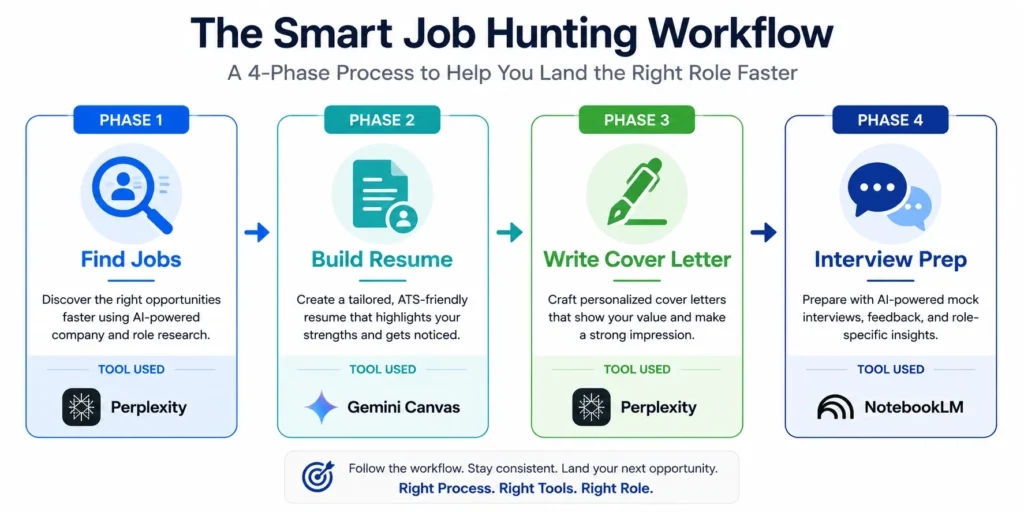
There is a completely free AI job hunting system using Claude and other AI automation tools 2026 that works around this limitation. It automates research. It tailors every application. It prepares you for interviews at a level most candidates never reach.
I built this system using free tools that already exist. No paid subscriptions. No LinkedIn premium. No fancy job board memberships. Just strategic use of Claude AI skills and free AI tools to handle work that normally takes weeks or months and compress it into days.
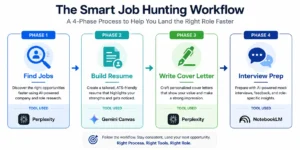
Phase 1: Find Matching Jobs Without Opening 50 Browser Tabs
The first phase solves the discovery problem. Job boards show hundreds of listings. Most are not right for you. Opening tabs for each one and comparing manually takes forever.
Use Perplexity AI inside the Comet browser to automate job discovery. Upload your LinkedIn profile or paste a summary of your experience. Ask Perplexity to review your profile against live job market listings. Ask it to score each role by percentage fitment. You get objective match percentages for every opportunity.
Perplexity returns results like this: Senior Marketing Manager at TechCo is 87 percent fit based on your experience. Director of Growth at StartupX is 72 percent fit. This scoring system focuses your effort on high probability applications. Apply to positions where you actually meet the requirements.
You only pursue positions where your background genuinely aligns with what they need. This saves time. It dramatically improves your application quality because you are not stretching to fit roles that require skills you lack. The strategy is filter before you apply, not apply then filter.
Phase 2: Build a Resume That Actually Passes ATS Filters
Applicant Tracking Systems scan resumes for keywords before humans ever see them. Most resumes fail because they use wrong formatting or missing keywords from the job description.
Use Gemini Canvas to build your resume using LaTeX formatting. LaTeX produces geometric precision that ATS systems read cleanly. More importantly it forces clean structure that passes keyword filtering automatically.
The critical step is tailoring. Paste the exact job description into Gemini Canvas. Ask it to tailor your resume for that specific role. Gemini identifies keywords from the job description. It ensures your resume includes them naturally. It restructures your experience bullets to highlight relevant skills first.
Request one thing from Gemini: condense everything onto a single page. Recruiters dismiss multi-page resumes instantly. ATS systems process single-page documents more reliably. A one-page resume signals focus and confidence about your most valuable experience.
I tested this strategy against generic resumes submitted to the same positions. Tailored single-page resumes made it past ATS screening. Generic versions were filtered out automatically. The difference was dramatic.
Phase 3: Write a Cover Letter That References Their Last Public Statement
Generic cover letters get deleted immediately. Personalized letters that reference a CEO’s recent article or announcement create genuine connection immediately.
Use Perplexity AI to research your target executive. Search for recent LinkedIn posts, company announcements, and public interviews from the hiring manager or CEO. Perplexity finds this information and summarizes it. Ask Perplexity to draft a cover letter that references these specific initiatives.
I tested this targeting Dario Amodei at Anthropic. Perplexity researched recent statements about AI safety and company direction. The resulting cover letter referenced specific initiatives and showed genuine knowledge of the organization. This stands out dramatically compared to template letters that every other candidate sends.
Perplexity generates 80 percent of the letter. You generate 20 percent. Review Perplexity’s draft. Add personal voice. Add specific details about why you care about this particular role at this particular company. The combination is powerful.
Phase 4: Practice Interviews Against the CEO’s Own Intellectual Framework
Interview preparation normally means generic practice questions. The approach misses something fundamental. You should practice against the actual thinking framework of the person interviewing you.
Use Google NotebookLM to create an interview simulation. Upload company documents, recent earnings calls, CEO essays, and blog posts into a NotebookLM workspace. Use the audio overview feature to convert these documents into a two-person podcast format. The podcast discusses company direction and philosophy. You learn the company’s actual intellectual framework.
Ask NotebookLM to act as an interviewer. Ask it to quiz you on topics relevant to the company based on these documents. Practice answering questions out loud. NotebookLM gives real-time feedback on your responses. You learn what answers resonate and what falls flat.
This interview preparation approach works because you practice against the actual intellectual framework of the company. Not generic interview questions. You develop genuine knowledge of what the organization cares about and why. That knowledge comes through in the actual interview.
The four-phase system is entirely free. It increases your odds of landing interviews at companies where you fit well and your background aligns with their needs. The strategy removes the randomness from job hunting. If you want to explore how this Claude-based approach compares with other solutions in the market, you can review the best AI recruiting tools to see how different platforms approach the job hunting challenge.
Claude vs ChatGPT for Productivity in 2026: An Honest Comparison
Is Claude actually better than ChatGPT for productivity work in 2026? The answer is yes for specific workflows. No for others. Both tools are capable. They excel at different things. Claude has architectural advantages that matter for certain tasks. ChatGPT maintains strengths in areas where Claude still plays catch-up.
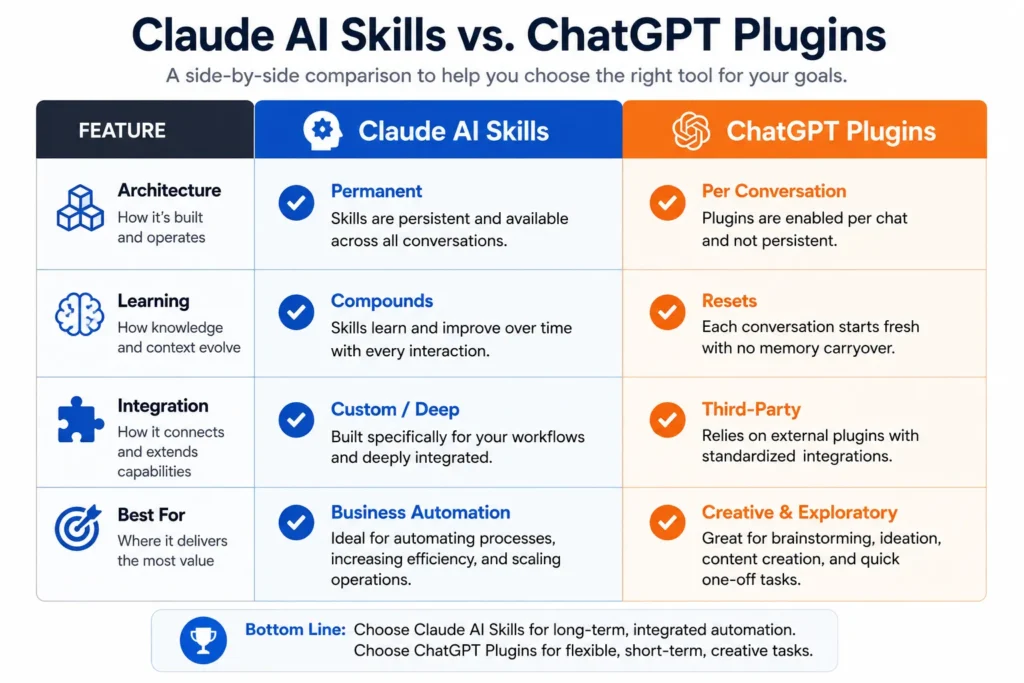
I tested both extensively. Business automation. Content creation. Complex analysis work. The differences became clearer the more I used each tool. One is not universally superior. The question is which tool fits your actual workflow and your actual needs.
Where Claude Wins: Skills Architecture and Infrastructure
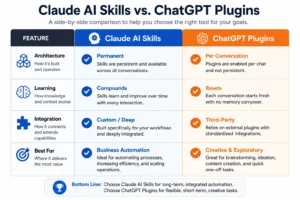
Claude’s biggest advantage for productivity is the skills architecture itself. ChatGPT has plugins. They work differently. They work less reliably than Claude skills. A Claude skill is a permanent installed package. It stays active across all conversations. A ChatGPT plugin requires you to invoke it in each conversation. It does not retain your preferences. The difference is structural.
This matters for repeated workflows. Run the same analysis weekly and Claude remembers your specifications. ChatGPT restarts from scratch each time. Over months the difference becomes obvious because Claude improves while ChatGPT stays flat.
Anthropic partnered with SpaceX for computing infrastructure that powers Claude. This partnership doubled usage limits for paid Claude users. It provides access to 220,000 Nvidia AI chips. That infrastructure investment directly affects performance and reliability. ChatGPT has robust infrastructure but Claude’s SpaceX partnership is unprecedented.
Claude spends more computing time parsing your request before generating responses. This slower approach reduces hallucinations. It catches logical errors that ChatGPT might miss. For business decisions where accuracy matters this difference is critical. You notice it immediately.
Claude’s model capabilities are specifically optimized for complex business strategies, detailed coding architecture analysis, and sophisticated content generation. The technical foundation was built with these workflows in mind. That optimization shows in the output quality.
Where ChatGPT Still Competes
ChatGPT dominates in creative writing and casual conversation. It was trained to be conversational and engaging. OpenAI optimized for personality and accessibility. Many users prefer this for less critical tasks. The personality factor matters.
ChatGPT also has broader integration across third party tools. More software products connect to ChatGPT than Claude. Why? ChatGPT launched earlier. It has deeper market penetration. The ecosystem advantage is real.
Switching from ChatGPT to Claude requires training and behavioral change if your team is already embedded in ChatGPT. That switching cost is real. Even real cost even if Claude offers technical advantages. The cost of change is the largest barrier for teams.
ChatGPT excels for brainstorming, ideation, and exploratory work. Conversational flow matters more than precision in these scenarios. For creative projects ChatGPT feels more natural. It feels more responsive. The experience is better.
The Real Difference: Skills vs Plugins
ChatGPT plugins and Claude skills function differently. Plugins activate per conversation. Skills activate permanently and retain context across all usage. The difference is structural.
Use an SEO plugin in ChatGPT. You invoke it. You get an analysis. You finish the conversation. Next week you need another SEO analysis. You invoke the plugin again. ChatGPT has zero memory of your preferences. You repeat setup instructions. Everything resets.
Claude skills work differently. Your preferences are documented and applied automatically every single time. The skill remembers what you corrected, what you preferred, and what worked well. The skill compounds in knowledge.
This architectural difference transforms productivity over time. Skills build value. Plugins deliver value per interaction but do not build across interactions. One improves. One stays flat.
The Honest Take
Claude excels at structured business automation, data analysis, and repeated workflows. You benefit from persistent improvement. The skills architecture and SpaceX-powered infrastructure give Claude genuine advantages for productivity work. This is where Claude AI skills shine.
ChatGPT remains superior for creative work and conversational exploration. Personality and engagement matter more than architectural sophistication. The ecosystem integration also gives ChatGPT advantages for teams already invested in OpenAI products. These are ChatGPT’s strengths.
The best approach is using both strategically. Use Claude for business automation and analysis. Use ChatGPT for creative work and brainstorming. Neither is universally superior. Each excels at different tasks. Match the tool to the task.
Choosing the right tool for the right job is how you actually get productivity gains. Marketing hype should not drive your decision. Your workflow should. Let your actual needs determine which tool you use.
6 Mistakes That Make Claude Skills Give You Worse Answers Than Google
Most Claude users abandon skills because they give disappointing results. The mistake is rarely the skill itself. The mistake is usually how people use the skill. Someone installs a skill. Runs it once. Gets mediocre output. Assumes the skill is useless. Deletes it.
In reality the skill was fine. The user made one of six predictable mistakes. These mistakes undermine every skill performance. Understanding them transforms your entire Claude experience. You stop blaming the tools. You start getting the results you deserve.
Mistake 1: Using Claude Like a Static Calculator
The biggest mistake is treating Claude AI skills like one-time tools. Run a skill. Get an answer. Never interact with it again. Each session resets. Claude has zero memory of your preferences.
This is like hiring an employee then firing them after one task. You explain the job. You re-state your preferences. You never benefit from accumulated knowledge. The employee never improves because you never tell them what works.
Claude is designed for compounding improvement. Use learnings.md alongside your skill and Claude remembers everything you taught it. Skip learnings.md and you stay at baseline. The skill does not improve. You do not improve. You stay stuck at day one performance.
Mistake 2: Building One Massive Skill Instead of Modular Specific Skills
New skill builders make this mistake constantly. They create one broad SEO skill. It tries to handle keyword research, technical audits, competitor analysis, and content optimization. All in a single file.
The result is shallow outputs across all areas. You get expert level outputs in no single area. Prompt for keyword research and get a generic list. Prompt for technical audits and get basic suggestions that miss critical issues. The skill spreads its knowledge too thin.
Build modular skills instead. Create a Keyword Research skill. Create a separate Technical Audit skill. Create a separate Competitor Analysis skill. Each one focuses on its domain. Each one becomes genuinely expert at that single job.
Broad skills fail because they lack specialized instruction depth. Real expertise requires focus. Give each skill one job. Let it become expert at that job.
Mistake 3: Blaming Claude When the Skill Instructions Are Vague
When a skill produces shallow output most people assume Claude cannot handle the task. The real problem is vague skill instructions. You never taught Claude what good looks like.
Vague instruction: analyze this website. Result: generic analysis.
Specific instruction: analyze this website for broken redirect chains, robots.txt configuration errors, sitemap validation issues, and AI search readiness then prioritize findings by business impact. Result: expert analysis.
The quality difference is not in Claude. The difference is in how specifically you instructed the skill about what matters. More specificity equals better output. Always.
Mistake 4: Assuming Claude Always Auto-Invokes Your Skill Without Naming It
Claude skills are still in early development. Claude sometimes fails to recognize when you need a skill based on context clues alone. Users get frustrated. They assume the skill is broken. Really Claude just did not invoke it.
The fix is simple and immediate. Explicitly write the skill name in your prompt. Instead of asking “analyze this website” write “use the SEO Audit skill to analyze this website.” Remove ambiguity. Guarantee Claude invokes the right tool.
Naming the skill is the safest approach right now. As the feature matures Claude will auto-invoke more reliably. Until then be explicit. Write the skill name.
Mistake 5: Burning Token Limits Before Installing Token Optimization
You have a monthly token limit. Big files and data-heavy research consume tokens for processing overhead. Many users work through their entire monthly allocation before getting substantial analysis done.
The Token Optimization skill reduces this waste dramatically. It compresses information intelligently before Claude analyzes it. Install this skill first whenever you work with large files or datasets.
Running deep analysis without Token Optimization wastes your token budget. You burn through your allocation on processing overhead. Instead of getting insights you get overhead costs. The math does not work.
Mistake 6: Never Asking Claude What You Should Have Asked
After Claude gives an answer most people accept it and move on. They never ask what gaps exist. The most powerful question comes after the first response: What am I missing? What should I have asked you to give you better context?
Claude catches the gaps in your request that you never noticed. It tells you what context would make the answer better. Feed that context back. The next response improves measurably. You get better outputs by asking better questions.
This single habit transforms how you use Claude AI skills. You move from static one-shot interactions to iterative conversations. Claude teaches you what questions to ask. You learn the right approach for your specific problem. The skill improves because you improve.
Your First 30 Minutes With Claude Skills: Start Here
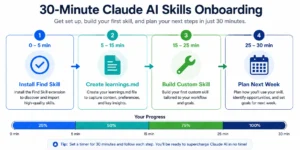
You are ready to start using Claude AI skills. You might feel overwhelmed by the possibilities. Do not overcomplicate this. Your first 30 minutes should focus on one simple goal: install Find Skill and create your first learnings.md file. These two actions set you up for months of compounding improvement.
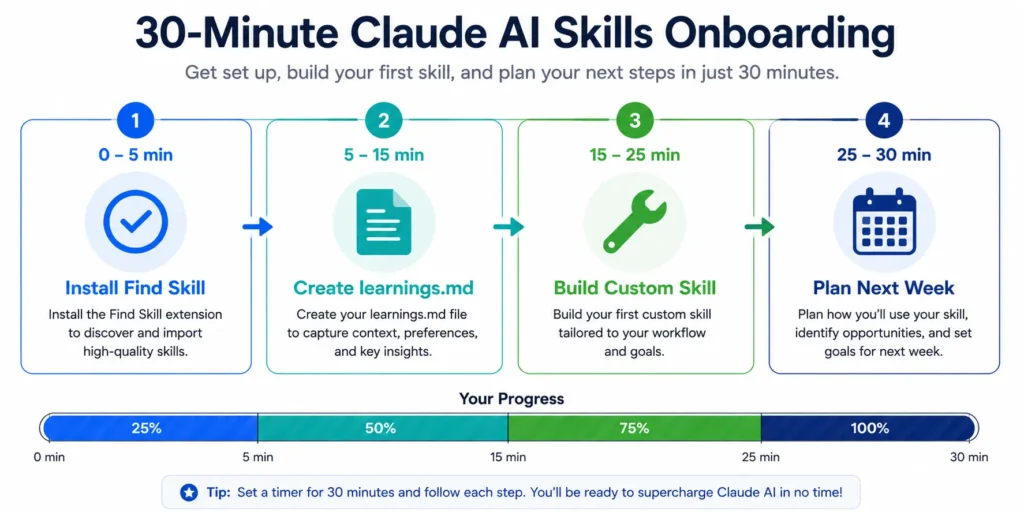
Minutes 0 to 5: Install Find Skill
Open Claude. Navigate to Settings then Capabilities then Skills. Click Browse Skills and search for Find Skill. Enable it immediately.
Find Skill is your gateway to everything else. You do not need to memorize the 1,000 plus skills available. You do not need to browse through endless lists. Find Skill routes you to exactly what you need based on plain English description. One skill. Everything becomes available.
Minutes 5 to 15: Start Your learnings.md File
Create a simple text file named learnings.md. Save it on your computer. This file is where you document everything Claude learns about your preferences.
Start with three basic entries. Write your preferred writing style for any content you create. Document your brand voice or professional communication style. List any recurring corrections you know Claude will need to apply.
Example entries:
Prefers short direct sentences.
Avoids corporate jargon.
Wants specific examples not generic statements.
Prefers active voice and conversational tone.
That is all you need for day one. This file will grow naturally as you use Claude. Starting with clear foundational preferences gives Claude important context from the beginning. The file becomes more powerful every single session.
Minutes 15 to 25: Create Your First Custom Skill
Open a new Claude chat. Type “make a new skill.” Describe one specific workflow you do repeatedly. At least once a week. Takes 15 minutes or more. Pick something specific and describe exactly how you want it done.
Examples: writing weekly reports, analyzing competitor content, brainstorming social media posts. Pick your workflow. Describe it specifically.
Claude will interview you with clarifying questions. Answer thoroughly. Then ask Claude one critical question: What else should I clarify before we finish? Answer those follow-up questions. This step improves your final skill measurably. The follow-up questions catch details you missed.
Download the skill file Claude generates. Upload it to your Claude account through Settings then Capabilities then Skills. Test it once in a fresh chat. Confirm it works the way you want. Make adjustments if needed.
Minutes 25 to 30: Plan Your Next Week
Think about what skill would genuinely save you time next. Do not build five skills at once. Build one. Test it. Document your learnings. Build the next one. Go slow. One skill at a time.
Each time you use a skill you learn what works and what needs adjustment. Document those lessons in your learnings.md file. The skill improves because you are teaching it.
The 80/20 Reality
Claude provides 80 percent. You provide 20 percent. Your judgment matters. Your preferences matter. Your corrections teach Claude what you actually need. This is not replacement. This is amplification. Use Claude AI skills to handle repetitive work. Focus on decisions that move your business forward.
Your productivity stack gets stronger the more intentionally you build it. Start small. Start with Find Skill and learnings.md. Build one custom skill. Document what you learn. Expand from there. Do not rush.
The best Claude skills are not the flashy ones everyone talks about. They are the ones that solve your exact workflow. They improve with every use because you are teaching them what you actually need.
FAQ: Frequently Asked Questions About Claude AI Skills
What are Claude Skills and how are they different from regular prompts?
Claude Skills are permanent installed packages. They teach Claude to perform a specific workflow perfectly every single time. Regular prompts disappear after your conversation ends. Restart a new chat and Claude has zero memory of what you asked before.
Test the same task with and without a skill installed and the difference becomes obvious. Without a skill I typed one line prompt. Claude gave a shallow three paragraph response about website SEO issues. With the SEO Audit skill installed I typed the identical prompt. Claude generated a 21-page technical report. Broken redirects analyzed. Robots.txt configuration reviewed. Sitemap validation completed. AI search readiness assessed across seven different pillars.
Same prompt. Same Claude. Completely different output. That difference is what Claude Skills deliver.
Do I need a paid subscription to use Claude Skills?
Yes. Claude Skills requires a Claude Pro or Claude Team paid plan. Free accounts do not access the Skills feature. This boundary matters. Understand it before investing time learning the system.
Paid Claude users get immediate benefits beyond Skills access. Anthropic partnered with SpaceX for computing infrastructure. This partnership doubled usage limits for paid users. You get more processing power. You get higher monthly token allocation. Advanced skills like Deep Research become genuinely affordable to use regularly. The subscription pays for itself with one good skill use.
How do I install Claude Skills from GitHub?
Find the skill repository you want on GitHub and navigate to the specific subfolder containing just that skill. Right-click that single folder and select compress to create a zip file. Do not download the entire repository because it likely contains dozens of skills and you only want one.
Once you have your compressed file go to Customize then Skills then click the plus icon. Select Upload a Skill and choose your zip file. Claude processes it and adds the skill to your account. Test it once in a fresh chat to confirm it works before relying on it for important work.
Why is Claude not using my skill even though I installed it?
The Skills feature is still in early development. Claude sometimes fails to automatically recognize when you need a skill based on context alone. The solution is straightforward but important. Explicitly write the skill name in your prompt.
Instead of typing “analyze this website” write “use the SEO Audit skill to analyze this website.” This removes all ambiguity and guarantees Claude invokes the right tool. It feels like a workaround now but as the feature matures Claude will get better at auto-invoking skills based on context.
What is the GPS framework for AI prompting and does it work with Claude?
GPS stands for Gaslight, Push Back, and Stress Test. This is a three step methodology that forces Claude to stop generating baseline generic responses and start delivering genuinely strategic thinking instead.
Gaslight means deliberately raising the professional stakes in your prompt so generic advice fails and Claude must think deeper. Push Back means challenging the first response and demanding the non-obvious expert insight. Stress Test means running a bias check on the final answer by asking Claude to verify for confirmation bias and survivorship bias.
This framework works with Claude, ChatGPT, Gemini, and any large language model because it exploits how AI models fundamentally behave. They are trained to please you and avoid risk. Raising stakes and requiring verification breaks that pattern and forces genuine expertise.
Can Claude really replace my SEO agency?
For technical audits, competitor analysis, and structured reporting the Claude SEO Skill delivers work that normally costs thousands monthly. I tested this twice with two different websites. Using the same skill both times Claude generated comprehensive 21 page technical reports identifying specific broken redirects, configuration issues, and competitive vulnerabilities.
Does Claude replace human SEO strategy entirely? No. Claude handles the execution brilliantly but you still need human judgment for strategy and interpretation. Think of Claude as doing the work that normally keeps your SEO agency busy with deliverables while you focus on the strategic decisions that actually move your business forward.
How do I make Claude remember my corrections between sessions?
Create a file called learnings.md and place it alongside your skill file. Add this directive to your skill: “Before running, read learnings.md and apply all documented preferences.”
Now Claude reads this file before every task and applies everything you have documented about your preferences. At the end of each completed task Claude updates learnings.md with what you corrected, what preferences you expressed, and what patterns it learned about your work. Over months this builds institutional memory that makes your skill smarter with every use.
What is the difference between Claude Haiku, Sonnet and Opus for skills?
Haiku is the lightweight fast model for simple tasks like quick summaries or basic formatting. Sonnet is the workhorse model handling 90 percent of needs including complex writing, sophisticated coding, and nuanced reasoning across multiple angles.
Opus is the enterprise-grade model designed for deep technical analysis and high-stakes strategic formulation where accuracy and depth matter more than speed. When you run demanding skills like Deep Research or Front-End Design your output quality improves measurably if you use Sonnet or Opus instead of Haiku. Choose the model based on how complex and critical your task is.