Stop Picking AI Tools Randomly: Here Is How to Choose the Right Ones for Your Freelance Workflow
Most freelancers I know started their AI journey the exact same way I did. They signed up for ChatGPT, spent a week feeling underwhelmed, and walked away convinced the whole AI thing was overhyped. The tool was never the real problem. Using the wrong tool for the wrong task was.
I burned weeks making that exact mistake before I found a framework that completely changed how I think about the best AI tools for freelancers. Every major AI tool has one specific superpower one type of task where it genuinely outperforms everything else available. Once you map those strengths, choosing the right tool takes seconds, not hours of trial and error.
What follows is that framework. Three core AI assistants, clearly defined, with exact guidance on when to reach for each one.
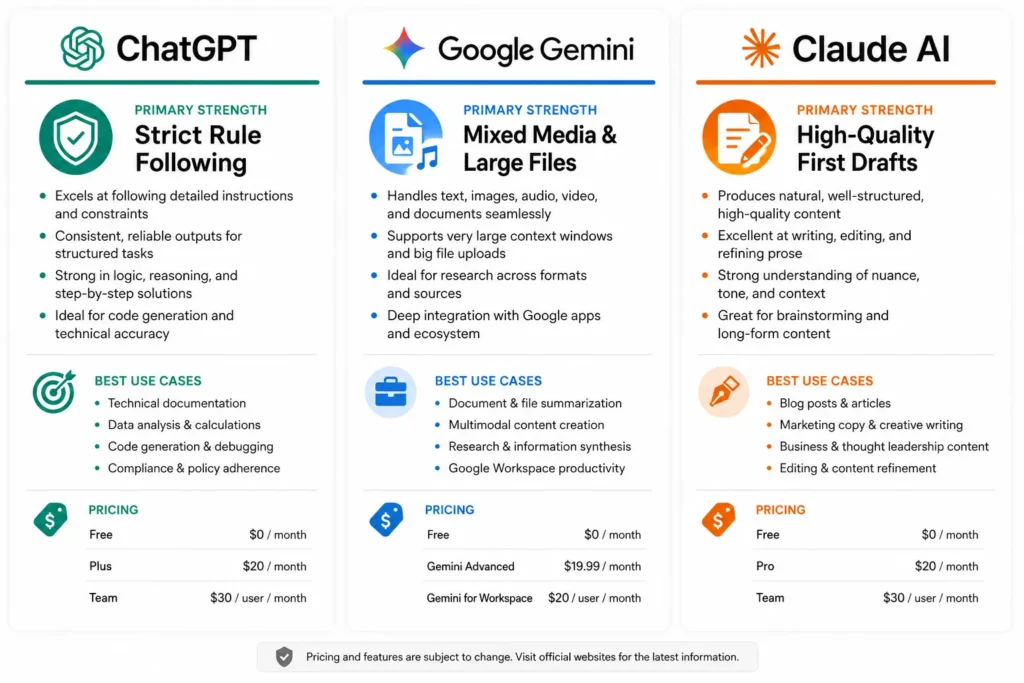
ChatGPT is the most obedient AI assistant I have tested. That sounds like a backhanded compliment. It is not.
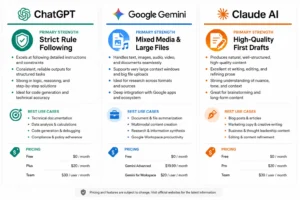
Hand ChatGPT a complex prompt with 10 rules and strict formatting requirements and it follows every single one precisely. Most other models quietly drop the rules they find inconvenient without telling you.
SEO and productivity educator Jeff Su documented this in a structured test. He built a 12-rule hiring evaluation rubric and ran it through multiple AI models at the same time. ChatGPT completed every rule without skipping one. Google Gemini quietly dropped several partway through without flagging the omission at all. That gap matters in real freelance work.
The use cases where this counts most are exactly the ones where back-and-forth corrections cost you time: a proposal that must hit a specific word count, tone, and structure simultaneously. A batch of social media captions where every single post must follow a client’s brand rules without exception. A formatted report with 14 client-specified requirements. ChatGPT is consistently the right tool for these situations.
The free version handles most everyday freelance tasks without any cost. If it becomes a daily part of your client workflow, ChatGPT Plus currently priced at $20 per month, though pricing may change unlocks faster response times and meaningfully more capable output. At most freelance billable rates, that pays for itself within a single project.
When to open ChatGPT: multi-step workflows with strict rules, complex formatting requirements, prompt chains where every detail matters, and client-facing documents with precise structural specifications.
Google Gemini Use It When You Have Large Files or Mixed Media
Google Gemini has one capability no other AI assistant currently matches: it handles video recordings, audio files, images, slide decks, and written documents all in a single conversation. Not one format at a time. All of them together, simultaneously.
That distinction is bigger than it sounds.
Jeff Su uses this in a workflow I started copying almost immediately after I saw it. He records a rough video walkthrough of himself completing a task, drops the raw video into Gemini, and asks Gemini to generate a clean Standard Operating Procedure document from what it observed. No manual transcription. No editing a rough draft. A fully formatted SOP straight from a casual screen recording.
I use a version of this for client project kickoffs. A 45-minute briefing recording, the corresponding slide deck, and a photo of my handwritten notes all go into Gemini at once. The output is a consolidated project summary with action items that would have taken me 40 minutes to write manually. Gemini produces it in under two minutes.
The free plan covers everything most freelancers need at this level. If you regularly handle large project files, video content, or multi-format client briefs, Gemini should genuinely be the first tab you open when a new project lands.
When to open Gemini: large audio or video recordings, mixed-format project files, hour-long documents that exceed what other models can process, and any task that involves synthesizing information from multiple different file types at once.
Claude AI Use It When You Need a Near-Finished First Draft
Claude AI produces the highest-quality first drafts of any general-purpose AI model I have tested consistently over the past year. When the output needs to be close to publication-ready on the first attempt, Claude is where I go every time.
Jeff Su ran a test that makes this concrete. He needed a backend script written in Go a programming language he had zero experience with. He asked Claude to write it. Claude produced working code on the first attempt with no debugging required.
For non-technical freelancers, that example points to something beyond coding. Claude does not just generate output fast. It generates output that is immediately usable. The gap between Claude’s first draft and a finished deliverable is consistently smaller than with any other model I have tested, and that gap is exactly where your billable hours disappear.
The feature I use most is Claude’s voice matching. Feed it several examples of your previous writing old blog posts, client emails, past proposals and Claude studies the patterns in your style and replicates them accurately in new content. I have done this across seven different client brand voices and the accuracy is genuinely good. You write a brief, attach three examples of the client’s previous content, and ask Claude to produce the new piece in that exact voice. If you want to go deeper on getting reliable results from it, I have put together a full breakdown of how to get the most out of Claude that covers the techniques I use most.
Claude’s free tier handles everyday use without issues. The Pro plan currently around $20 per month becomes worth it when you regularly produce long-form written deliverables for clients, because the quality difference at higher output volumes is real and noticeable.
When to open Claude: client deliverables that need to sound polished immediately, brand voice matching across different client styles, long-form content where coherence across paragraphs matters, and any task where first draft quality directly affects what you can charge.
The ROI of Knowing Your Tools
Choosing the right AI assistant for each task is not a minor detail. It is the difference between saving three hours a week and spending three extra hours running the same prompt through the wrong tool wondering why the output is wrong.
ChatGPT for strict multi-rule workflows. Gemini for large mixed-format files. Claude for high-quality first drafts. That is the whole framework in one line. Once you internalize it, the decisions get faster and the results get better almost immediately. You stop re-running prompts in the wrong tool. You stop editing outputs that were never going to be right for that task. You start treating each model like a specialist you bring in for their specific strength not a single generalist you hope can handle everything.
This is the foundation the rest of the guide builds on. ROI for freelancers from AI tools comes from matching the tool to the task, not from using more tools.
The Daily Workflow That Actually Works (Open These Tools in This Order)
The question I hear most often from freelancers who are just getting started with AI is a simple one: which tool do you open first when a new project lands?
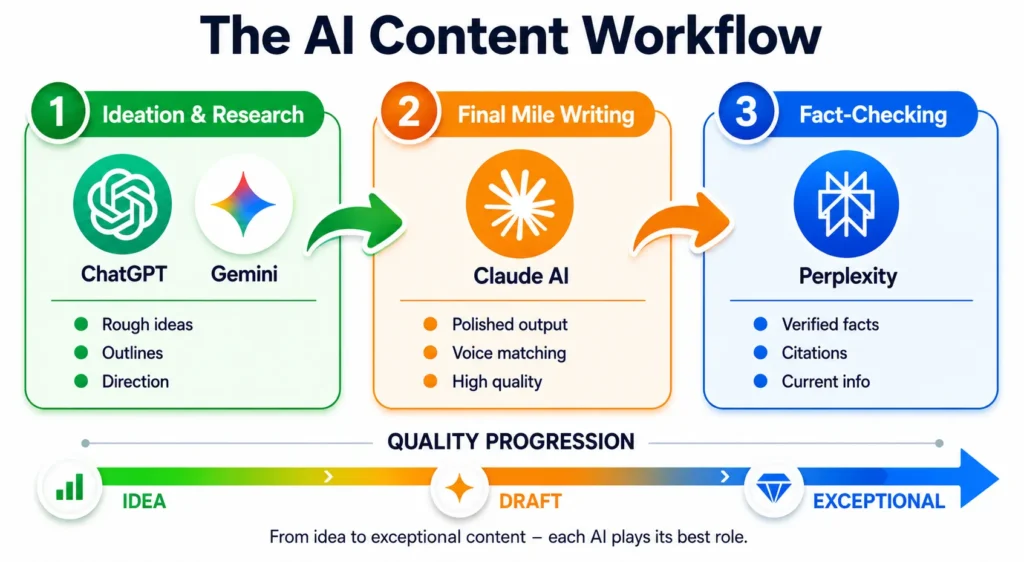
The honest answer is that it depends on the stage of the project, not on which tool you like best. Different AI tools are genuinely better at different stages of the work.
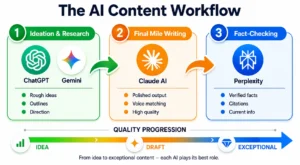
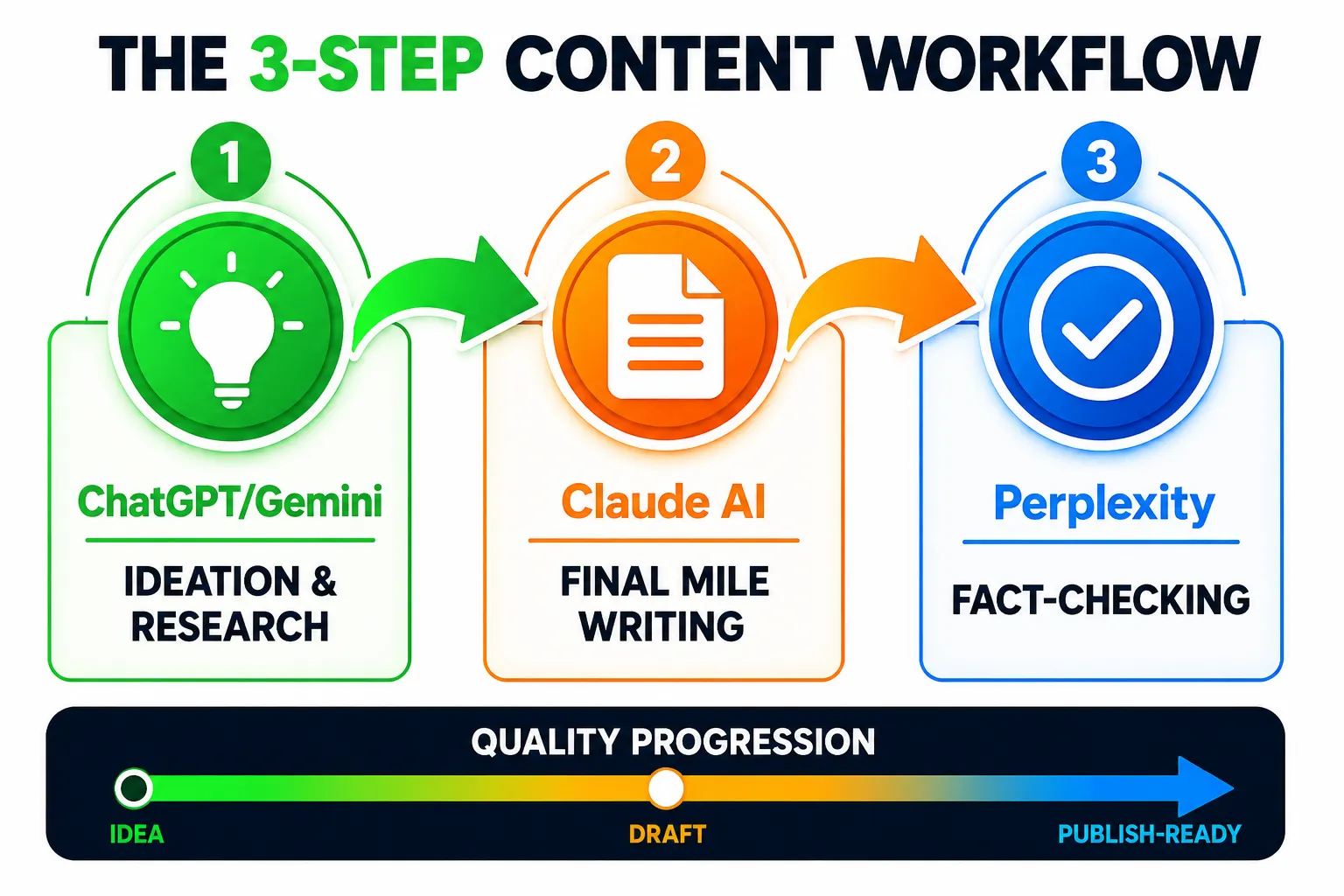
I follow a three-step sequence that takes raw project ideas and turns them into finished client deliverables. This is not something I built theoretically. This is the exact order I open my tools every single workday, without exception.
Step One: ChatGPT or Gemini for Ideation and Research
I start every new freelance project by opening either ChatGPT or Gemini for brainstorming and research. These tools are built for reasoning, which means they are better at helping you think through ideas, explore angles, and generate outlines than they are at producing polished final output.
If the project involves large files hour-long recordings, slide decks, mixed-format briefs Gemini goes first because it handles those formats natively without needing workarounds. For everything else, I default to ChatGPT because it handles complex multi-step prompts more reliably and consistently.
This first stage is where the project skeleton gets built. I ask the AI to suggest five different approaches to the client brief, request an outline with the key points that need coverage, and probe what competitors are doing and where gaps exist in the current conversation around the topic. All three of those things happen inside a single session.
The output is always rough at this stage. Unpolished sentences, half-developed ideas, structure without substance. That is the entire point. I am not looking for finished work here. I am looking for direction.
Step Two: Claude for Final Mile Writing and Styling
Once I have a solid outline and a clear direction, I move everything over to Claude. Claude produces the highest-quality first drafts of any AI tool I have tested consistently, and this is the stage where output quality matters most because what comes out here is what the client actually sees.
I paste the rough outline from ChatGPT or Gemini into Claude along with examples of the client’s previous content if I have them. Claude picks up on the patterns in voice and tone across those examples and replicates the style accurately in the new draft. The result is content that sounds like the client’s brand, not like generic AI output that has been lightly edited.
This is what I call the last mile. The outline exists. The structure is set. Claude handles the execution turning rough ideas into polished paragraphs that need light editing rather than complete rewrites. On a typical blog post that used to take me four hours to write from scratch, this step brings that down to about 90 minutes total. That difference compounds fast across a full week of client work.
Step Three: Perplexity When You Need Hard Facts
Chatbots like ChatGPT and Claude are excellent for reasoning and drafting, but they are not reliable search engines. When I need hard facts, accurate citations, or up-to-date information, I switch to Perplexity.
Perplexity is built specifically for information retrieval rather than content generation. It searches the web in real time and returns answers with direct citations to the sources which makes fact-checking faster and more trustworthy than asking a chatbot to recall information from training data that may be months or years old.
One technique I use regularly is the site operator inside Perplexity. If I am researching what real users think about a product or service, I search using site:reddit.com followed by my topic. The results pull actual Reddit discussions honest, unfiltered user experiences that never show up in polished marketing content. When I am writing comparison articles about AI tools for freelancers or researching real-world use cases to optimize bids on Upwork, those Reddit threads are often the most useful source I find. If your work involves content that targets search traffic, pairing Perplexity with dedicated AI-powered research and SEO tools takes that research further.
Why This Workflow Saves Time
This three-step sequence creates a clear division of labor across your AI tools. ChatGPT or Gemini handles the thinking stage. Claude handles the writing stage. Perplexity handles fact-checking. Each tool works at the task it is actually built for.
Following this order cuts out the most common time-wasting mistake freelancers make with AI, which is using the wrong tool for the wrong job. You stop asking ChatGPT to remember facts it cannot verify. You stop asking Claude to brainstorm when brainstorming is not where it excels. You start treating each model like a specialist you bring in at the exact moment their strength is needed.
No complex integrations. No expensive software subscriptions beyond what you may already use. Just three tools opened in the right order at the right time. When this sequence becomes a habit, the time you recover compounds across projects I started finishing standard client blog posts in roughly half the time within my first two weeks of running the sequence consistently.
That is the point of freelance workflow automation at this level. Work smarter as a freelancer by choosing the right tool for each stage, not by working longer. The sequence is repeatable, the results are consistent, and it works across writing projects, client presentations, and project proposals alike.
AI Tools for Freelance Writers That Cut Draft Time in Half
Freelance writers face a productivity challenge that does not get talked about honestly enough. Output quality directly determines what clients pay, but most of the working day disappears into editing, revising, and polishing rather than the actual writing that bills at the highest rate. AI tools for freelance writers solve this by handling the polish layer, which frees up time for the creative and strategic thinking clients genuinely value.
I use three AI writing assistants regularly and each one covers a different part of my writing workflow. Not theoretical picks from a listicle. These are the tools I open every single day before I start writing client deliverables.
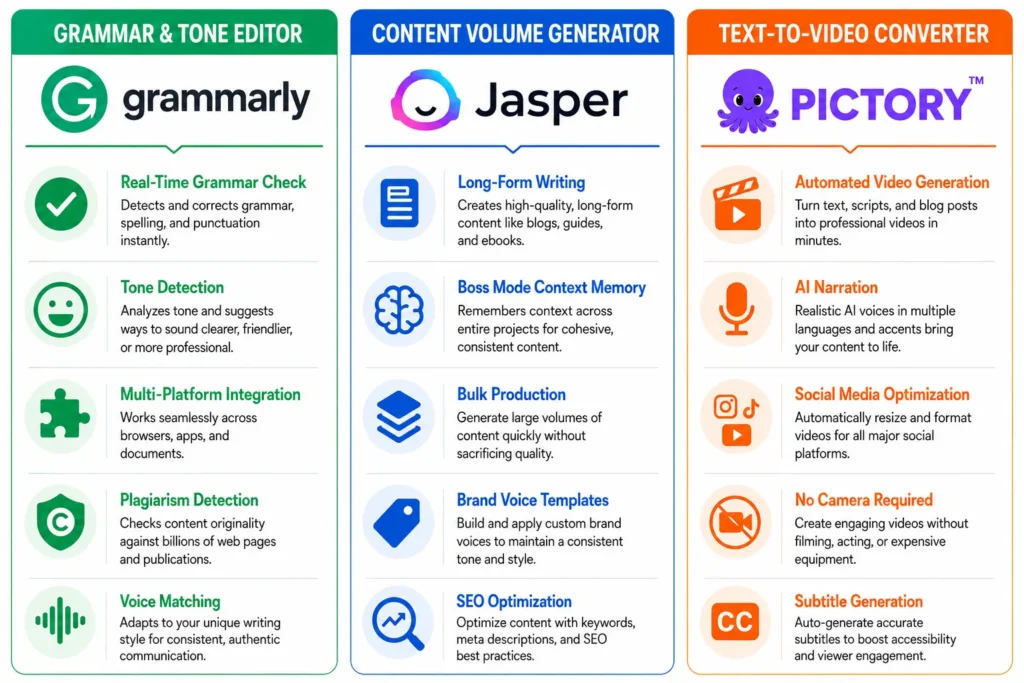
Grammarly Your Always-On Writing Editor
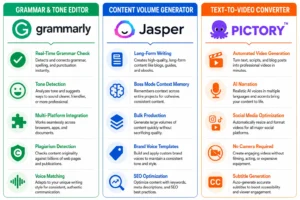
Grammarly for freelancers is essential for sounding smart and professional across everything from client emails to published blog posts. It runs in the background across every text field you type in and catches mistakes in real time before you hit send which is exactly the kind of invisible safety net that prevents embarrassing errors from reaching clients.
What sets it apart from basic spell checkers is the tone adjustment feature. The tool analyzes whether your message sounds friendly, formal, confident, or concerned and suggests edits to match the tone you actually want. For freelance writers managing multiple clients with different brand voices, that feature alone saves significant editing time on its own.
The free version handles the majority of what most freelancers need grammar corrections, clarity suggestions, and basic tone detection. I used the free plan for two full years before upgrading and it never felt limiting for everyday client work.
Grammarly works best when you treat it as a first-pass editor rather than a final authority. It catches errors, but you still make the final call on whether a suggested change actually fits your voice. That distinction is what keeps your writing sounding human instead of over-polished.
Jasper AI When You Need to Scale Content Volume
When I need to produce high volumes of content quickly, I switch from ChatGPT to Jasper AI. Jasper is built specifically for AI content creation at scale, and the difference shows up most clearly in long-form writing where maintaining coherence across thousands of words is the actual challenge.
The feature I rely on most is Boss Mode. It remembers context across multiple previous paragraphs, which creates coherent storytelling even in articles that run several thousand words. ChatGPT sometimes loses the thread midway through long pieces, but Jasper Boss Mode maintains narrative consistency from start to finish. [Note: Verify that “Boss Mode” is the current feature name Jasper has rebranded features previously.]
Jasper works best for freelance writers who regularly produce blog posts, email sequences, or social media content in bulk. If you write one article per week, ChatGPT is probably sufficient. If you write ten articles per week, Jasper becomes worth the investment because the time saving compounds fast at higher output volumes.
One practical tip I picked up early: use Jasper for first drafts, then run the output through Grammarly for final polish. Combining these two AI writing assistants creates a two-layer editing system that catches both structural issues and surface-level errors without requiring you to manually read every sentence multiple times.
Pictory Turn Written Content Into Videos Without a Camera
If you manage content marketing for clients or run your own blog, Pictory solves a problem most writers genuinely hate, which is creating video content when the thought of appearing on camera makes you want to close the laptop.
Pictory converts blog posts directly into videos with matching visuals and AI-generated voiceovers. You paste your written article in, and the tool automatically selects relevant background footage, adds text overlays, and syncs everything to a professional-sounding narration track. No camera. No recording setup. No editing software.
I recommend this specifically for freelance writers who know that video performs better than text in most social feeds but have zero interest in appearing on screen. Pictory handles the entire production process using your existing written content as the foundation.
For freelance writers, this opens up an additional service you can offer clients directly. Instead of delivering just the written blog post, you can also deliver a video version of the same content which increases the perceived value of your work without requiring any video production experience at all.
AI Tools for Freelance Designers, Marketers, and Creative Professionals
AI tools for freelance graphic designers and creative professionals solve a completely different set of problems than what writers face. Designers need fast mockups, brand-consistent visuals, and the ability to produce client-ready graphics without spending hours in Photoshop for every iteration. Marketing freelancers need ad creative, social content, and campaign visuals that perform well without requiring an entire production crew behind every asset.
I rely on three primary AI tools for visual and creative work. Each one handles a specific type of design task, and together they cover almost every visual need I run into across client projects.
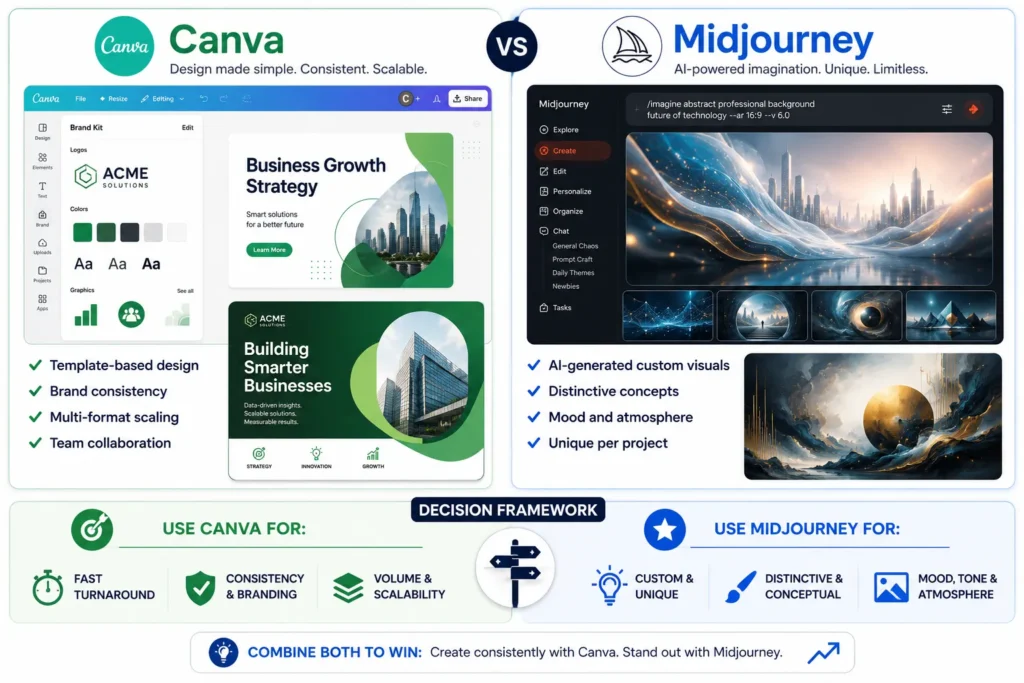
Canva AI Professional Design Without a Design Degree
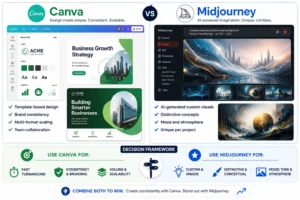
Canva has moved well beyond the basic social media graphic tool most people think it is. It now functions as a full creative workspace handling complete brand style guides, video editing, and direct social media scheduling all in one place.
What makes Canva AI for freelancers genuinely valuable is the brand kit feature. You upload a client’s logo, define their primary colors, and select their preferred fonts once. From that point forward, every graphic you create in Canva automatically pulls from those brand guidelines, which keeps visual consistency consistent across dozens of posts or marketing materials without you manually checking colors and fonts every single time.
The feature I use most regularly is the direct scheduling integration. Canva connects with third-party scheduling software, which means I can design a full week of social media posts and schedule them directly from inside Canva without switching to a separate tool. That alone cuts a three-step process down to one.
Canva works exceptionally well for freelancers who need to produce professional-looking graphics quickly but have no formal design training. The templates handle layout decisions and the AI features handle detail work like background removal or automatic resizing across different social media formats. Once the graphics are ready, pairing Canva with AI tools that help your content get seen closes the loop between creating content and making sure it actually reaches the right audience.
Midjourney When Your Client Needs High-Quality Custom Visuals
When a client needs truly custom visuals that do not look like stock photography, I turn to Midjourney. It generates high-quality images from text descriptions, and the output quality is noticeably higher than most competing AI image generators I have tested.
The key to getting client-ready results from Midjourney is learning how to use the stylize and quality parameters inside your prompts. These parameters control how creative versus how literal the AI interprets your description and the difference between a generic result and something genuinely usable for a client’s brand often comes down to a single parameter adjustment.
I use Midjourney most often for concept art, presentation imagery, and campaign visuals where the client wants something visually striking that nobody else has. It excels at creating mood and atmosphere, which makes it particularly useful for marketing campaigns where visual impact matters more than photographic accuracy.
AI Tools for Digital Marketing Freelancers
Marketing freelancers need tools that handle ad creative, video content, and social campaigns without requiring a full production crew behind every deliverable. AI tools for digital marketing freelancers focus specifically on these high-volume visual needs.
Adcreative.ai generates multiple ad variations from a single product image or brand description. This is where it pays off most: when you need to test different ad concepts quickly without manually designing each variation inside Canva or Photoshop.
Pomelli AI [verify tool name before publishing] takes this a step further by generating complete video ads directly from a website URL. The tool analyzes the brand, product catalog, and visual identity from the URL and produces short-form video ads featuring AI avatars which eliminates the need for scriptwriters, video editors, and production crews for basic social media advertising.
For freelance marketers managing multiple client campaigns simultaneously, these tools compress what used to take days of production work into hours of setup time. The output quality handles most standard social media advertising formats well and the time recovered lets you manage more clients without adding team members.
AI Productivity Tools for Freelancers: Never Miss a Deadline Again
AI productivity tools for freelancers solve the invisible time drain problem that quietly kills profitability. The hours that disappear into administrative tasks project tracking, meeting follow-ups, and deadline management are hours that should be billable time.
I use AI tools for project management to handle the organizational layer of my business so I can focus on the work that actually generates revenue. These tools eliminate the mental overhead of remembering deadlines, tracking project status, and following up on client communications manually.
Notion AI Your Freelance Business Hub
Notion AI productivity has genuinely transformed how I manage multiple client projects at once. Notion functions as my central workspace where every client project lives in its own organized space deadlines, deliverables, and communication history all in one place, accessible in seconds.
Notion AI streamlines project planning by letting me auto-generate to-do lists, outline content ideas, draft templates, and summarize detailed meeting notes without manual typing. When a new project starts, I ask Notion AI to create a complete project template based on the client brief, and Notion generates the task breakdown, timeline, and milestone structure automatically.
The feature I rely on most heavily is meeting note summarization. After client calls, I paste my rough notes into Notion and the AI organizes everything into clear action items, deadlines, and follow-up requirements. That eliminates the post-meeting scramble where I am trying to reconstruct what I actually committed to deliver.
Notion works exceptionally well as an AI tool for project management because the workspace grows with your business. Whether you manage two clients or twenty, the system scales without becoming overwhelming or requiring you to learn entirely new software every few months.
Meeting Transcription Without Creeping Out Your Clients
The biggest challenge with most AI meeting transcription tools is that they join your video calls as a visible bot, which often makes participants self-conscious. Clients start speaking more formally or avoid sensitive topics when they know a recording bot is sitting in the call with them.
Granola AI solves this by listening to your computer’s native audio output without appearing in the meeting at all. It presents a concise summary document immediately after the call wraps up, but your clients never see the tool working. That preserves the natural flow of client conversations while still giving you accurate meeting notes.
For meetings where you want full transcript sharing with clients, Otter.ai for freelancers works better since clients recognize the brand and generally accept a visible bot when you disclose the recording upfront.
Fireflies AI and Fathom AI take meeting transcription further by connecting directly to Zoom, Google Meet, and Microsoft Teams. These tools automatically transcribe the dialogue, then distribute action items and meeting summaries directly to your CRM tools which closes the loop between client conversations and your project management system without any manual data entry.
The time saving from automated meeting notes compounds fast when you run multiple client calls per week. Instead of spending twenty minutes after each call typing up notes and action items, the AI handles the documentation while you move immediately to the next task.
AI Business Tools for Freelancers: Proposals, Contracts, and Getting Paid
AI business tools for freelancers handle the administrative work that nobody talks about but everyone quietly dreads. Writing proposals, chasing invoices, and managing contracts consumes hours every week that could be billable client time instead. These tools eliminate the business overhead that eats into freelance profitability.
I rely on specific AI tools for freelance business management to automate the entire client lifecycle from initial proposal through final payment. That keeps me focused on the work that actually generates revenue, rather than spending the first and last hour of every day buried in follow-up emails and paperwork.
HoneyBook AI Proposals, Contracts, and Invoices on Autopilot
HoneyBook AI handles the complete client management pipeline that most freelancers manage manually and inefficiently. It creates professional proposals in minutes, generates contracts with AI-reviewed terms, and automates payment follow-ups without requiring constant attention.
The freelance client management AI features save me the most time at project kickoff. Instead of writing each proposal from scratch, I input the project details and HoneyBook AI generates a branded proposal based on my previous successful pitches. According to HoneyBook’s documentation, the tool is designed to learn from proposal patterns and suggest improvements over time though I recommend reviewing suggestions manually rather than applying them automatically.
HoneyBook also functions as one of the more capable freelance invoicing tools by automating the entire payment process. The system sends invoices automatically based on project milestones, follows up on overdue payments, and processes payments directly through the platform which removes most of the awkward money conversations that freelancers tend to avoid and then regret avoiding.
The AI proposal writing features inside HoneyBook analyze proposal patterns and suggest language intended to increase acceptance rates. For freelancers who hate writing proposals or consistently underprice their services, that feature alone often justifies the subscription cost.
GoHighLevel For Freelancers Who Want to Scale to an Agency
GoHighLevel replaces the separate tools traditionally needed for client emails, invoicing, and social media scheduling by bringing everything under one interface. It works best for freelancers who manage multiple clients simultaneously and want to present as more established than a solo operator.
The white-label capabilities let freelancers looking to scale into an agency fully rebrand the GoHighLevel tools and dashboard as their own. That creates a premium experience during client onboarding that can justify higher rates and longer-term contracts though the premium feel depends heavily on how well you set up the platform.
GoHighLevel includes AI content generation for social scheduling, which means you can manage client social media accounts without manually writing every post. The platform is designed to adapt to each client’s brand voice and generate content based on their industry and audience results vary, so I recommend reviewing AI-generated posts before scheduling them.
For freelancers handling client acquisition, GoHighLevel also includes AI quote generation for freelancers and AI tools for reviewing freelancer proposals. These features help with winning new clients and managing existing relationships from a single dashboard.
The platform works particularly well as an AI tool for freelance business management when you have reached the point where manual client management is consuming your workday but hiring a virtual assistant still feels premature.
Pitch Decks and Client Presentations
When pitching high-value contracts, I use Gamma App or Tome App to build structured, visually striking presentation decks from a text prompt in minutes. These AI presentation tools produce professional slide decks that look like they took hours of design work in practice, they take significantly less time than building the same deck manually in PowerPoint or Keynote.
Gamma tends to work better for structured narrative presentations where slide flow matters. Tome handles more visual, portfolio-style presentations where the imagery needs to carry the message. Both are worth testing with your specific presentation style before a high-stakes client pitch.
This approach works particularly well for consultative freelance services where visual presentation matters as much as the actual proposal content. The AI handles the design and layout while you focus on the strategy and messaging.
The free tiers of the right AI tools deliver real results without any payment required. These tools handle writing, design, organization, and research tasks effectively enough for most freelancers to start producing client-ready work immediately without spending anything.
I tested the free tiers of several AI platforms consistently over the past year and found they cover the majority of daily freelance needs without friction. The key is knowing exactly what each tool can and cannot do before you commit time to learning it because time spent learning the wrong tool at any price is still a cost.
ChatGPT and Gemini for Writing and Research
The ChatGPT free tier handles basic writing tasks like drafting emails, proposals, and simple blog outlines without any cost. The main limitations are slower response times during peak hours and restricted access to newer features. For most freelancers, this version is sufficient until output volume increases to the point where those limitations start creating real friction.
Gemini offers a completely free experience with strong research capabilities. It processes large files and answers factual questions effectively, and the free plan has no message limits, which makes it reliable for daily use when quick information retrieval or project note organization is what the work requires.
Grammarly, Canva and Notion for Daily Productivity
The Grammarly free version catches grammar errors and suggests tone adjustments across emails and documents. It covers the essentials for professional communication, but limits advanced style suggestions and plagiarism checks to the paid plan which is worth noting if you write content that needs originality verification.
The Canva free tier provides enough templates and basic AI design tools to create social media graphics and simple presentations. The main restriction is limited access to premium elements and brand kit features, which matter most once you are managing multiple client brands regularly and need visual consistency across everything.
The Notion free plan supports unlimited pages and basic AI features for project tracking and note summarization. For solo freelancers managing a handful of clients, this is entirely sufficient. The cap shows up when you need advanced databases or team collaboration features at which point the paid plan becomes the easier path.
When Free Tools Are Enough
Pick one or two tools that directly line up with your specific freelancing niche and master those first before adding anything else. Most freelancers can operate profitably using only ChatGPT, Canva, and Notion without ever upgrading. The paid versions become worth the cost only when client work demands faster output, higher volume, or advanced features that directly increase what you can charge and that point is different for every freelancer.
Granola AI and Perplexity also offer strong free tiers for meeting notes and research respectively. Both require no payment while still delivering measurable time savings in daily workflow.
Once you have these free tools running smoothly, the next level is connecting them into an automated system which is where the real efficiency gains start to compound.
AI Automation Tools for Freelancers: The “Workflow Glue” Nobody Talks About
AI automation tools for freelancers work best when they connect existing tools together rather than trying to replace everything with one massive platform. Most freelancers get better results from targeted workflow connections than from giant all-in-one AI apps that promise to handle everything because in practice, specialized tools handle their specific tasks better than any platform trying to do all of it at once.
This is what I call workflow glue: automation that makes your current AI stack communicate automatically, so outputs move from one tool to the next without you manually copying, reformatting, and re-uploading everything between steps.
How to Connect Your AI Tools Into a System (Not Just a Collection)
Freelance workflow automation transforms isolated tools into a coordinated system. Zapier and n8n function as the connectors that link AI tools together without requiring any coding knowledge.
The difference between using tools individually versus connecting them into a system is significant. Before automation, I would draft content in ChatGPT, manually format it for different platforms, upload images separately, and schedule posts one by one. After setting up basic automation, the content flows from creation to publication with minimal manual steps between.
Three focused tools that communicate with each other consistently outperform one bloated all-in-one platform. Specialized tools handle their specific tasks better, and automation bridges the gaps between platforms. This approach lets you choose the best tool for each function while maintaining a smooth workflow across the entire production process.
Claude Co-work [verify tool name before publishing] takes this further by running scheduled tasks automatically. Claude can scan Twitter every day at a set time, analyze trending topics, and pre-write video scripts based on what is surfacing. That turns what used to require a multi-person team into a single automated process running in the background while you focus on other work.
The Creative Freelancer’s Automated Production Pipeline
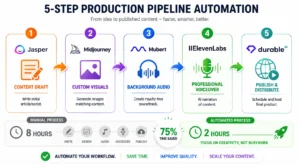
The most practical example of AI automation tools for freelancers in action comes from content creators who have built complete production pipelines. This system shows how five different tools combine to automate an entire project from concept to completion.
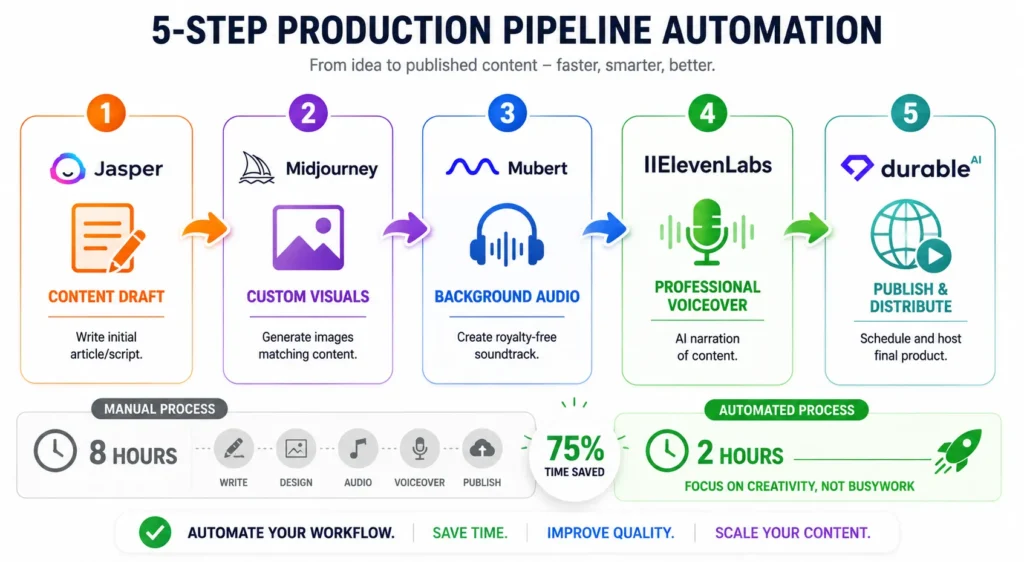
The pipeline works like this: ideate and draft initial content using Jasper AI or CopyMonkey [verify current tool name] for the foundation. Generate custom visuals with Midjourney based on the content themes. Create original background audio using Mubert to avoid copyright issues. Add professional voiceovers through ElevenLabs without recording anything manually. Host and distribute the final content using Durable AI for publication.
This freelance workflow automation approach can cut production times significantly while maintaining professional quality output. Each tool handles the task it does best while automation moves content from one stage to the next. The time saving compounds when you produce content regularly for multiple clients simultaneously.
The ROI for freelancers becomes clear when you map out the time difference. Instead of spending eight hours on manual production tasks, you might spend two hours on strategy and oversight while automation handles execution though actual time savings vary based on your content type and volume. That shift is what lets you work smarter as a freelancer by concentrating time on the high-value decisions clients actually pay for.
Using AI to Win More Clients, Not Just Do the Work Faster
Most freelancers use AI tools to complete projects faster, but completely ignore the client acquisition side where AI can be even more valuable. Winning new clients requires a different skill set than delivering work, and AI tools can help you stand out in crowded marketplaces like Upwork and Fiverr where hundreds of freelancers compete for every posted project.
AI tools for client acquisition focus on proposal writing, bid optimization, and self-promotion rather than project delivery. These tools help you win more work at higher rates, which matters more for long-term success than simply finishing existing projects faster.
AI Tools for Writing Winning Proposals on Upwork and Fiverr
AI tools for Upwork freelancers can analyze job descriptions and write tailored proposals that mirror the client’s exact language and priorities. ChatGPT excels at this when you feed it both the job posting and examples of your previous successful proposals.
The process works by asking ChatGPT to identify the key concerns and requirements in the job description, then craft a proposal that addresses each point directly. This approach helps you stand out because most freelancers send generic proposals that barely reference the actual project brief.
Pouncer AI automates Upwork proposal generation by monitoring new job postings and sending customized proposals within minutes of a job going live. Speed matters on freelance platforms because clients often review proposals in the order received, and many stop reading after they find a few strong candidates.
AI tools for freelancers to optimize bids also help with pricing strategy by analyzing similar completed projects and suggesting competitive rates. Design.com and Adcreative.ai can help you create portfolio pieces and proposal attachments that demonstrate capabilities visually rather than just describing them in text.
The goal is using these tools to make your proposal the strongest in the list not just the fastest. A well-crafted, AI-assisted proposal that shows genuine understanding of the project requirements regularly beats lower-priced generic submissions.
Using AI to Market Your Own Freelance Services
Most freelancers spend their energy competing on Upwork or Fiverr where price is the deciding factor. The smarter move is building inbound marketing that brings clients to you and AI tools for digital marketing freelancers make that realistic even without a dedicated marketing team.
Pomelli AI is one I find genuinely interesting for this. You feed it your website URL and it generates complete video ads featuring AI influencers. No production crew. No scriptwriter. No video editor negotiation. For a solo operator, that changes the math on social media advertising entirely.
Canva AI handles the day-to-day social graphics side, and the ai quote generation for freelancers feature is worth using if you want to post industry insights consistently without spending an hour per graphic. Gamma and Tome are my picks for pitch decks when a client meeting calls for something more polished than a Google Slides template.
The point of all this is simple. When a prospect discovers you through useful content instead of stumbling across your profile during a search, you are not competing on price. You are already the person they wanted to call.
The Mistakes That Make AI Tools Feel Useless (And How to Avoid Them)
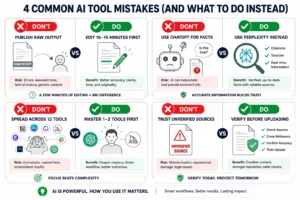
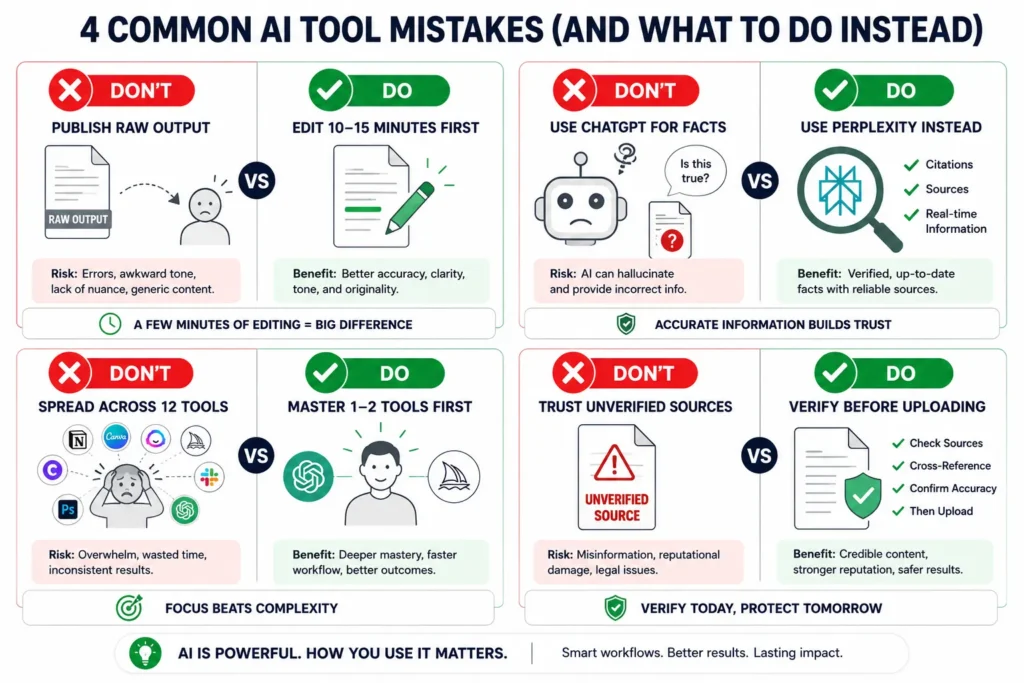
Freelancers quit AI tools because the tools felt useless. That’s the complaint I hear constantly. But the technology almost never fails. What fails is how people use it and the same three or four mistakes show up every single time.
I made all of them. Months of daily use, hours of wasted effort, and eventually a clear picture of exactly where things go wrong. Each mistake is fixable once you know what to look for. The work smarter as a freelancer goal people talk about with AI only materializes when you understand these breaking points before you hit them.
Publishing Raw AI Output Without Human Editing
The most expensive mistake I see is sending raw AI output directly to clients. AI for content writing genuinely does produce solid first drafts. But those drafts read like they were written by someone who understood the topic from a distance not by someone with actual experience in it.
The fix is not complicated. Treat what AI gives you as a rough first pass, then go back through it manually. Swap out the generic phrases. Add the specific detail only you would know. Rewrite the opening sentence so it sounds like you. That process takes 10 to 15 minutes for most deliverables.
What clients actually notice is not the AI use itself it’s when the work reads like it could have been about any client in any industry. That’s when trust breaks. One round of real human editing is the difference between a client who asks for revisions and one who refers you to someone else.
Using the Wrong Tool for the Wrong Task
Google Gemini is the one I keep having to warn people about. Give it a complex prompt with multiple rules or constraints and it quietly ignores the ones it finds inconvenient. You don’t get an error. You get output that looks right until you read carefully and realize step three was skipped entirely. ChatGPT is significantly more reliable for structured workflows where the rules actually matter.
But flip the scenario and Gemini wins. Large files, mixed media, documents with images Gemini handles these better than most alternatives.
The other mistake is treating ChatGPT like a search engine. It is not one. Ask it for a specific statistic or a recent fact and you will often get a confident answer that is simply wrong. Perplexity is built for research and fact retrieval. Use it there. This one switch alone saves real time once you make it a habit.
Overwhelming Yourself With Too Many Tools
Tool overwhelm is real and it stalls more freelancers than any technical problem. I’ve watched people sign up for six AI platforms in a week, spend two weeks watching tutorials, and still produce the same output they were producing before. Surface-level familiarity with twelve tools is worth less than genuine mastery of two.
Pick the one or two systems that directly match what you do every day and actually use them. The freelance productivity tips that circulate online focus on habits and consistency not on having access to every new release. A tool you use every morning beats a tool you tested twice and forgot about.
Trusting AI With Unverified Information
NotebookLM is genuinely impressive for document analysis until you feed it bad source material. Whatever errors exist in the documents you upload, NotebookLM repeats back to you with complete confidence. I found this out the hard way when a client’s outdated internal report produced a summary full of numbers that were two years out of date.
Check what you upload. Verify the accuracy of the documents before the AI ever sees them. The time saving that makes AI worth using only happens when the inputs are reliable. Garbage in, accurate-sounding garbage out.
Build Your Stack: Which AI Tools to Start With Based on Your Freelance Type
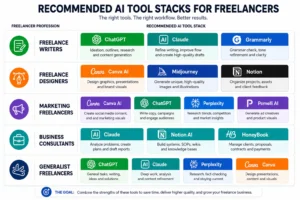
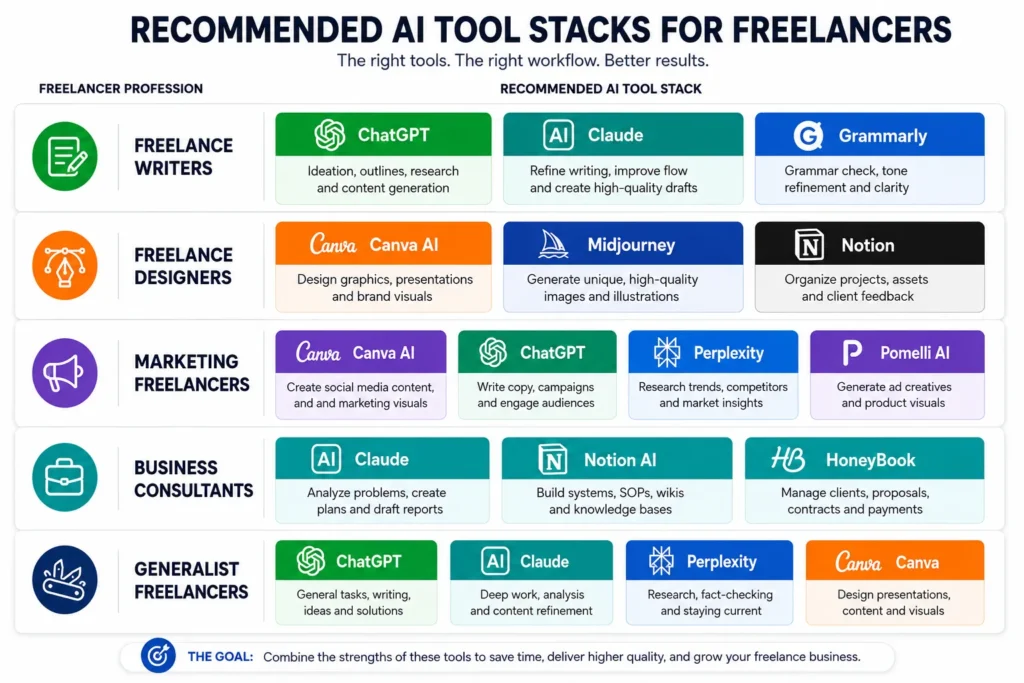
The recommendations below are organized by freelance type because the best ai tools for freelancers are not universal. A graphic designer and a business consultant have almost nothing in common in their daily workflow, and the tools that save one person three hours do nothing for the other.
Master one or two tools before you add more. The ROI for freelancers on AI comes from deep daily use, not from collecting subscriptions. These systems support your work and extend what you can do they don’t replace the part that makes clients hire you in the first place.
For Freelance Writers:
Writers, start with three tools and nothing else. ChatGPT for ideation and rough first drafts. Claude when the draft needs actual polish before it goes to a client Claude’s output quality on finished writing is noticeably stronger than most alternatives. Grammarly as the last check before anything leaves your screen.
These ai tools for freelance writers cover the full path from blank page to final deliverable without requiring you to pay for anything extra at the start. Ninety percent of daily writing tasks fit inside this stack.
For Freelance Designers and Visual Creators:
For designers, Canva AI handles the fast-turnaround everyday work social posts, presentations, simple client deliverables. Midjourney is where I go for anything custom or conceptual where the output needs to be genuinely distinctive. Notion keeps projects organized without becoming a project management system that takes more time to maintain than the work itself.
These AI tools for freelance graphic designers work together without needing a background in design software. The outputs look professional because the tools are purpose-built for it.
For Marketing Freelancers:
Marketing freelancers need three things covered: content creation, copy quality, and research. Canva AI handles the content creation side fast. ChatGPT is strong for copywriting across most formats when you give it a clear brief. Perplexity is the research tool not a chatbot you ask questions and hope the answer is accurate, but an actual search-backed tool that cites its sources.
Once your client base is stable, Pomelli AI is worth adding for video ad creation. It’s the kind of output that would cost a client several hundred dollars to produce traditionally and takes you about twenty minutes.
For Business Consultants and Virtual Assistants:
If your work is built on client communication and project management, Claude is your primary tool professional tone, careful reasoning, and it handles long-form documents without losing context. Notion AI keeps projects, client notes, and deadlines in one place rather than spread across seven different tabs.
HoneyBook is the operational backbone here. Contracts, invoices, onboarding sequences, payment collection it manages the client lifecycle from first inquiry through final payment. These AI tools for freelance business management together mean less administrative work eating into your billable hours.
For Generalist Freelancers:
The generalist stack is three tools: ChatGPT for ideation, Claude for final drafts, Perplexity for anything where you need actual facts. That covers the majority of client work across almost any service type.
Add Canva AI the first time a client asks for something visual. Don’t subscribe before the need exists. This combination keeps things simple enough to actually use consistently, which matters more than having the most complete toolkit on paper.
Build competency with your stack before you add anything new. And hold each tool to a real standard: it should save time as a freelancer in ways you can actually point to. If a tool does not deliver that within the first week of daily use, it is either the wrong tool for your work or you are using it wrong. Both are fixable.
Conclusion
The best AI tools for freelancers are not here to replace what you bring to your work. They exist to stop you from spending your best hours on tasks that do not require your expertise. Admin, research, first drafts, graphics, invoicing that is where the hours go. That is also where AI actually helps.
Choose the stack that matches your freelance type. Start there and nothing else. Pick one tool this week, use it every day, and track what changes in your actual output.
The goal is to save time as a freelancer on the things that drain your schedule so you can spend more time on the things that build your reputation and your income. That is what it means to work smarter as a freelancer not using AI everywhere, but using it in the right places.
The ROI for freelancers on these tools is real. But it only shows up when the tools are chosen carefully, learned properly, and used consistently. That is the whole framework. Start small, use it daily, expand when you have outgrown what you have.
Frequently Asked Questions About AI Tools for Freelancers
Which AI tool should a freelancer open first when starting a new project?
It depends on what the project actually requires. For writing and ideation, I start with ChatGPT or Gemini to generate ideas and build an outline. Once there is a structure I can work from, everything moves to Claude for the final writing pass Claude consistently produces cleaner output on finished deliverables than the alternatives I have tested. If the project needs research or verified facts before drafting begins, Perplexity goes first, not a chatbot. Chatbots hallucinate. Perplexity cites. That distinction matters every single time. This three-tool sequence covers the majority of project starts across any freelance niche.
Are free AI tools good enough for freelancers, or do you need to pay?
The free tiers of ChatGPT, Grammarly, Canva, Notion, and Gemini handle most everyday freelance work without a subscription. The paid upgrade makes sense only when a specific tool is becoming a daily bottleneck on output that directly affects what you charge. Claude Pro at $20 per month becomes easy to justify when you are billing clients $500 or more for written deliverables the output quality improvement is real and clients notice it. Start with free versions across the board. Upgrade one tool when you have hit a ceiling you can measure.
Will AI tools replace freelancers?
AI is replacing specific tasks. Not entire freelance careers. The risk I see for freelancers is not the tools themselves it’s the freelancers who ignore the tools while their competitors use them to complete the same projects in half the time. Someone who finishes a project in three hours instead of eight can take on more clients, reduce their turnaround time, or charge more. None of those outcomes look like being replaced. The real competitive gap is between freelancers using AI and those who decided it was not for them.
What are the top 3 AI tools every freelancer should have?
ChatGPT for writing, proposals, and client communication is the first one I recommend to every freelancer regardless of niche. Canva AI handles any visual or design need without requiring prior design experience. Notion AI organizes client work, project timelines, and deliverable notes in one system instead of across multiple platforms. Writing, design, and organization these three areas consume most non-billable hours for every freelancer type. This stack addresses all three.
How do I use AI tools on client calls without making clients uncomfortable?
The problem with most AI meeting recorders is that they join the call as a visible bot participant, which immediately changes the dynamic and makes clients conscious of every word. Granola AI a Mac application that runs locally solves this differently. It listens through your computer’s audio without appearing in the meeting at all. Clients never see it. You still get complete meeting notes afterward. For situations where clients have requested or accepted full transcripts, Otter.ai and Fireflies are both well-recognized tools that clients generally accept when you disclose the recording upfront before the call starts.
Can I use AI tools to get more freelance clients, not just do the work faster?
Yes and this is where most freelancers leave real money on the table. ChatGPT can analyze a job posting and write a proposal that mirrors the client’s exact language and priorities, which dramatically improves response rates compared to a generic pitch. Pouncer AI automates Upwork proposal submissions so your bids go out faster. Canva AI and Adcreative.ai generate professional social content for your own promotion without needing a designer. Gamma and Tome build polished pitch decks for high-value proposals in a fraction of the time a manual build takes. These tools do not just help you do the work they help you win the work at better rates.
What is the biggest mistake freelancers make when using AI tools?
Publishing raw AI output without editing it. Every time. The draft quality has improved significantly across most tools, but those drafts still read like they were written by someone who understood the topic generally not by someone who has actually done the work. Ten minutes of real editing changes the entire impression. The second mistake is spreading across too many tools before mastering any of them. Pick one platform that fits your work, use it every day for a month, and track the actual time it saves before adding anything else to your workflow.